Today's News by Michael
Jeremy Hoesly's recent ResEx article, Power of the Keychain, has been updated with comments from Apple Keychain developer Ken McLeod. Read more on suppressing Access Dialogs and the security risks involved in doing so.
Click for larger image
 |
My favorite game of all time is now playable under LinuxPPC! Before Bungie sold out to the darkside and joined Microsoft, they released the source code for Marathon Infinity. An Open Source project sprung up named Aleph One to port the code to many operating systems, even the MacOS! This new version adds support for OpenGL rendering, which makes the game look better than ever.
Ian Geiseri has created rpm's that install relatively easily. Here's what you need:
You can download Aleph One for the MacOS at this site.
A lot of the maps from the Marathon Archive play fine. There are some issues with Terminal graphics though.
All in all, a great job by everyone involved. Marathon is a great game now brought to Linux and tons of new maps are still being created.
Hystereo is a CD-ROM loaded with over 300 sounds for your Macintosh from Clicksounds. As if that weren't cool enough, Mark Evans was hunting around on the Hystereo CD and found a bunch of hidden folders with out-takes! The a look at the secret map below to find the files.
User Contributed Splash Screens:
- Mike Vannorsdel sent another Aqua styles pair of contributions for MacOS X.
- For MacOS 9, brenda von ahsen also contributed two files!
Software News 11-10-00 Software News: by Cletus™ Updated — preview of Graphite Theme Akio has posted his first Public Release of an OS X Theme! Akio states it will provide a complete Graphite overhaul for OS X. All files and instructions are included in the download. The image below will give you some idea of the look you will achieve with this theme. Courtesy Akio! ScreenGrid by Sono Software was recently updated to version 1.2.1. ScreenGrid was designed to make moving and adjusting the size of the window a lot easier for the user. Listed below are the features of ScreenGrid. • Snap the window to screen edges.
• Snap the window to virtual grid on screens.
• Snap the window to window edges.
• Layout windows with certain offsets.
• Limit the movement of the window horizontally, vertically and 45 degrees. PowerOn Software has released their update for ACTION Menus. Version 1.0.2 brings compatibility issues with Mac OS 8.1 and earlier operating systems into check. Michael Rabe from MacThings is releasing yet another theme. This one is called "Pluto." This theme features a dark grey foundation and lite grey in the window. Which of course I always like! :) By the way, Have you ever checked out the "Coming Soon" page at MacThings? They show some really cool previews of the unreleased themes being developed. Not all, but some. I am looking forward to Zooplancton. Kaleidoscope Schemes continue to be released, with another five new and eleven updated schemes being added to the archive. These are cool: APB Wood, New Beginning: Black And Blue and New Beginning: Black And Plum. While the rain and wind batter the clapboards outside, I plan on sitting back and rummaging around the themes.org site to check out what others are doing with their desktops. I can't guarantee I will see you there. But who knows maybe I will! Once your done at Themes.org you can then venture over to RAILhead Design and read the review Maury McCown has written up on Norton SystemWorks 1.0. Submit Software News Suggestions!

Support ResExcellence By Visiting Our Sponsors!
Snapshot Gallery by Jeremy Hoesly Snatch Friday’s helping of snapshots on your way to the weekend: - Black cats are everywhere in this submission from Matthew Aaron bearing the “Quantum Foam” desktop picture. Audion is cranking out the music in the lower right-hand corner.
- Andre S. submitted this snapshot fresh from StarFleet Academy sporting George Kotsopoulos’ LCARS K-Scheme. A-Dock is hugging the bottom of the second screen.
- An OS X desktop picture and the Goinsane K-Scheme debut in this contribution from Pablo Mingo. Audion, retro-fitted with the Gizmo face, is kicking out tunes in the upper left. Icons from Xicons and Icon Factory are showcased along with some homegrown ones.
- This gorgeous screenshot from Sergio Recabarren touts Digital Blasphemy’s “Sierra Moonlight” desktop picture. Audion, retooled with Chaos Design’s Blade face, is serving up the music at dead center. Chic icons, some custom and others from Icon Factory and icons.cx, are scattered throughout.
Have a masterpiece in your hot, little hands that you want to show off? Visit our submission guidelines page for more info.
Applescript/Scripting by Michael
Following up on Tuesday's Perl scripting problem. Today's tidbit improves on the earlier example of printing the amount of time the computer has been running.. Here are some problems I solved in this latest version.
We want the output to print, "2 days", or "47 minutes", but what if the server has been booted for one minute or one day? So there is an if (then) else test to see if the time_units should be singular or plural.
The format of "uptime" is different for the 1st hour through to the 23rd hour. Another loop tests for this condition and formats the output accordingly.
|
Running 129 days
without a restart!
|
|
Running <!--#exec cgi="scripts/up.cgi"> without a restart!
|
The script was tested and runs equally well unter MacOS X, or LinuxPPC. Because the script now is longer (and is heavily commented), I have moved it to its own page. Enjoy!
11/9/00 Snapshot Gallery by Jeremy Hoesly Here are Thursday’s snapshots: - Matthew Aaron submitted this contribution with a cool looking desktop. Audion is tickling the eardrums at lower right.
- Windows 95 gets an Aqua facelift in this submission from Roberland Borges touting the “Aqua” desktop picture and MacAqua! WindowBlinds skin. CoolPlayer is dishing out tunes at bottom. Icons from Icon Street and El cementerio del Icono also abound throughout.
- This dual OS snapshot from Joakim Uhrwing emulates under Virtual PC what appears to be Windows 98. Interesting.
- Konoko is getting ready for Christmas a little early in this snapshot from Daniel Vera sporting an edited Oni desktop picture and the Aqua Theme. Audion, equipped with the PanMan face, is sitting in as digital DJ in the lower left-hand corner. Icons.cx and Icon Factory supply the icons.
Have a masterpiece in your hot, little hands that you want to show off? Visit our submission guidelines page for more info.
Today's News by Michael
Jan Van Boghout was wondering...
"I really hate the current look of the Sherlock window and I would like it to look like the MacOS X Sherlock . I especially want to change the button of Sherlock , but I don't have a clue what resource this is .Could you help me ?"
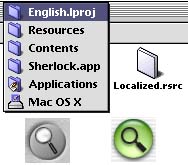
Jan, in Sherlock2 under MacOS 9, those buttons are stored in icns resources. Their size is 48x48. Under the MacOS X version of Sherlock, the buttons are also icns resources, but because all the info is in the data fork of the Localized.rsrc file. Take a look at this previous icon edit to learn how to copy the data fork to the resource fork.
Once you have converted a copy of Localized.rsrc, open it in Iconographer to copy and paste the new Aqua buttons into the older Sherlock2. One more thing to watch for: in the newer program, the icons are in the 128x128 section of the icon data, so when you copy/paste the icons and masks, you will copy from the 128 box, but paste into the 48 box.
Whew! The final set of Propaganda tiles have been prepared for your Macintosh and are ready to view and download. In fact, an additional 38 M file contains all the Propaganda preview html and pictures.
MacNewbie has released the final version of his Pomona skin for MACAST. Optimized for a desktop griddie and a black "Oblique" scheme, the screen of the player features a whole-earth full-color topographical time zone map in the spectrum area when you use the Old Style 2.0 plugin.
User Contributed Splash Screens:
- A very nice artistic MOSS was sent by oku-chin. It features a young lady walking on the beach.
- It's a very small change, but Michael Smit sent a new background pattern for the Quicktime Player that makes the app a little nicer to look at.
- Ha 'Te sent this replacement for the MacOS 9 About this Mac screen.
Software News 11-08-00 Software News: by Cletus™  Wapp pro 2.8.1 has been released by Jérome Foucher. This is a very popular product in the ResExcellence Archive. Wapp pro displays a menu that lists the windows of the front most applications, the background applications and their respective windows in submenus. Jérome sent in a list of fixes and enhancements for this version: Wapp pro 2.8.1 has been released by Jérome Foucher. This is a very popular product in the ResExcellence Archive. Wapp pro displays a menu that lists the windows of the front most applications, the background applications and their respective windows in submenus. Jérome sent in a list of fixes and enhancements for this version:
• Added support for BBEdit.
• Added an "arrow-with-spinning-beachball" cursor when loading large
folders' content in Wapp pro's menu to show that Wapp pro is busy
loading the folder's content.
• Proxy-icons are now displayed in Wapp pro's menu for each
application that uses them.
• Added support for Mac OS 9 packages and Mac OS X application
bundles when browsing folders inside Wapp pro's menu (ie. you can't
access their content like in the Finder). With Clixsounds inactivity, — they still host a huge amount of sounds — a reader recommend I check out MacAlert. I pass this along as great place to pick up some nice "Alert" sounds. PTHClock 1.4, a menu bar clock program for OS X Beta, has been updated. Many fine enhancements are within this update. A few of which are listed below: • Date mode reverts to time after 5 seconds
• Added default date/times formats to Preferences
• Added Japanese and German localizations
• Added Calendar menu item
• Calendar no longer covers time window when Clock is on the bottom of the screen
SpeedApp has once again been updated in its beta form. Version 2.0b6 "has been created from the same beta project as SpeedApp 5, the only difference is that this new version has been created using REALbasic 3.0a12 instead of the version of REALbasic 2.1.2." Stefano Ghielmi writes that "I can not reproduce on my Macintosh some of the class errors that some of you have reported. Therefore, I would ask you to try this new version on the same computer where you got those errors." Akio announces a new screensaver at his site called "Spinnin' Apple Graphite." It features a 3D Vector based apple spinning in the middle of the screen and also works with multiple monitor systems.
Additionally, Akio has released a 3 part series for BIG Indigo. The items are all connected with the release. First up is the K-Scheme; "BIG Indigo K2 Scheme" — a really cool looking scehme with an icon set to match called ironically; "BIG Indigo." Rounding out the release is an Audion Skin; "BIG Indigo Audion Skin." All items are available on his site. MacThings release "Doghouse's Theme" by Michael Rabe. This is a very unique theme with a "dog bone" for a title bar and "dog paw prints" for buttons. Submit Software News Suggestions!

StuffIt - The Complete Compression Solution
Snapshot Gallery by Jeremy Hoesly Pick up some snapshots to boost you over the midweek hump: - This snapshot from Scott Bower touts Maury McCown’s MacQNX K-Scheme. SoundJam, overhauled with the 80’s Tech skin, is dishing out tunes in the upper left-hand corner.
- Matthew McEniry contributed this OS X Beta screenshot sporting a custom desktop picture. Audion, configured with a new face he’s working on, is supplying the music in the upper left. Planet icons from Xicons are also featured.
- A custom Myst III desktop picture and custom RedBevel K-Scheme are showcased in this submission from Christian Plourde. MacAmp, retooled with his MET(al)AMP skin, is pumping out soundwaves in the upper left-hand corner. Various custom icons along with selections from Mozco, Around the Pixel, and RAILhead Design are also shown off.
- This snapshot from Evan Sharp can practically carry out photosynthesis! It features a custom desktop picture in conjunction with the Glassworks Sage Theme. Audion, outfitted with Todd Wheeler’s Frog face, is croaking near the top, while Josh Garden’s Pixelpalooza-winning Macintosh Garden icons are sprouting along the edges.
Have a masterpiece in your hot, little hands that you want to show off? Visit our submission guidelines page for more info.
Icon/Desktop News 11-8-00 Icon & Desktop News by Dan  The December issue of Macworld Magazine includes an excellent section on how to use your Mac to create beautiful hand made holiday gifts, cards and decorations, a tradition many of us probably have forgotten about. You might enjoy the read if you're in the habit of making your own or want to try your hand at it. Once you've got those creative circuits humming, remember, the Resexcellence Holiday Archive is sorely in need of your seasonal artwork and energy as well. Why not share that holiday spirit with the community of Mac users around the globe, and send us your desktops and icons. You will be glad you did! The December issue of Macworld Magazine includes an excellent section on how to use your Mac to create beautiful hand made holiday gifts, cards and decorations, a tradition many of us probably have forgotten about. You might enjoy the read if you're in the habit of making your own or want to try your hand at it. Once you've got those creative circuits humming, remember, the Resexcellence Holiday Archive is sorely in need of your seasonal artwork and energy as well. Why not share that holiday spirit with the community of Mac users around the globe, and send us your desktops and icons. You will be glad you did!
Icon and Desktop Archives: As promised, starting today we will begin displaying all the desktop work we have on hand from the pop artist "Nasty Nene" and a fellow that just calls himself "Frank". Also on display are four new icon sets as well as four very unique desktop pictures for your viewing pleasure. Enjoy! - Agrapha X icons created by Agrapha Design, have been designed as 128x128 pixel thumbnail icons for Mac OS X. In Mac OS 8.5-9.1 you will not be able to see the 128x128 pixel thumbnail icons, but you will be able to see 32x32 pixel and 16x16 pixel versions of the icons if your monitor is set to 32-bit color.
- While waiting to find out who won your favorite political race, take a look at "Election2000" icons. Made at the Pixel Farm by maCombine
- Dylan Daniélou all the way from Switzerland decided to try his hand at icon making and came up with this ResEdit Only set of Aqua icons in 32 bit format.
- The Insane Clown Posse Icon Set by the folks at Devil's Desktop are based on the music group, you guessed it, Insane Clown Posse. Full set of characters.
- First in the set of desktops by "Nasty Nene" is a wild piece entitled "Scribble". I'm not sure who his characters are modeled from, but he sure does seem to have fun creating them.
- "Grundig TechniColor" by Frank can only speak for itself. 1024x768.
- PTmon sends us this set he calls "G4 Squared" desk pics. Hey explains that they were made on his dual processor G4/450 with dual monitors. Some guys have all the luck.
- Brenda of Noen Design posts another of her unique compositions entitled "fourpointfive". Created in artmatic and tweaked in Photoshop.
- For those lovers of metaphysics, "Sriyanta" by Ben Klocek is what you have been searching for. Visit his web site for more of his amazing work.
- Yosemite-X by Harvey Lubin of Agrapha Design, appears to set the OS X logo in a Bryce rendered backdrop of Yosemite. Nicely done. Comes in 4 resolutions.
News From Around the Web:
Akio updates his site with a load of new work, featuring the two desktop pictures "Water Blade" and "Abstract Apple". The Devil's Desktop has been updated this week with an "Insane Clown Posse" icon set and two new desktops. Also posted in the Resexcellence Icon Archive. Three sisters want us to know about their web site @ http://www.ritkontoret.com/english. They make icons as well as other stuff together. Rosa Pomar of Colheres writes in just before posting to let us know that her site has been updated again with a new icon set titled "Green" by Luisa.
So what's up WWW? Icons? Desktop pictures? News? Inform us! We'll post it!
Applescripts 11-7-00
Applescript/Scripting by Michael Today, instead of covering Applescript, we'll delve into the other scripting language supplied with MacOS X - Perl. Below is one of the simplest scripts used on ResExcellence. At the bottom of the left sidebar, it prints the amount of time the LinuxPPC server has been booted. This script runs equally well under MacOS X. There are only 7 required lines of code; lines beginning with # are comments. | #!/usr/bin/perl
#
# The line above is needed to tell the script
# where to look for the perl program. It's required.
#
# After creating a script, you need to tell the computer it’s
# an executable program. Do this by typing in a terminal:
# chmod 755 /path_to_script/name_of_your_script
# 'uptime' is the name of a standard Unix application that prints
# the time the server has been running and the load on the cpu
# What I do below is take the output of 'uptime' and
# store it in a string variable
$result_of_run_command = `uptime`;
# Below is the result of an ‘uptime’ command.
# We are interested in the number between the words: up and mins.
# (13 in this example)
#
# 8:06AM up 13 mins, 2 users, load averages: 0.08, 0.16, 0.19
#
# To extract the number from the string use ‘split’ to break it into parts
# part1 equals everything before ‘up’. part2 is everything after ‘up’
($part1, $part2) = split(/up /,$result_of_run_command);
# we take part2 and say we want everything before ‘mins’
($the_number_of_mins) = split(/ mins/,$part2);
#the final result is the number of minutes culled from the string
# Enable the line below if you want plan to call the script from a browser.
# In your html, you need the line: <!--#exec cgi="scripts/up.cgi"-->
# print "Content-type: text/html\n\n";
# Otherwise, just print to the command line.
print "You’ve been booted for $the_number_of_mins minutes.";
# Add a line return to make look pretty.
print "\n" ;
#the end :) | I'm the first to admit that as displayed, this script needs work. What happens after 60 minutes and the output of "uptime" reads one hour? What happens after 24 hours and "uptime" outputs 1 day? All of these can be handled with the addition of a conditional program loop. Drop me a line if perl interests you, and maybe we will cover this script in more detail on Thursday. In the meantime, if you run Linux or MacOS X, download the text of the script and give it a run. Instructions to install: Download up.tar.gz Open a terminal and change into the directory where the download is located. Type: tar cvfz up.tar.gz
chmod 755 up.cgi
./up.cgi If you have been booted less than an hour, you will see the number of minutes in the terminal output string. If you have been booted longer than an hour, nothing harmful will happen, but your text will not be formatted correctly.
REALSoftware announced the availability of REALbasic 3.0a12. Using this alpha release gives you the chance to learn about new features in REALbasic early, work with Carbon, and participate in setting the direction for the next release. It runs on and compiles for both Classic (7.6.1 to Mac OS 9) and Mac OS Public Beta. It uses Carbon and the Aqua User Interface for both the IDE and the compiled applications when running in Mac OS X, and Platinum in Classic.This release adds a complete revision of REALbasic's code encryption method. Modules may now be encrypted with a password. There is an excellent discussion in our forum on how easy REALBasic is to use.

11/7/00 Snapshot Gallery by Jeremy Hoesly Tuesday’s snapshots are ready to fly: - Akio, Danger Girl extrordinaire, is back with a submission featuring another custom Danger Girl desktop picture and the BIG Indigo K-Scheme, both of which were unreleased when I received this snapshot. Audion, overhauled with the BIG Indigo face, is dishing out tunes in the upper left.
- The custom “Zorak” desktop picture and Maury McCown’s Mangus OS K-Scheme debut in this screenshot from loyal contributor Alberto Chávez. iPObox, configured with the custom Apple Lime skin, is running in the lower left.
- Time for another trip into Mac history with this screenshot of a Mac SE from Michael V. An ancient version of Microsoft Word is running in the background with only a one megabyte memory partition! Now that’s something for the record books!
- Daniel Vera returns with an encore snapshot touting MacDesktops’ “Chrome” desktop picture coupled with the QT4 Modoki Theme. Audion, retro-fitted with the Quickie face, is taking music requests in the lower left-hand corner. The icons are provided by icons.cx and Icon Factory.
Have a masterpiece in your hot, little hands that you want to show off? Visit our submission guidelines page for more info. Applescripts 11-7-00
Applescript/Scripting by Michael Today, instead of covering Applescript, we'll delve into the other scripting language supplied with MacOS X - Perl. Below is one of the simplest scripts used on ResExcellence. At the bottom of the left sidebar, it prints the amount of time the LinuxPPC server has been booted. This script runs equally well under MacOS X. There are only 7 required lines of code; lines beginning with # are comments. | #!/usr/bin/perl
#
# The line above is needed to tell the script
# where to look for the perl program. It's required.
#
# After creating a script, you need to tell the computer it’s
# an executable program. Do this by typing in a terminal:
# chmod 755 /path_to_script/name_of_your_script
# 'uptime' is the name of a standard Unix application that prints
# the time the server has been running and the load on the cpu
# What I do below is take the output of 'uptime' and
# store it in a string variable
$result_of_run_command = `uptime`;
# Below is the result of an ‘uptime’ command.
# We are interested in the number between the words: up and mins.
# (13 in this example)
#
# 8:06AM up 13 mins, 2 users, load averages: 0.08, 0.16, 0.19
#
# To extract the number from the string use ‘split’ to break it into parts
# part1 equals everything before ‘up’. part2 is everything after ‘up’
($part1, $part2) = split(/up /,$result_of_run_command);
# we take part2 and say we want everything before ‘mins’
($the_number_of_mins) = split(/ mins/,$part2);
#the final result is the number of minutes culled from the string
# Enable the line below if you want plan to call the script from a browser.
# In your html, you need the line: <!--#exec cgi="scripts/up.cgi"-->
# print "Content-type: text/html\n\n";
# Otherwise, just print to the command line.
print "You’ve been booted for $the_number_of_mins minutes.";
# Add a line return to make look pretty.
print "\n" ;
#the end :) | I'm the first to admit that as displayed, this script needs work. What happens after 60 minutes and the output of "uptime" reads one hour? What happens after 24 hours and "uptime" outputs 1 day? All of these can be handled with the addition of a conditional program loop. Drop me a line if perl interests you, and maybe we will cover this script in more detail on Thursday. In the meantime, if you run Linux or MacOS X, download the text of the script and give it a run. Instructions to install: Download up.tar.gz Open a terminal and change into the directory where the download is located. Type: tar cvfz up.tar.gz
chmod 755 up.cgi
./up.cgi If you have been booted less than an hour, you will see the number of minutes in the terminal output string. If you have been booted longer than an hour, nothing harmful will happen, but your text will not be formatted correctly.
REALSoftware announced the availability of REALbasic 3.0a12. Using this alpha release gives you the chance to learn about new features in REALbasic early, work with Carbon, and participate in setting the direction for the next release. It runs on and compiles for both Classic (7.6.1 to Mac OS 9) and Mac OS Public Beta. It uses Carbon and the Aqua User Interface for both the IDE and the compiled applications when running in Mac OS X, and Platinum in Classic.This release adds a complete revision of REALbasic's code encryption method. Modules may now be encrypted with a password. There is an excellent discussion in our forum on how easy REALBasic is to use.
 Today's News by Michael Today's News by Michael
Judging from last week's poll, we all need to get a little more sleep! More than half of us are leaving our computers on for more than twelve hours (I plead guilty).
Our poor hardworking Macintosh computers barely get a rest, and the same for the users who use them. Even before I maintained ResExcellence, my Powerbook has always been on 18 hours a day, checking mail every 10 minutes (who knows what I may miss!). By contrast, I watch very little TV now that Star Trek: TNG is gone. :(
I have way too many email addresses. Like mouse pads from MacWorld, they collect over the years with most never being used. How about you? This week's Polling Place asks, "How many email address to you have?"
 Update: Change the Finder Buttons in MacOS X Update: Change the Finder Buttons in MacOS X
In the original tutorial posted on Friday, it appeared to me that the only way to change the Favorites icon in the Button Bar was with the previous HIToolbox icon resource edit. But a reader discover this much simpler approach!
In your article about replacing OS X finder buttons, you indicate that the favorites icon is coded into the HIToolbox resource file. (Why Apple did this for just that icon and not the others is strange.) While this is true, it is not necessary to edit the .rsrc. If you simply add a favorites.icns file in the same location as the others, it will override that big ugly red blob that's supposed to be a heart.
The only problem with all of this that I still haven't found any way to solve is that it is a system-level hack. It will hold for all users on that machine. It would be better if we could find a way to replace these .icns at the ~/Library/Preferences/com.apple.finder.plist level.
The original edit has been updated to reflect this new information.
Themes are dead! Long live the Themes! Does MacOS X really mean the demise of themes? Not according to Dave MacLachlan. He has written an application called Theminator to get the ball rolling for creating themes under the new OS.
If you have been following ResExcellence, you've heard us mention the mysterious Extras.rsrc file and the (now proven) belief that it contains a modified theme format. Dave also provides updated Resorcerer templates for the MacOS X resources for those of you who are already familiar with the difficult task of theme creation.
The Theme Shop contains tons of tools and information, so take you time visiting and wait with anticipation for the first fruits of their efforts.
Are you all set to vote in this week's big election? Not the US Presidential champaign! The MacInstruct - Teach Different Contest! For months, writers have toiled over their tutorials to win the coveted first prize, an autographed book from Steve Wozniak. Now it's your turn to help decide the winner from the eighteen articles.
User Contributed Splash Screens:
- Alex MacDonald has updated his super popular skin for Toast. Download the new version and impress all your friends.
- If you like lovely ladies in tight rubber outfits (huh?) Bill Heissenbuttel created an Interarchy Wand that will great on your desktop. Download it version and impress all your friends (except your girlfriend!).
- Mike Vannorsdel has submitted another outstanding pair of contributions for MacOS X. Take a look at this startup Bootpanel, and a matching Login makeover. Download it version and impress all your Windoze using friends.
Software News 11-06-00 Software News: by Cletus™  TypeLaunch by Tobias Peciva, is an application launcher, allowing you to type in part of the name of the application in order to launch it. TypeLaunch quickly searches through all your applications to find the best match for what you have typed. "When the right application pops up, just hit return to launch it." It is freeware. TypeLaunch by Tobias Peciva, is an application launcher, allowing you to type in part of the name of the application in order to launch it. TypeLaunch quickly searches through all your applications to find the best match for what you have typed. "When the right application pops up, just hit return to launch it." It is freeware.
A similar application for launching applications is called SpeedApp by Stefano Ghielmi, which has also undergone some modifications as it roles along under version 2.0b5. It provides new options in the preferences window, and the main window is now re-sizable. If you haven't tried SpeedApp in a while, give it a try again. Direct download of beta. InterfaceViewer by Jason Williams is a newly released piece of software that will allow you to view your graphical user interface in a variety of ways. Creating a new scheme or theme? "You get the views of a finder window, dialog, alert, or utility. Other features include clickables (buttons, popup menus, etc.), sliders and arrows, and main appearance info about your computer." Jason further requests your comments since this is a new application. If you find this useful and would like it added into the Software Archive, drop me a line. Show Drives 1.0 by MacPowerUser.com is a Mac OS X utility that will place local drives and the trash can on the desktop while in OS X. Described as a very simple utility it lets you choose whether you want your local drives or trash can displayed on the desktop. "ShowDrives enables these features that already existed in OS X Beta but were disabled at default by Apple." Last time we mentioned Glass II. There were some limitations with it that irked some of you. This update takes care of many of them. Version 3.1 handles the following problems. • The view magnification can be from 1x to 16x actual size.
• The view can be shown with or without an overlaid grid.
• The view window can be re-sized as required.
• The window may be a normal or a floating window.
• The magnified view can be copied to the clipboard.
• Glass II can optionally show the cursor position (in screen coordinates) and the colour of the pixel under the cursor. The color can be displayed in a large number of different formats.
Graphic Converter, virtually everyones favorite graphic manipulation software, has been updated to version 4.0 with a slew of enhancements and bug fixes. Far to many to list here. For $30. You can not go wrong with this application. Grab the newest releases of K-Schemes at "The Archive." Nine new creations grace the pages this time. Some of my favorites are: APB Metallic Blue by Patricia Baron, Aquatica Z II and Medalion by Carl Pitts. Submit Software News Suggestions!

Support ResExcellence By Visiting Our Sponsors!
Snapshot Gallery by Jeremy Hoesly Fresh snapshots for Monday are being served: - This snapshot from Bsempai touts a custom desktop picture coupled with the DarkLight Soft K-Scheme. Audion, outfitted with the Freece X face, is serving up music in the lower left. Icons from Hide Itoh and several K-Schemes are situated along the left edge.
- Creative Box’s “Darkness Decends” desktop picture in conjunction with Albie Wong’s PussyGalore K-Scheme debut in this submission from Zhi Hao. Audion, retooled with the Dragonskin face, is pumping out soundwaves in the lower right.
- Will Henderson contributed this snapshot sporting a custom desktop picture about his site HalfwayFinished with the QT4 Modoki Theme complementing it. SoundJam is sitting in as digital DJ in the upper left.
- Pulling late-nighters? The fella featured in this RICOH advertisement made into a desktop picture sympathizes with you. Daniel Vera submitted this screenshot with the aforementioned desktop and the Aqua Theme. Audion, overhauled with the Triangular face, is kicking out soundwaves in the lower left-hand corner.
Have a drop-dead gorgeous desktop to strut about in the Snapshot Archive? Read up on the submission guidelines page for details.
Icon/Desktop News 11-6-00 Icon & Desktop News by Dan  The old saying "ask and yee shall receive" must surely be true. Many thanks to those who responded to my plea and sent in your Icons and Desktop Pictures. We have quite a nice lineup for the week, but that doesn't get you off the hook from continuing to send in your contributions and news from around the web. Enjoy your little bit of fame. We want your work! The old saying "ask and yee shall receive" must surely be true. Many thanks to those who responded to my plea and sent in your Icons and Desktop Pictures. We have quite a nice lineup for the week, but that doesn't get you off the hook from continuing to send in your contributions and news from around the web. Enjoy your little bit of fame. We want your work!
Icon and Desktop Archives: Today's lineup includes 7 new desktops and 4 excellent icon sets . Have no fear, I'm darn close to getting through the backlog of items sent but not posted in the last month.
- T.A. Bieneman sends us "G4 Rust", and excellent metallic backdrop with a nice transparent effect
- "Sage", another in the "I Mac 2000" series makes it's debut. Check out the other 4 titles in the group by Gavin Robb in the Resexcellence Archive.
- Jeff Garczewski submits his bizarre desktop titled "Halloween" A little late for Halloween this year, but a good one for the next.
- "DG Mystic" by imac features the voluptuous Sydney Savage. More desktop pictures to be found at his website
- Jeff Garczewski is at it again with his alien "Landscape". Comes in 1152x870.
- "Mac Storm" by VijayVenkatesh, is a study in form color and shadow using the colors of the Mac logo.
- One more time for Jeff Garczewksi with his "Ready to Roll" desktop. 1152x870.
- Check out Shane Hendersons 8.5 update Icons in Resedit format. These are 8.5-ized versions of the drab older icons not updated by Apple for Mac OS 8.5
- "Design Icons Collection 1" by Martin Valdes of MV Designs presents a wide variety of 8 bit icons to dress up your mac with style. Also available in our ResEdit Only icon archive (minus a few new ones).
- "EJ's Icons" have been waiting some time to get posted. Behold this amazing collection of folder icons in 5 unique sets.
- Gary Gehiere submits his Little Icons Vol. 2 to soothe your icon addiction. 50 plus little gems designed for use with the software "Menuette" which allows you to replace file bar names with small icons. Get Menuette from Tiger Tech.
News From Around the Web:
Starting on Wednesday we will be displaying all the work we have on hand from the pop artist "Nasty Nene" and a fellow that just calls himself "Frank". One pic each update. Look for them in the Desktop Archive.
Flax Creations (hey that's me!) updates with 6 new desktop pics over the weekend. Take a look at the Simple Backdrops set if you are in need of an easy on the eyes change.
Brenda Von Ahsenq, aka Noen Design, informs us of the redesign of her website, as well as a new desktop picture. Look for her newest creation "four point five" in the archives later this week. So what's up WWW? Icons? Desktop pictures? News? Inform us! We'll post it!
Support ResExcellence By Visiting Our Sponsors!
Previous News Page...
You can now upload your contributions (include a READ ME) to the ResExcellence
ftp drop box, and let us know with an email. Be sure to read the Submission Policy
|