10/20/00
Greg Landweber - A ResExcellence Interview by Michael Coyle
In 1995, Mac users anticipated the release of Apple’s next leap in operating systems. Code named “Copland”, a preview CD containing a Macromedia presentation was released to thousands highlighting new features and the new user interface. Collectively drooling over the menus, progress bars, and 3D icons, we would have waited years for the Platinum look if it were not for the efforts of Greg Landweber. (Continued...)
X-Tips
All of our MacOS X tips have been placed on a single page. If you think you may have missed any, take a look.
Nick Mason says, "I was just poking about in my MacOS X partition (through MacOS 9), and found something very interesting in the Preview.app bundle. Have a look at the file "previewSplashScreen.bmp" in the Resources folder of the Preview.app. Interesting, no?"
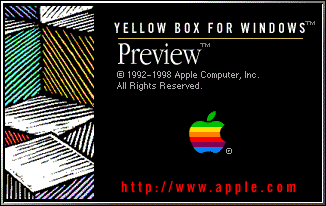
I suspect it's left over from a very early Rhapsody release, but still you never know what the future may hold...
To aid in trouble shooting the MacOS X system, you can hold the "V" key during startup. Instead of the pretty boot panel, you're see pages of diagnostic text scroll down the screen.
With Sweetest Day this Saturday, why not save yourself some money and send your favorite chat room guy or gal a card you made in AppleWorks. What, you forgot how? Then stop by MacInstruct and read Liz Harter's latest tutorial, "How to Make a Card in AppleWorks".
Akio has added two new Danger Girl Desktops - tweaked for MacOS X, one for each accent color (Aqua & Graphite). He also has posted two new matching Boot Panelswo new
Boot Panels/Login Panels, they are for the same (one for Aqua and one for
. And just to prove he's been hard at work, there are two new Audion Skins, Aquafine Graphite (A pill shaped skin with a reflection, all in the style of "Aqua"), and Bio-Apple III (An apple shaped skin with a metallic texture and glass face with wires and gears underneath)! Good work Akio. Take the rest of the day off.
User Contributed Splash Screens:
Snapshot Gallery by Jeremy Hoesly Friday has arrived, so start your R&R off right with some cool refreshing snapshots. Always for the fans. Always ResEx Snapshots: - Danger Girl obsession continues in this contribution by Akio featuring a modified “Bio-Apple” desktop picture with Sydney Savage coupled with Akio’s own BIG Graphite K-Scheme. Audion, equipped with the SlickCorner Graphite face also by Akio, is dishing out tunes in the lower left-hand corner. Various custom icons, including several of the Danger Girl variety (surprised?), are scattered throughout.
- Faithful contributor Alberto Chávez is back with another snapshot this time touting a custom “Brak” desktop picture in combination with the Darkside Prototype K-Scheme. SoundJam, overhauled with the Metal Headz skin, is tickling the eardrums at left center. The trash icon is part of the eJam iPack.
- Jess Jackson sent in this submission touting a chic desktop picture from the QNX Neutrino OS along with a modified version of Maury McCown’s QNX K-Scheme. Very stylish!
- This Mac OS X Public Beta submission from Kári is downright awesome! A breathtaking desktop picture of the Mir spacestation covers the background and some hefty 128x128 icons from Xicons demand attention on the right edge. The Apple Music Player is serving up music in the lower right.
Have a drop-dead gorgeous desktop to strut about in the Snapshot Archive? Read up on the submission guidelines page for details.

Icon/Desktop News 09-29-00 Icon & Desktop News by Jessica Well kiddies. Feel free to blame me. I am not the smooth traffic operator, I thought I was. I should have known that you are a force, a maddening throng! Actually you've all been lovely. I really do appreciate the hospitality and well wishes. A special thanks to Ilona for putting a lot of time and consideration into mapping out a smooth transition. She has offered her assistance with blanket generosity.
Icon and Desktop Archives: Our precious seed repository, featuring heirloom icons and desktops.
Fontosaurus Text has just added a new "Nissan XTerra" desktop. Look for OSX icons to follow on a horizon in your area, soon. Check in with the best little stuttering Bush gifmation. If you love 50's kitsch Dome-O-Rama rules. They have a monster mash of desktops, including "Frankenstein," "Bats," and "Buzz." The "Snow Dome" is a 3D must in royal blues. "Spider," "Jazzy," and "Fab" will bring new gusto to your get-along. Just say no to doldrums, meds, and psyche wards. Grab firm the rubber duckie and hula hop. You are in charge of fun. Brian Sutorius at Iconhouse debuts "Rubber," his spin on fall fashioned System Folders. I know what I think they are.. Curious what you peeps think. Because you do partake in the synapses snapping. I get your submit buttons. Our man Cletus has added IconParty to the Software Archive, included for your convenience under "icon." Bredstik isn't just icons or desktops or free stuff baby. It's all about full body entertainment. That's right, a sensory flea dip and sauna beyond your wildest. Accompany your every download with the flash and attention to detail you deserve. See the newest screaming fun icons by Santa Maria "SockMonkey." Colheres (quem não tem que fazer...) - friends | namorar (by Luisa) - Icon designer yes, but child, witch, and crone too, this Luisa folds spells into icons. She can make a G4 dual processor vanish,. Appear kneading basic dough for bread. She throws sunny sweat, back pinching beauty into every corner, pushing out this child, these children, each new friend.
Think about the next Apple convention. With Colheres designs. Send chiat-day mega money flowers and proposals. Think lamb and baptism. Think Luisa and icons. Think. Go to Happicon now, best trashcons in the business. Say hi to Rene, who has a new desktop section, part of his master make over plan. Xicons is offering a set of 17 game characters, by Chad Potenzone, called,"Square,Soft, Games." Don't miss Flax Creations, if you need a sootheing visual smoothie, find pleasing, well crafted work, with choice. So whats up WWW? Icons? Desktop pictures? Inform us! We'll post it!
Software News 10-20-00 Software News: by Cletus™ UPDATED! October 20, 2000 6:52 AM Late additions first thing in the morning!! Look for Jerome Foucher's A-Dock "application Switcher on steriods" next version 2.1.4 to be released today. Details are not yet available. While you are at his site be sure to check out his newly released "skins" for A-Dock as well. Glidel 5.1.0 by Gilles Berkovitch has been released, A very popular drag and drop menu extension enhancer. New is this version is: • Compatible with AutoMenus Pro 4.0,
• The Glidel user's manual is now packed as Glidel help, a folder best located within the System Help folder,
• Partially compatible with ActionMenus (see Glidel help),
• Both the About and Registration dialogs are now modeless. In other words, you can move them and switch to another application when they are open.
 Greg Landweber has updated Power Windows to version 2.4.2. Power Windows provides applications the live window dragging and transparent menus like Carbon and Cocoa apps have. I think this is one of the coolest features of OS X. Why wouldn't you take advantage of this if you could in OS 9? Jeremy's article on Power Windows will provide you with additional information. Primarily described as a maintenance release, version 2.4.2 "adds support for Multiple Users and Appearance sound tracks, as well as fixing an intermittent crash when opening the Power Windows control panel." Greg Landweber has updated Power Windows to version 2.4.2. Power Windows provides applications the live window dragging and transparent menus like Carbon and Cocoa apps have. I think this is one of the coolest features of OS X. Why wouldn't you take advantage of this if you could in OS 9? Jeremy's article on Power Windows will provide you with additional information. Primarily described as a maintenance release, version 2.4.2 "adds support for Multiple Users and Appearance sound tracks, as well as fixing an intermittent crash when opening the Power Windows control panel." On Monday we announced the update to AutoPurge. Today we announce even more enhancements and features to this space reclaiming utility. One of which is a true safety feature. AutoPurge will skip over remote volumes, and most importantly, WILL NOT LAUNCH when ANY other application is running except itself and the Finder (and extensions/control panels). ...AutoPurge will simply quit if it sees another application running. There is more too! "Responding to many requests, I have made a small utility to alter the setting of AutoPurge. This new application called AutoPurge Config Tool 1.0 is bundled with AutoPurge. Some extensions and control panels act as an application, making it impossible to run AutoPurge without disabling all extension. Simply run the tool, and uncheck the "Don't run when apps are open" button. They DO NOT RECOMMEND ALTERING THESE SETTINGS, HOWEVER! Michael Rabe writes in to let the readers know that MacThings has four new Previews of the new Pastel Colors Theme they are: "Pastel Blue, Pastel Red, Pastel Green, and Pastel Orange." Saving the best for last. For the last month Michael has been working on a new theme and he has kept a tight lid on it. The new theme is a Halloween theme and he has finished it. "Halloween Night" was released Thursday night and just in time for the Holiday. TaskMenuBar updates to version 2.2.2. One of the main update features this time around is that it now works with the very popular ACTION Menus' drag and drop feature. The other main attraction that will make users want to get this update is that menu bar flicker is further reduced. Crunch! How many times have you added software whether it was commercial, shareware or freeware only to have your computer crash or lock up. You are sure it is an extension problem but you have no idea what is what. Sure Apple's Extension Manager or Conflict Catcher (which I personally use) provides some basic information about what an extension may be. This is where Extension Overload can help out. Extension Overload is an extensions & control panels management application. It offers detail information of 3749 Extensions and Control Panels and Control Strip Modules in your system. Let's pop over to Themes.org (no pinch here Brian ether) and check out this weeks submissions of cool desktop screenshots and themes. Five of each and everyone is worth a look this time in my opinion. Submit Software News Suggestions! Remember, lack of a return E-mail address does little to instill confidence that what you have to say is worthwhile.
10/19/00 Snapshot Gallery by Jeremy Hoesly Thursday’s snapshots have arrived for your viewing pleasure: - Wolverine from the X-Men returns to the Snapshot Archive in this submission from The Admiral featuring a desktop picture from the X-Men movie site in combination with William Bart’s Ultrasleek Designer Sharkskin K-Scheme. SoundJam, overhauled with the converted Reintegration Graphite Audion face, is pumping out soundwaves in the upper left-hand corner.
- James Bay contributed this snapshot showcasing a custom desktop picture and the Aqua II K-Scheme. Icons from OS X and the Spiffy Apps collection line the left and right edges.
- Radioactive fungi have taken root in this screenshot from regular contributor Mike Orticari sporting Digital Blasphemy’s “Flourescence” desktop picture. Audion, retooled with the Quickax face, is radiating tunes in the upper left-hand corner.
- Go galactic with this snapshot from Evan Sharp touting Digital Blasphemy’s “Cradle” desktop picture in conjunction with the Hi-Tech Theme. Audion, outfitted with Tim Ehlenbech’s Planetary face, is playing music in its orbital position at top center. The Repley icons complete the stellar setup.
Have a drop-dead gorgeous desktop to strut about in the Snapshot Archive? Read up on the submission guidelines page for details.
Applescripts 10-19-00
ApplescriptsIf you often feel your desktop is a clutter of Finder windows scattered about, this script by Victor Yee can help clean things up. Using a predetermined staggering value of 22 pixels, the script adjusts all windows based on the position of the last active Finder Window when the applet was launched. Not only are they staggered, but they get resized as well. Do you want the windows staggered a little farther apart? Simply adjust the value in the first line.
10/18/00
After 52 flawless days, I finally had to reboot the ResExcellence Linux server last Sunday. Since I'm not a real IT Manager (I only play one on TV), I'm not positive as to what happened. A search of the logs by my pedestrian eyes revealed nothing, but I have my suspicions.
On Thursday, I rushed out of work to go on a camping trip. With the arrival of Jessica to the staff, I had been working at the server and had a lot of various applications open as I changed permissions, added and deleted users, and reorganized a few sections. I rushed out the door leaving them all running.
Normally, this wouldn't have been a problem for a Linux server, but one of those applications, or maybe the screensaver, did something so offensive that the entire machine froze. I couldn't telnet in on either of the ethernet cards, couldn't wake the terminal from a black screen, so all that was left to do was the "three finger salute". So we start the uptime count again...
Moral of the story? Don't leave a bunch of general purpose applications (many of which are beta) running free on your server.
X-Tips
All of our MacOS X tips have been placed on a single page. If you think you may have missed any, take a look.
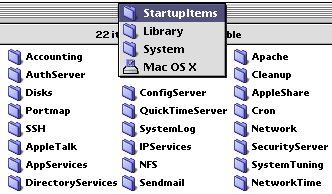
You know the text items that race by on the Boot Panel when MacOS X is starting up? Micah Lanier found their location.
Each of the folders in the location shown above contains a file called StartupParameters.plist. This file is a script that's run at the start of that service. The text that is displayed over the Boot Panel is visible in the script:
{
  Description     = "application services";
  Provides        = ("Desktop DB",
		     "Input Managers",
		     "Print Server");
  Requires        = ("Resolver");
  OrderPreference = "None";
  Messages =
  {
    start = "Starting application services";
    stop  = "Stopping application services";
  };
}
You can change the start sentence, and it will be displayed at boot time. I must admit that these text strings are displayed for a much shorter period of time than the text elements under MacOS 9, but if it has any value, you will now know where to find them.
Here are two sites that I found interesting. At MSN Computing Central you can test the speed of your connection to the net. A similar site is at CNET. Your speed at either site is highly dependent upon numerous conditions, but by running the tests over several days, at different times of the day, you can get a good feel for the real-world speed your cable modem, DSL line, even 56k modem.
DVD Utilities for the Macintosh is a site that contains some useful programs for the owners of DVD movies. Checkout the DVD Extractor for extracting the MPEG-2 video and AC-3 audio from DVDs. There's also a manual for ripping DVD's and a modification of Apple's DVD Player to allow playback from any drive, not just a DVD drive (real buggy, but interesting).
Fontosaurus Text has added two new fonts. Print your essay on the Rise and Fall of the Soviet Union using the Soviet 2000 font and shock your teacher! Invitations for the Halloween Party would look great in the Fallen family grunge font.
User Contributed Splash Screens:
- Both Akio and Neo created Giant Boot Panels for MacOS X featuring the Danger Girls. Each also comes with a Dock replacement image. Be sure to hunt around their sites for lots-o-goodies.
- Neo also sent a watery splash screen for Hotline.
- Looking for a new Eudora splash? iMatt put a nice one together.
- Gene Van Dyke sent another in his series of Boot Panels for MacOS X.
- This is great for Powerbook owners! T. Salzano created a series of replacement graphics for the Control Strip Battery Meter.
- Made to tuck into the corner of your monitor, this Interarchy Wand by xochi has a cool 'L' shape.
Snapshot Gallery by Jeremy Hoesly Though they kick and scream, my Snapshot Picks for the Month of September are on their way out. Last chance to see them!
Midweek slump dragging you down? Get a shot of snapshots to perk you right up: - Joe Chapman submitted this snapshot with the Windows 98 K-Scheme to show embarrassment: Bill Gates style. You know that had to hurt!
- This gorgeous contribution from Tyler Giles touts Mandolux’s “Rosa in Blue” desktop picture in conjunction with the Aqua Theme. Audion, retooled with the Albuminum face, is tickling the eardrums in the upper left. Various icons from Face of the Moon, icons.cx, and a handful of homegrown ones are prominently displayed along the right edge.
- One of our faithful contributors, Helen, submitted this screenshot sporting the GG Citrus Theme. Audion, equipped with the Little Love face, is sitting in as digital DJ at the top. Happicon’s TranZformZ icons along with the ExtraVirgin iPack are also featured.
- A customized desktop picture from Blue Sky Heart and William Bart’s Darkside Prototype K-Scheme are showcased in this contribution from Joseph Payan. Macast Lite, retro-fitted with the Reversie skin, is serving up the music in the lower right-hand corner.
Have a drop-dead gorgeous desktop to strut about in the Snapshot Archive? Read up on the submission guidelines page for details.

Click here to learn more about Toast 6 Titanium
Software News 10-06-00 Software News: by Cletus™ Wow I can feel Jessica's energy all the way down here...at the bottom! :)  Everyday Software has updated their wonderful application clipEdit. This version fixes several bugs and provides even better manipulation of clipping data. Fixes include: a bug that would cause a clipping to loose its data when saved and a crash when exporting an internet clipping with "mailto:" in the selected text. Remember to check out their page for information about preparations for a Mac OS X version of this excellent program. A link is provided in the SW Archive. Everyday Software has updated their wonderful application clipEdit. This version fixes several bugs and provides even better manipulation of clipping data. Fixes include: a bug that would cause a clipping to loose its data when saved and a crash when exporting an internet clipping with "mailto:" in the selected text. Remember to check out their page for information about preparations for a Mac OS X version of this excellent program. A link is provided in the SW Archive.
Michael mentioned last time about an update to SmoothType. Quickly following that update was another concerning the following bugs and enhancements to the product. Make sure you have updated again to version 2.2.1 to gain the following features. • Fixes a crash at startup on Power Macs running Mac OS 8.x
• SmoothType now draws inverted text using the correct colors
• The underscore character (_) draws correctly in Courier 12 Software question from the Forum: Does anyone know what software can take a snapshot of an entire web page? I am sure there are several that can do this, but the most notable is probably Screen Catcher by St. Clair Software. If you have another suggestion you can post the information here. Themes and Schemes news: Two new K-schemes can be found at Desktopper dot net. 0099 and 1991 are both by Shiocop. 0099 is a very orange colored scheme but may appeal to someone. 1991 on the other hand I like a bit more. It is more futuristic and the colors are more tolerable for my particular tastes. Check them out. Michael Rabe has released his theme called GlassWorks Snow at Macthings. This is to be considered the last of the GlassWorks Themes. Definitely not hard on the eyes and well suited for a darker desktop pattern or picture. Considering the way the weather has been around here, I would say "Snow" is not out of the question! Submit Software News Suggestions!
Applescripts 10-17-00
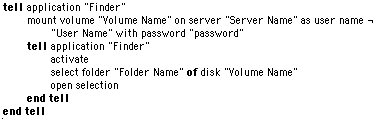
ApplescriptsRon Bishop constantly needs to log into NT Servers that run Services for Macintosh. He wrote this script to automate the process, saving a few dialog windows and a little time. To use the script, just enter the name of the server, volume, your user name, and password. It shouldn't take a rocket scientist to realize that if someone opens your script, they'll have access to your password, so after you enter the script, save it at a run-only application. You can then toss the little application in the Apple Menu, or use OSA Menu to launch it.
10/17/00 Snapshot Gallery by Jeremy Hoesly My Snapshot Picks for the month of September are pining away for you!
Snapshots! Get your Tuesday Snapshots! Read all about it: - A custom desktop picture and Akio’s Aquafine Graphite K-Scheme debut in this contribution from Jimmy Hilario. Very well done.
- It’s time for another walk down memory lane with this nostalgic screenshot from Robert Marking of a Mac Classic. A gray pattern covers the desktop and the Alarm Clock desk accessory sits in the lower left-hand corner. Tetris is running in the background.
- Mike Orticari is back with this gorgeous OS X Public Beta snapshot touting MacDesktops’ “Trinity Alps” desktop picture. Audion, overhauled with the Amp Tool face, is dishing out tunes in the upper left-hand corner. wClock and wStock are running in the menubar.
- In the Halloween mood, Evan Sharp sent over this snapshot for the occasion touting Digital Blasphemy’s “Room 1999” desktop picture and the I-Tech Theme from power/Mac. Audion, retooled with the Dragonskin face by Inspirator, is kicking out soundwaves in the upper left. Icons from the Icon Factory line the edges.
Have a drop-dead gorgeous desktop to strut about in the Snapshot Archive? Read up on the submission guidelines page for details.
10/16/00
 It appears most readers are not using Apple's Keychain technology, and I must side with them. Using the Keychain adds another layer of complexity to my computer access. I tried to convince myself that eventually, all my needed keys would be on the ring and those annoying dialog boxes would quit appearing, but it never seemed to end. I disabled the Security extensions long ago and haven't looked back. It appears most readers are not using Apple's Keychain technology, and I must side with them. Using the Keychain adds another layer of complexity to my computer access. I tried to convince myself that eventually, all my needed keys would be on the ring and those annoying dialog boxes would quit appearing, but it never seemed to end. I disabled the Security extensions long ago and haven't looked back.
This month's Wired Magazine has an outstanding article detailing the Microsoft Antitrust trial. John Heilemann had access to both sides during the proceedings with the understanding that not a word would be leaked until the trial was over. It's a fascinating story, and leads to this week's Polling Place question, "Should Microsoft be split?"
X-Tips
All of our MacOS X tips have been placed on a single page. If you think you may have missed any, take a look.
 Akio sends this tip for Internet Explorer under MacOS X: Akio sends this tip for Internet Explorer under MacOS X:
I dunno if this has come up before or not, but I thought it was pretty cool, and if it has not I feel special :) anyway I found that Explorer 5 for OS X can be "Skinned", I found this file called "Internet Explorer.rsrc" that is basically a replica of Internet Explorer for OS 9, all you have to do is apply a skin/makeover to that file and it works!
Stavros Karatsoridis weights in with more info on installing new software under MacOS X:
I wish to comment on your security warning regarding installing things as root. You raise some good issues regarding patches, and I think that your advice regarding security updates is important.
When installing software under MacOS X, however, don't install it as a "plain-jane" user, because that will cause all manner of problems for other "plain-jane" users on the system as well (they may not be able to run the programs, for example). This is true of most UNIX systems.
The solution would be to either install the software under either "root" (not recommended unless you needed to) or under Administrator (recommended). This would avoid some of the problems associated with "root," as the Administrator does not have access to the critical System files.
"Regular" software should be installed under Administrator (not Superuser--root) access to avoid both some of the security issues and software usability issues.
I'll bet you never expected to find cool Applescripts at IconParade! "Ramón's Icon Scripts" is a collection of eight Applescripts to handle a bunch of icon chores for you. Most deal with icon conversion, but several also help with the organization of large icon collections.
A recent ResEx poll dealt with font smoothing, particularly on how poor font smoothing looked on an LCD display. Well, Greg Landweber heard our prayers in this new release of SmoothType. In this version:
- Smoothed text is less "fuzzy" and looks much better on LCD screens.
- Optimized SmoothType for G3 and G4 machines
- Adds support for Multiple Users under Mac OS 9.
You can also find info in our Software Archive.
Nick Jones read something interesting in the latest Quicktime News email:
I was checking my email tonight and I noticed I'd received my Quicktime news. I get these (as do many others) once in a while from Apple, and they include news about trailers, codecs, etc. Among the new features listed for the Quicktime 5 beta was:
"Easier developer customization of the QuickTime Player by creating "skins" in Adobe Photoshop"
Maybe someone should tell Apple that ResExcellence has been posting Quicktime Skins for more than a year!
User Contributed Splash Screens:
- ReNe has sent a package of creations with a little something for everyone. A triple-Happy Mac logo adorn a Boot Panel and Login Screen for MacOS X, and for MacOS 9, there is an included MOSS.
- Last month, Miguel D'Amico sent a cool looking Tech MOSS, he follows it up today with a matching About This Mac replacement.
- This Interachy Wand by Thomas Herzog will look good tucked into the lower corner of your monitor.
- Here's the next Happy Mac boot panel for MacOS X from Gene Van Dyke.
- Featuring the beautiful Boon Lighthouse in York Beach, Maine, Lavertune created this Netscape Splash.
- With a scene from Bedazzled, vertigo created a Hotline splash.
- A Giant MOSS was created by Mike Vannorsdel. It's an Aqua-look, with a clever use for Tabs.
Snapshot Gallery by Jeremy Hoesly Have you looked at my Snapshot Picks for the Month of September?
Ring the dinner bell! It’s time for Monday’s serving of snapshots: - The custom “Spiderman” desktop picture and Fancy Angel K-Scheme debut in this screenshot from regular contributor Alberto Chávez. Audion, retooled with the Edge face, is kicking out music at right center.
- You’ve seen the K-Scheme, but now it’s time to see the OS that inspired it! Pedro Fernández submitted this dual OS snapshot featuring the Mac OS and QNX Real-Time Platform OS running under emulation. Now you can compare Maury McCown’s MacQNX K-Scheme running on the Mac side with the QNX RTP OS interface.
- Get happy with this contribution from SS3 GokouX sporting the custom “Happy!” desktop picture in conjunction with Albie Wong’s ByCrom! K-Scheme. SoundJam, permanently hacked with the EmulateX skin, is cranking out jubilant music in the upper right.
- Steve from GUI-Zone sent in this contribution touting the custom “Fairchild” desktop picture and Aqua Theme. I think that shirt might of shrunk in the wash, though.
Have a drop-dead gorgeous desktop to strut about in the Snapshot Archive? Read up on the submission guidelines page for details.

Support ResExcellence By Visiting Our Sponsors!
Icon/Desktop News 09-29-00 Icon & Desktop News by Jessica Your completely gonzo silly, absolutely sufi ecstatic new icon stewardess is present. Indulge me a bit, while I tell you how cool ResExcellence and Michael are for hiring me. I feel lucky and honored. I could go on and on about how great they are, but lets not embarrass them, yet. I have a somewhat sordid past with icons. A strange all around desktop obsession really. It's been a bloody difficult secret. Not that I am ever boring, but how could I explain the intricacies of color coding icons? Or why would I even care to bother with the uninitiated? Loved ones can't fathom what it is I do. And frienemies, those lovable carrion munching gossips, find a delicious reason for flying in circles terribly worried. They might see consternation on my face. Yes, I have problems. I have to rebuild my desktop more than most. I admit going on all night binges and sucking down (load) some 800 folders. I confess to having written a lengthy letter or two, to Iconfactory, but I have never sent them. One imaginative e-mail spoke of the future, when we will all live in posh icon houses... So you see I have been let out of the closet. Curiously, I could tolerate a show tune just now. Gentle reader, my intention in making these disclosures, is to inspire you to e-mail me. As your stewardess I can better serve you if you set in an aisle where observation is possible. 4-D is fine, you don't have to give a name. Can you hear the purr of engine? I want your submissions and thoughts, but do remember I am a new attendant, so if I don't get back with you immediately, I will ASAP.
Icon and Desktop Archive: Get aquatinted. I know I've spent hours.
Join "Igor and Friends" hanging out at Mad Science Laboratories. These little monsters are kinda cute, in a nasty but non threatening sort of way. Reminds me of a boyfriend or two. Sure they look green sometimes, and attempt to scowl, but it's all just fun. Get dizzy with the master of time travel Ethherbrian. The only hemisphere where one can exist simultaneously slammed together in a space age, stone age sandwich, with cheese. Note, "The Silvermen's," are not your long lost hebrew cousins. See 4 new collections and the entire site with a fresh makeover doo. Check in with the Green Rabbit, especially if you are looking for a cute cauldron. Something for the kids. To put them in, if need be. And last but not least for desktop insanity you have to see my friends at the Cacophony Society. The same freaks who brought you "Burning Man," are on a flash bender that will leave your sides aching. Howl to desktopimage.com. I recommend the dead fish selection, perfect for you insane i-mac bondi fans. The artist known as, Rivka (if we are to believe any of it) has a link you should follow. Stay sharp I warn you in advance, those jellyfish will revolt. A powerful message to all of us. Interactivity can be hazardous to fragile marine life. What's new on your site? Icons? Desktop pictures? Inform us! We'll post it!
Software News 10-16-00 Software News: by Cletus™ How the weekends fly by any more. Maybe it is because there is just more work to do in Autumn? Ah, but there is always time for a round of golf!  StimpSoft Inc. have released a new version of AutoPurge. A note on their page explains why this is still necessary in Mac OS 9.0.4. "After a bit of investigation, it appears that Mac OS 9.0.4 does NOT fix the issue of the Temporary Items folder not getting cleaned out at startup. Therefore, this application is still needed if you want to save space on your Hard Drive under Mac OS 9.x." I can attest to this! I do very little graphic work, but did find some Word work files listed. A summary about the new version 2.5 and the changes follows: StimpSoft Inc. have released a new version of AutoPurge. A note on their page explains why this is still necessary in Mac OS 9.0.4. "After a bit of investigation, it appears that Mac OS 9.0.4 does NOT fix the issue of the Temporary Items folder not getting cleaned out at startup. Therefore, this application is still needed if you want to save space on your Hard Drive under Mac OS 9.x." I can attest to this! I do very little graphic work, but did find some Word work files listed. A summary about the new version 2.5 and the changes follows:
Version 2.5 AutoPurge will now dig down through nested folders in the Temporary Items folders and remove any unused files. Please note that AutoPurge will NOT recreate the folder structure, but rather place all files found inside nested folders at the root level of the "Rescued Items" folder and then delete their original folder. I have also placed quite a few more traps in there to make sure nothing weird gets removed.
Public Access Software have released a new version of their trademark software: Sherlock Menu. The listing of feature enhancements is lengthy, but the hi-lites include: A change in the memory usage to occur in the System zone. Version 3.5 is using a different search method to open Sherlock than previous versions. Ability to resolve an alias for the Sherlock application itself. A special note on the page states: Sherlock Menu Control is now a Carbon application, thus you must have CarbonLib version 1.0.3 or newer to use it. The most recent version of CarbonLib is 1.0.4 and will work on Mac OS 8.1 on up to 9.x.
Rob True has sent in a link for all about a freeware screensaver based on the computer interface from Star Trek: The Next Generation called System 47. Purty cool! The next beta version of wClock, by Wolfware is available. This software was just recently added to the Mac OS X Archive page. Version 1.7 adds feature requests from testers. It really seems to be coming along nicely! • The font and color used for the display can now be changed.
• Dates and times are displayed using the local language.
• Leading zeros are stripped off of time display.
• Default font style, position and drop-shadow more closely matches menu text.
• Default position does not conflict with Classic Menu (remember you can change the position by Option dragging!)
Last Friday saw an update to The Kaleidoscope Scheme Archive page. Fifteen new schemes arrived to spice up the archive, while 25 were tweaked to near perfection! Now let me scan them to see what strikes my fancy! Well, none of them do. Sorry! Oops! Just kidding! Jeez...YiYi is nice, Aluminum has cool blue progress bars, APB Blue is pretty and DV Gold Pastel brightens things up. But then this is just my opinion. :) Submit Software News Suggestions!

Support ResExcellence By Visiting Our Sponsors!
Previous News Page...
You can now upload your contributions (include a READ ME) to the ResExcellence
ftp drop box, and let us know with an email. Be sure to read the Submission Policy
|