Desktop Picture Scripts
These scripts will allow you to quickly set a desktop picture.

 Jim Flach rose to the challenge of creating a detailed Applescript for quickly changing the desktop picture. This little ditty is just about darn perfect. It supports drag and drop, and presents a dialog box with positioning options.
If you would rather display a random desktop at every restart, take a look at this script by Erik Barzeski from Applescript Central. Edit the first line to match the path to your picture folder, and place the script in the Startup Items folder.
What will you do now that you have all these Desktop Picture Applescripts? Duh! Head to our Picture Archive and start downloading some of those beauties!
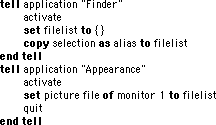
Andrew Morris wrote a very simple script that changes the desktop picture. Here's how it works: place the script in the Apple Menu, select an image for your desktop picture, then run the script.
The author acknowleges there are some caveats with a script this simple. You must have an image selected when the script is run or the Finder slows to a crawl. Perhaps ResEx readers can build on this example adding error checking and drag-and-drop support. For extra credit, how about options to tile or scale an image? A little script like this can make it easier to tryout images from the ResEx Desktop Picture Archive!
Back to the Archive