image ResEx Logo
App Makeovers
Boot Images
Boot Panels
Cell Phone Themes
Clocks
Desktop Pictures
Desktop Snapshots
Dock Poofs
Growl Styles
Icons
iTunes Skins
Links List
Login Panels
Mac OS X Mods
Mac OS X Themes
Mighty Mouse Cursors
Photoshop Goodies
REALbasic
Safari Stuff
Screen Savers
Software Archive
Software Reviews
Splash Screens
System Level Icons
Unix & The Terminal
Uploads
Widgets & Widgets

Homepage


Installation instructions can be found at bottom of page.

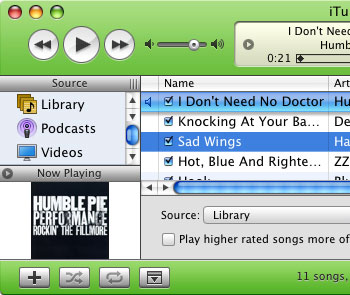
Dragon Music Records Skins + Sounds
Skin has 3 color variants; Blue, Red, Dragon Orange
Also includes 5 versions of sound file "Complete.aif"
Compatible with iTunes 6.0.2
by Stefan Gast
17th January 2006
Download Zipped folder

Rejoyce iTunes Skin 1.5
Compatible with iTunes 6.0.2
by MacBelwinds
12th January 2006
Download Zipped folder

Dragon Music Records Second Chance
Compatible with iTunes 6.0.1
by Stefan Gast
27th December 2005
Download Zipped folder

SimplyWhite
Compatible with iTunes 6.0.1
by HIEN
13th December 2005
Download Zipped folder

SimplyGreen
Compatible with iTunes 6.0.1
by HIEN
5th December 2005
Download Zipped folder

SimplyBlue
Compatible with iTunes 6.0.1
by HIEN
5th December 2005
Download Zipped folder

How To Install a Custom iTunes Skin
Skins on this page are for iTunes 6.0.1 and iTunes 6.0.2.

Some skins may use installer packages as their switching method. Others require you to manually switch out the iTunes Extras.rsrc.

1. Control-Click on iTunes.
2. Select Show Package Contents.
3. Open Contents folder, then Resources folder.
4. Make a copy of the original iTunes.rsrc file.
5. Install new iTunes.rsrc (skin) and have fun!


NOTE: You may need to add iTunes to ShapeShifter's exclude list if the skin appears to have not been applied.


App Makeovers
Boot Images
Boot Panels
Cell Phone Themes
Clocks
Desktop Pictures
Desktop Snapshots
Dock Poofs
Growl Styles
Icons
iTunes Skins
Links List
Login Panels
Mac OS X Mods
Mac OS X Themes
Mighty Mouse Cursors
Photoshop Goodies
REALbasic
Safari Stuff
Screen Savers
Software Archive
Software Reviews
Splash Screens
System Level Icons
Unix & The Terminal
Uploads
Widgets & Widgets

Homepage


Loading
Maintained by the Staff of ResExcellence. This entire site ©1997-2006 ResExcellence
Privacy Statement? Sure we gotta Privacy Statement.