|
Today's News by Cletus™ Remember to enter the giveaway we are having with Jerome Foucher for A-Dock. A lucky ResExcellence reader could become the proud owner of one of ten free registrations. Now that's a deal! Jerome also dropped me a line that he needed to correct a minor bug that was occurring in Mac OS 8.5 and 8.6 with the new release. If you are using 8.5 or 8.6 you probably should download a new copy. Other Mac OS's should be fine.  Connectix has updated CopyAgent to version 1.0.1. I picked up a copy of this during MacWorld in New York and positively love it. This was formerly part of the SmartCopy feature of Speed Doubler. "This version fixes an issue wherein copying to a destination with insufficient disk space, nothing would happen. CopyAgent now correctly brings up an error when there isn't enough disk space." Connectix has updated CopyAgent to version 1.0.1. I picked up a copy of this during MacWorld in New York and positively love it. This was formerly part of the SmartCopy feature of Speed Doubler. "This version fixes an issue wherein copying to a destination with insufficient disk space, nothing would happen. CopyAgent now correctly brings up an error when there isn't enough disk space."
James Thomson has updated PCalc to version 2.2. PCalc is a scientific calculator application for both Classic and MacOS X. This version adds a Reverse Polish Notation mode, support for octal numbers, an option to display thousands separators in the LCD, option to quit PCalc when closing the last calculator window and OS X and Aqua fixes. Be sure to stop by on Monday for even more news about PCalc! SETI@home Client Software for Macintosh has reached version 3.0.3. This version features: added pulse detection to signal analysis, triplet detection to signal analysis, implementation of faster FFT analysis routine and analysis continues without waiting for FFT graph drawing to complete. The archive has been updated.  Mac Unicorn Software has updated their software for changing the volume and resolution on your computer. Press Volume 1.0.1 is a minor upgrade, but fixes some serious bugs. It is recommend you download this version. Mac Unicorn Software has updated their software for changing the volume and resolution on your computer. Press Volume 1.0.1 is a minor upgrade, but fixes some serious bugs. It is recommend you download this version.
- Fixed a blinking window bug.
- Sometimes, Press Volume changed the volume even if the Control key wasn't pressed. This is now fixed.
- Press Volume will automatically choose the best resolution.
Seems to be a popular week for updating your volume control software. Evological Software has updated VolumeRocker to 1.5. The list below indicates all the additions to this release. - Added popup menu to allow customization of VolumeRocker's features. To access the popup menu, hold down the Command key and click the speaker icon.
- Option to turn the popup volume level on and off.
- Option to set the amount of time the popup volume level remains visible.
- Added an option to turn audible feedback on and off.
- Added the ability to use the Control key to temporarily reverse the current audible feedback setting.
Greg Landweber has released version 2.3 of Kaleidoscope and 2.4.3 of PowerWindows. The complete version history for Kaleidoscope is listed here. This version also reduces the shareware fee to $20. This is totally unrelated to life at ResExcellence, but I found it so interesting I wanted to share it. Ever wonder about how snowflakes begin life? Are there really no two alike? Themes and Schemes: DogHouse Online is releasing a new theme called Pastel Green. The Pastel Blue theme was released about 2 weeks ago. Now you can have a green version of the classic Pastel theme. Desktopper has posted PinkDark 1.0, a Kaleidoscope Scheme by Taiitusoftware. Submit Software News Suggestions!

Support ResExcellence By Visiting Our Sponsors!
Tools of the Trade by Michael
Today is the last day for you to answer the Big ResEx Survey and have your name entered to win a ResEx T-Shirt. Watch for the results to be posted next week.
I had always wondered how Linux Themes based on MacOS X Aqua slipped under the radar of Apple's Prowling Lawyers. Well, it seems they have upgraded their radar because themes.org received the standard cease and desist order.
Last week, I calledthe Apple Repair Center to request a box for my Wallstreet Powerbook G3. The screen hinge was busted and the only way to work on the machine was by propping it up. It's a good thing I was procrastinating, because I stumbled upon this site with instructions on how to increase your chances of Apple covering the cost of this common repair. Thanks to Kenneth Ott for his efforts. I'll let you know if I am successful.
MacInstruct has posted the third and final chapter of MacScripter's Magazine. This is more than an article, it's an interactive presentation you download are run.
Fontosaurus Text has posted more new fonts! They've rolled out 989 Max Protect, Sexypants, Juggernaut, and LoveBot. Fontosaurus Text has also remixed a Chank font, Orbital, and given it the moniker Skylab.
Wrappers for Your G4 Cube by Patrick O'Kelly
 To start with, I wish to thank all the hard working people at ResExcellence your site is an inspiration to all who follow it. Every section is a promotion for the continuing evolution and development of the curious and creative Macintosh community. To start with, I wish to thank all the hard working people at ResExcellence your site is an inspiration to all who follow it. Every section is a promotion for the continuing evolution and development of the curious and creative Macintosh community.
That said, I am submitting a desktop snapshot to show an example of an idea for changing the physical “Appearance” of the Macintosh G4 Cube as often as you like by way of a printout image i.e. “Cube Wrappers”. Let’s get started with a brief description. There is a space between the clear outer plastic housing and the metal inner housing of the Cube and this space is just enough to allow a piece of paper to be easily inserted and removed as often as one would like. Beginning to get ideas already aren’t you!? (Continued...)
Upgrade your Mac with Maxpowr from Newer Technology by Dan
For those on a tight budget, and looking for ways to increase the speed and power of their aging Macintoshes, take a hard look at the latest CPU upgrade cards from Newer Technology . Until recently quite a few of the pre - G3 and G4 machines were considered impossible to upgrade due to their lack of a processor upgrade slot. This includes many of the Macs and Clones using the 603 chip series and earlier. Enter the MAXpowr G3-L2 upgrade card. Here's how it works. (Continued...)
User Contributed Splash Screens:
Snapshot Gallery by Jeremy Hoesly Hark, Christmas is on the horizon! Now’s the time to send those snapshots dripping with holiday cheer.
Friday’s snapshots are hot off the press: - Roberlan Borges is once again bringing Mac goodness to the Windows desktop in this contribution featuring the “Yosemite X” desktop picture. WinMac provides the top menubar and platinum appearance. CoolPlayer, overhauled with a QuickTime 5-style skin is tickling the eardrums at the bottom. A smorgesbord of icons from Etherbrian, Mozco Garash, and Icon Factory also abound.
- This OS X Beta submission from Keston Charles sports Customize.org’s “ChillVision” desktop picture. Music Player is sitting in as digital DJ in the lower left-hand corner. Icons from Xicons are also visible.
- This screenshot from Patrick O’Kelly sports Akio’s “Bio-Apple 2” desktop picture and BIG Graphite K-Scheme. SoundJam, outfitted with the Lombard skin, is dishing out music selections along the bottom. A cube makeover, a scan from an old PETA T-shirt, and a picture for the movie Target Earth are open in PictureViewer. Icons from the far reaches of the Mac universe are also congregated on the desktop.
- Regular contributor Sergio Recabarren is back with this snapshot bearing the “Sky” desktop picture. Audion, equipped with the Beacon face, is cranking out tunes on the left. Some custom icons along with others from Icon Factory and icons.cx are also featured.
Like the snapshots that you see? Inspired enough to send one of your own? Read our submission guidelines, and then bring it on!
Icon/Desktop News 12-15-00 Icon & Desktop News by Dan  Only 10 days left till Christmas. OH MY! Are you're ready? Just in case you're in a panic and you're not going to get that pile of Christmas cards out after all, remember the ResExcellence Postcard section is chock full of beautiful Holiday Greetings you can use. Only 10 days left till Christmas. OH MY! Are you're ready? Just in case you're in a panic and you're not going to get that pile of Christmas cards out after all, remember the ResExcellence Postcard section is chock full of beautiful Holiday Greetings you can use.
Icons - Desktops - Postcards: We've got a full house today with 6 new desktops and two icon sets. As always, Enjoy! - SoulRocka "Nasty Nene" takes a serious moment to honor the memory of Scott Gray, with his "In Memory desktop. In1024x resolution. More info on this to be found in the "News From Around the Web" section below.
- Nicolas Cardot's sends us this elegant set of Startup Screens entitled "Fablue". Included are 10 different screens in 1024x resolution.
- Jamie Hilario submits another of his traditional style Xmas desktops. Puernatus comes in 1024x resolution only.
- I think you will enjoy Toma Marcello's latest set of two stylish desktops entitled "All". Both come in 1152x resolutions.
- One more classy "Nasty Nene" to add to your collection. Think Different OK with Scribble 2 in 1024x resolution.
- Drew Hamlin, webmaster of Icenteronline updates the Microsoft Office Manager Extension Icon you see at startup. Before this update, the icon is of an oversized puzzle picture - ugly to say the least. With this update, the icon is now a regular 16x16-sized puzzle in an extension icon - much more pleasant. Installation instructions included.
- Adam Potts, a 17 year old high school senior from Montana releases his first set of Apple Photocons. The icons are actually pics converted to icons from Apple's website. He thought these would be great for using with numerous documents and applications.
News From Around the Web:
It saddens me to report on the death of Scott Gray, publisher of the newly resurrected Appleholics-Anonymous and editor of big g media on Saturday, December 9th, 2000. AA will be having a Scott Gray memorial desktop picture contest to honor his memory. Visit the site for more details.
Jason Maki drops a quick note to let us know that he's released a new desktop picture today. "Joey" comes in1600x and 1200x resolutions. Note* Joey is an 8 week old full breed Mexican Chihuahua.
Adrian Jean of Axon Design Studio has some swanky Mac icons, Desktop Pics, and a few OSX tips. He serves the site right from his desktop, and claims it's up when he is, which is most of the time. Two new desktops have been added to the Flax Creations collection. Beautify your Mac with "Who am I" and "G'day". Macombine updates with two new desktops. One is called "Goose" and the other "Caroler" in honor of the season. So what's up WWW? Icons? Desktop pictures? News? Inform us! We'll post it!
12/14/00 Snapshot Gallery by Jeremy Hoesly Christmas is around the corner; so start sending your yuletide snapshots!
New snapshots for Thursday await you: - Misery in Motion’s “Trendwhore” desktop picture debuts in this OS X Beta contribution from Keston Charles. QuickTime movie trailers for Charlie’s Angels and Vertical Limit are also playing.
- This submission from Cootieworm sports the “Grape Mission” desktop picture included with OS 9. Audion is supplying the music in the upper right. MacTicker is displaying stock quotes along the top, while Headlines displays the latest news on the bottom.
- Keith Crosbie contributed this OS X Beta screenshot featuring the Ruby Theme. Music Player stands ready in the upper right, and icons from Xicons and Icon Factory abound.
- Anders Ericson’s “Superintelligent Shades of Blue” desktop picture is showcased in this snapshot from Robert Palmer. QuickTime Player is showing the Phantom Menace movie trailer, while Terminal is displaying an easter egg.
Like the snapshots that you see? Inspired enough to send one of your own? Read our submission guidelines, and then bring it on!

Visit the Mac Experts!
12/14/00 Snapshot Gallery by Jeremy Hoesly Christmas is around the corner; so start sending your yuletide snapshots!
New snapshots for Thursday await you: - Misery in Motion’s “Trendwhore” desktop picture debuts in this OS X Beta contribution from Keston Charles. QuickTime movie trailers for Charlie’s Angels and Vertical Limit are also playing.
- This submission from Cootieworm sports the “Grape Mission” desktop picture included with OS 9. Audion is supplying the music in the upper right. MacTicker is displaying stock quotes along the top, while Headlines displays the latest news on the bottom.
- Keith Crosbie contributed this OS X Beta screenshot featuring the Ruby Theme. Music Player stands ready in the upper right, and icons from Xicons and Icon Factory abound.
- Anders Ericson’s “Superintelligent Shades of Blue” desktop picture is showcased in this snapshot from Robert Palmer. QuickTime Player is showing the Phantom Menace movie trailer, while Terminal is displaying an easter egg.
Like the snapshots that you see? Inspired enough to send one of your own? Read our submission guidelines, and then bring it on!
Today's News by Cletus™ Another great chance for readers! Jérome Foucher will release A-Dock 2.2 today. To coincide with this release and to show his gratitude to all ResExcellence readers, Jérome is offering a very special opportunity to get a free registration for A-Dock. Simply send an email to this address. You must include your full name and email address to be eligible to win. Jérome will pick 10 winners from all entrants. The list of winners will be announced on Monday December 18 at ResExcellence. A German and Japanese version will be released in a few days. | | There is even a new "Skins" page. | Another favorite with ResExcellence readers is DropDrawers! Gideon Greenspan announces the release of version 1.5 for both Classic and Mac OS X. I have been using this beta for about two weeks now on my iBook and it is great. "Version 1.5 is a major upgrade adding dozens of new features, including configurable grids with multiple styles and arranging options, support for Applescripts with built-in compilation and parameter passing and several included drawer templates." A Japanese translation of version 1.5 is also immediately available. Other translations should follow in the future. MenuStrip 1.2.1 is now available from Mac PowerUser. This is primarily a maintenance release to fix a few bugs and add a much-requested "Mute" button to the volume control. Additionally the volume and hide button states are now saved after quitting and "0 Hz" refresh rate is no longer displayed for resolutions on LCD monitors. REAL Software's Cubie Awards Contest deadline has been extended to December 22, 2000 as more sponsors add prizes. REAL Software's Cubie Awards recognize the best products made with REALbasic in six categories, plus an award for the REALbasic Advocate of the Year. The categories are: Mac OS X, Game, Internet, Cross-platform Utility, REALbasic development aid, and Overall Advocate of the Year. Check out the web site to find out what you could win! Carsten Klapp has released Even Smaller Font Smoothing. This is an Open Source project that sets the minimum font smoothing size to 1 pt. then quits. To change the minimum font smoothing size back to normal, simply use the Appearance control panel. The only requirements are Mac OS 8.5 or newer and a PowerMac. Join the fun now! I think it is a feather in all the caps of ResExcellence readers that we do indeed have one of the most useful forums out there. I know that I have no hesitations in referring readers there when they send me an email asking a question that I can't answer. In fact it is one of the first places I go when I have a question myself. Well-done readers! Themes and Schemes: There appears to be an update to Kaleidoscope in the wings. It may come relatively quick. To wet your appetite you can read the version history of 2.3 to get an idea of what to expect. 8'renderful by Renderful is the new Kaleidoscope Scheme available at Desktopper. Submit Software News Suggestions!

Tools of the Trade by Michael
 It has been ages since JPegView has been updated, yet it's still my favorite application for quickly viewing images. I prefer its one-at-a-time way of updating mutliple images versus the Quicktime PictureViewer way of flashing them all at once. Carsten Klapp agrees, but the look of the program is a little dated, so he made a comprehensive makeover kit. It has been ages since JPegView has been updated, yet it's still my favorite application for quickly viewing images. I prefer its one-at-a-time way of updating mutliple images versus the Quicktime PictureViewer way of flashing them all at once. Carsten Klapp agrees, but the look of the program is a little dated, so he made a comprehensive makeover kit.
It contains a new window definition for the Slide show controls, 8 bit icons that look good enough to be 32 bit, and updated Menu definition. Follow he instructions closely because there are resources that need to be deleted. Afterwards, rebuild the desktop to see the new icons.
VNCThing 2.2 is available for download. Major changes in this release are:
- Now supports Zlib and Zlib Hextile encodings
- Added bookmarks menu
- Several performance improvements
- Fixed crashes and UI bugs on Mac OS X
- Command key now sent correctly to Mac servers
- Ctrl-Alt-Del sent correctly to Windows servers
- Update request sent immediately on receiving previous reply
If you're not sure what the heck VNC is, read this previous article.
The First Annual Audion Winter Holiday 2k Faces Contest has been launched! Stop by to download some great looking Holiday skins, or submit your own creation for a chance at winning praise and prizes! The contest ends December 20, soget hacking!
I must admit that until reading about the latest MacInstruct Tutorial, I had never heard of iBuild., but it looks like an interesting program for building interactive presentations. Stop by MacInstruct to learn more.
Adding OmniWeb the Internet Control Panel by Rick Roe
I prefer to use OmniWeb as my web browser (no surprise), but I still use Entourage in Classic because Apple Mail doesn't do multiple outgoing accounts (yet, I hope). Unfortunately, it's not possible to set up the Internet Control panel to use OmniWeb as a helper app, because it doesn't recognize Cocoa applications (or some types of Carbon apps) in its app-choosing dialog.
However, with a resource editor anything is possible. (Continued...)
User Contributed Splash Screens:
- They're at it again -The McHugh Family! Father and Son have once again teamed up to bring you two great looking MOSS creations. Big Daddy Peter sends the Giant MOSS proclaiming "This Ain't Microsoft"...
- ...and som Alex McHugh created another Transparency effect. A giant circular MOSS featuring a butterfly. What do these two discuss at dinnertime? "I don't know Dad, I think you should have feathered that filter 4 pixels, not 5".
- I'm not quite certain why Eudora Splash screens are all-the-rage, but Ray Johnson has sent another featuring my favorite ghost hunting dog, Scooby Doo!
- For Netscape 6, Luis Miguel Eiroa submitted a splash featuring the photography of Anita Spero & Mariano Valladares (of Spooky Muffin Photography).
- Richard Rice created a splash for Explorer based on the Anime characters in TallGeese.
Snapshot Gallery by Jeremy Hoesly Hark, Christmas is on the horizon! Now’s the time to send those snapshots dripping with holiday cheer.
Get through that midweek slump with a dose of snapshots: - This LinuxPPC snapshot from Derek features the HeliX-Sweetpill-Crowberry Theme. The Mozilla browser is shown off in the upper left. X-Chat, an IRC client, is running just below it.
- A custom desktop picture debuts in this submission from Charlie Hayes. SoundJam is kicking out soundwaves along the bottom.
- Egads! Sergio Recabarren decided to test OS X Beta’s multitasking abilities in this snapshot. A custom desktop picture is in the background… somewhere. Kids, do not try this with Windows.
- This snapshot from Michael Wolfe sports the “Black Privateer” desktop picture. Audion, retro-fitted with the F1 face, is dishing out tunes in the lower left while SoundJam, equipped with the Music Player skin, stands ready in the upper right. Icon Factory’s Smoothicons and Perfect Yosemite’s High Level Abstraction iPack provide the icons.
Like the snapshots that you see? Inspired enough to send one of your own? Read our submission guidelines, and then bring it on!
Icon/Desktop News 12-13-00 Icon & Desktop News by Dan  Only 12 days left till Christmas. YIKES! Hope you're ready. Just in case you don't have time to send out that pile of Christmas cards, don't forget that the ResExcellence Postcard section is quite full of really elegant Seasonal Greetings that you can use. Only 12 days left till Christmas. YIKES! Hope you're ready. Just in case you don't have time to send out that pile of Christmas cards, don't forget that the ResExcellence Postcard section is quite full of really elegant Seasonal Greetings that you can use.
Icons - Desktops - Postcards: Things are growing a bit quiet in submissions around here due to the approaching holidays. None the less, we really have some high quality items for today's update. As always, Enjoy! - Layne Karkruff, of the well know BlueSkyHeart website very graciously gives us the opportunity to showcase his Xmas 2000 desktop console. Visit his site to download this beauty. Comes in multiple resolutions to fit any size monitor.
- 'Ilicon's newest Christmas 2000 icon set is a must have for the holidays. Includes 13 hand drawn mega-cute icons.
- 'Flax Creations (that's me) bids you a G'day with this cheerful desktop in 800x and 1024x resolutions. Visit the site for many more unique creations to beautify your Mac.
- Toma Marcello submits this very elegant set of two backdrops entitled "Waves". Both come in 1152x resolution.
News From Around the Web:
Live Pencil updates with 6 Xmas Wallpapers. His funny animals have returned, and two wallpapers offer us some entertainment. He also reminds us not to forget his Virtual Advent Calendar! Let everybody know about it, it's important because it only lasts until the 24th.
ShroomGfx is going to have a new desktop picture every day this week, so if people want to stop by there's plenty of new things on hand.
Iconmaker informs us about their new set of delicious icons entitled "Ramen Icons". So what's up WWW? Icons? Desktop pictures? News? Inform us! We'll post it!
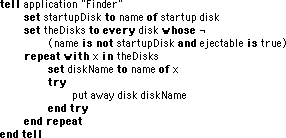
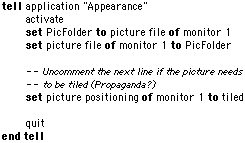
Applescripts 12-12-00 Applescript/Scripting by Michael The other day I was complaining about the kids leaving CD's in the iMac. Brian Marsh sent this expanded script to check for ejectable media (hopefully a CD), and then spit it out. This is just a little modification to the "eject CD" applescript posted yesterday the modification just adds a check to make sure the "disk" is ejectable, so it doesn't put away any drives connected over a network, nor even try to unmount other partitions/hard drives. (I'm sure this could be refined even more, but it works for my purpose). In my case, I have an iMac DV from 1999 without the new keyboard and it's CD eject button, so I set up a keyboard function key (MacOS 9 ability) as a CD eject button (by making the script a run only application) I hope it's useful to some other people out there. Joel Benson sends one more script to change the desktop picture with these comments: If one's only goal is to get a different, randomly selected desktop picture every time your Mac starts up, all you have to do is open the Appearance Control Panel, select the Desktop tab, drag the icon of the picture folder to that panel's Desktop, and click on the Set Desktop button. The advantage to doing this with an AppleScript is that it can randomly change the selected picture any time you choose to run it. Once you've already configured the control panel to randomly select a picture from some folder, the enclosed Cycle Desktop script will cause it to select a different picture from that folder. Those with more than one monitor should use the Cycle All Desktops script.
12/12/00 Snapshot Gallery by Jeremy Hoesly Christmas is around the corner; so start sending your yuletide snapshots!
Tuesday’s snapshots are on display: - Perry Fjellman from AppleSource contributed this screenshot sporting Akio’s “Bio Apple” desktop picture and BIG Graphite K-Scheme. The Spiffy Apps icon set from icons.cx is prominently displayed.
- This contribution from Michael Gargas touts a custom “Deftones” desktop picture. Audion is pumping out soundwaves in the lower right-hand corner.
- A custom desktop picture and the Hi-Tech Theme debut in this submission from Andrea Longhurst. SoundJam, equipped with the Broken skin, is serving up the music in the lower right-hand corner. Icons from Pseudoroom are also shown.
- This screenshot from Justin Tarango features a modified version of the “SleekGraphite” desktop picture coupled with William Bart’s HyperSleek Pro Graphite K-Scheme. Audion, outfitted with the F1 face, is cranking out the music in the lower right.
Like the snapshots that you see? Inspired enough to send one of your own? Read our submission guidelines, and then bring it on!

Visit the Mac Experts!
12/14/00 Snapshot Gallery by Jeremy Hoesly Christmas is around the corner; so start sending your yuletide snapshots!
New snapshots for Thursday await you: - Misery in Motion’s “Trendwhore” desktop picture debuts in this OS X Beta contribution from Keston Charles. QuickTime movie trailers for Charlie’s Angels and Vertical Limit are also playing.
- This submission from Cootieworm sports the “Grape Mission” desktop picture included with OS 9. Audion is supplying the music in the upper right. MacTicker is displaying stock quotes along the top, while Headlines displays the latest news on the bottom.
- Keith Crosbie contributed this OS X Beta screenshot featuring the Ruby Theme. Music Player stands ready in the upper right, and icons from Xicons and Icon Factory abound.
- Anders Ericson’s “Superintelligent Shades of Blue” desktop picture is showcased in this snapshot from Robert Palmer. QuickTime Player is showing the Phantom Menace movie trailer, while Terminal is displaying an easter egg.
Like the snapshots that you see? Inspired enough to send one of your own? Read our submission guidelines, and then bring it on!
Today's News by Cletus™ Another great chance for readers! Jérome Foucher will release A-Dock 2.2 today. To coincide with this release and to show his gratitude to all ResExcellence readers, Jérome is offering a very special opportunity to get a free registration for A-Dock. Simply send an email to this address. You must include your full name and email address to be eligible to win. Jérome will pick 10 winners from all entrants. The list of winners will be announced on Monday December 18 at ResExcellence. A German and Japanese version will be released in a few days. | | There is even a new "Skins" page. | Another favorite with ResExcellence readers is DropDrawers! Gideon Greenspan announces the release of version 1.5 for both Classic and Mac OS X. I have been using this beta for about two weeks now on my iBook and it is great. "Version 1.5 is a major upgrade adding dozens of new features, including configurable grids with multiple styles and arranging options, support for Applescripts with built-in compilation and parameter passing and several included drawer templates." A Japanese translation of version 1.5 is also immediately available. Other translations should follow in the future. MenuStrip 1.2.1 is now available from Mac PowerUser. This is primarily a maintenance release to fix a few bugs and add a much-requested "Mute" button to the volume control. Additionally the volume and hide button states are now saved after quitting and "0 Hz" refresh rate is no longer displayed for resolutions on LCD monitors. REAL Software's Cubie Awards Contest deadline has been extended to December 22, 2000 as more sponsors add prizes. REAL Software's Cubie Awards recognize the best products made with REALbasic in six categories, plus an award for the REALbasic Advocate of the Year. The categories are: Mac OS X, Game, Internet, Cross-platform Utility, REALbasic development aid, and Overall Advocate of the Year. Check out the web site to find out what you could win! Carsten Klapp has released Even Smaller Font Smoothing. This is an Open Source project that sets the minimum font smoothing size to 1 pt. then quits. To change the minimum font smoothing size back to normal, simply use the Appearance control panel. The only requirements are Mac OS 8.5 or newer and a PowerMac. Join the fun now! I think it is a feather in all the caps of ResExcellence readers that we do indeed have one of the most useful forums out there. I know that I have no hesitations in referring readers there when they send me an email asking a question that I can't answer. In fact it is one of the first places I go when I have a question myself. Well-done readers! Themes and Schemes: There appears to be an update to Kaleidoscope in the wings. It may come relatively quick. To wet your appetite you can read the version history of 2.3 to get an idea of what to expect. 8'renderful by Renderful is the new Kaleidoscope Scheme available at Desktopper. Submit Software News Suggestions!

Calendar & Appointment Scheduler for Mac OS X
Tools of the Trade by Michael
It has been ages since JPegView has been updated, yet it's still my favorite application for quickly viewing images. I prefer its one-at-a-time way of updating mutliple images versus the Quicktime PictureViewer way of flashing them all at once. Carsten Klapp agrees, but the look of the program is a little dated, so he made a comprehensive makeover kit.
It contains a new window definition for the Slide show controls, 8 bit icons that look good enough to be 32 bit, and updated Menu definition. Follow he instructions closely because there are resources that need to be deleted. Afterwards, rebuild the desktop to see the new icons.
VNCThing 2.2 is available for download. Major changes in this release are:
- Now supports Zlib and Zlib Hextile encodings
- Added bookmarks menu
- Several performance improvements
- Fixed crashes and UI bugs on Mac OS X
- Command key now sent correctly to Mac servers
- Ctrl-Alt-Del sent correctly to Windows servers
- Update request sent immediately on receiving previous reply
If you're not sure what the heck VNC is, read this previous article.
The First Annual Audion Winter Holiday 2k Faces Contest has been launched! Stop by to download some great looking Holiday skins, or submit your own creation for a chance at winning praise and prizes! The contest ends December 20, soget hacking!
I must admit that until reading about the latest MacInstruct Tutorial, I had never heard of iBuild., but it looks like an interesting program for building interactive presentations. Stop by MacInstruct to learn more.
Adding OmniWeb the Internet Control Panel by Rick Roe
I prefer to use OmniWeb as my web browser (no surprise), but I still use Entourage in Classic because Apple Mail doesn't do multiple outgoing accounts (yet, I hope). Unfortunately, it's not possible to set up the Internet Control panel to use OmniWeb as a helper app, because it doesn't recognize Cocoa applications (or some types of Carbon apps) in its app-choosing dialog.
However, with a resource editor anything is possible. (Continued...)
User Contributed Splash Screens:
- They're at it again -The McHugh Family! Father and Son have once again teamed up to bring you two great looking MOSS creations. Big Daddy Peter sends the Giant MOSS proclaiming "This Ain't Microsoft"...
- ...and som Alex McHugh created another Transparency effect. A giant circular MOSS featuring a butterfly. What do these two discuss at dinnertime? "I don't know Dad, I think you should have feathered that filter 4 pixels, not 5".
- I'm not quite certain why Eudora Splash screens are all-the-rage, but Ray Johnson has sent another featuring my favorite ghost hunting dog, Scooby Doo!
- For Netscape 6, Luis Miguel Eiroa submitted a splash featuring the photography of Anita Spero & Mariano Valladares (of Spooky Muffin Photography).
- Richard Rice created a splash for Explorer based on the Anime characters in TallGeese.
Snapshot Gallery by Jeremy Hoesly Hark, Christmas is on the horizon! Now’s the time to send those snapshots dripping with holiday cheer.
Get through that midweek slump with a dose of snapshots: - This LinuxPPC snapshot from Derek features the HeliX-Sweetpill-Crowberry Theme. The Mozilla browser is shown off in the upper left. X-Chat, an IRC client, is running just below it.
- A custom desktop picture debuts in this submission from Charlie Hayes. SoundJam is kicking out soundwaves along the bottom.
- Egads! Sergio Recabarren decided to test OS X Beta’s multitasking abilities in this snapshot. A custom desktop picture is in the background… somewhere. Kids, do not try this with Windows.
- This snapshot from Michael Wolfe sports the “Black Privateer” desktop picture. Audion, retro-fitted with the F1 face, is dishing out tunes in the lower left while SoundJam, equipped with the Music Player skin, stands ready in the upper right. Icon Factory’s Smoothicons and Perfect Yosemite’s High Level Abstraction iPack provide the icons.
Like the snapshots that you see? Inspired enough to send one of your own? Read our submission guidelines, and then bring it on!
Icon/Desktop News 12-13-00 Icon & Desktop News by Dan Only 12 days left till Christmas. YIKES! Hope you're ready. Just in case you don't have time to send out that pile of Christmas cards, don't forget that the ResExcellence Postcard section is quite full of really elegant Seasonal Greetings that you can use. Icons - Desktops - Postcards: Things are growing a bit quiet in submissions around here due to the approaching holidays. None the less, we really have some high quality items for today's update. As always, Enjoy! - Layne Karkruff, of the well know BlueSkyHeart website very graciously gives us the opportunity to showcase his Xmas 2000 desktop console. Visit his site to download this beauty. Comes in multiple resolutions to fit any size monitor.
- 'Ilicon's newest Christmas 2000 icon set is a must have for the holidays. Includes 13 hand drawn mega-cute icons.
- 'Flax Creations (that's me) bids you a G'day with this cheerful desktop in 800x and 1024x resolutions. Visit the site for many more unique creations to beautify your Mac.
- Toma Marcello submits this very elegant set of two backdrops entitled "Waves". Both come in 1152x resolution.
News From Around the Web:
Live Pencil updates with 6 Xmas Wallpapers. His funny animals have returned, and two wallpapers offer us some entertainment. He also reminds us not to forget his Virtual Advent Calendar! Let everybody know about it, it's important because it only lasts until the 24th.
ShroomGfx is going to have a new desktop picture every day this week, so if people want to stop by there's plenty of new things on hand.
Iconmaker informs us about their new set of delicious icons entitled "Ramen Icons". So what's up WWW? Icons? Desktop pictures? News? Inform us! We'll post it!
Applescripts 12-12-00 Applescript/Scripting by Michael The other day I was complaining about the kids leaving CD's in the iMac. Brian Marsh sent this expanded script to check for ejectable media (hopefully a CD), and then spit it out. This is just a little modification to the "eject CD" applescript posted yesterday the modification just adds a check to make sure the "disk" is ejectable, so it doesn't put away any drives connected over a network, nor even try to unmount other partitions/hard drives. (I'm sure this could be refined even more, but it works for my purpose). In my case, I have an iMac DV from 1999 without the new keyboard and it's CD eject button, so I set up a keyboard function key (MacOS 9 ability) as a CD eject button (by making the script a run only application) I hope it's useful to some other people out there. Joel Benson sends one more script to change the desktop picture with these comments: If one's only goal is to get a different, randomly selected desktop picture every time your Mac starts up, all you have to do is open the Appearance Control Panel, select the Desktop tab, drag the icon of the picture folder to that panel's Desktop, and click on the Set Desktop button. The advantage to doing this with an AppleScript is that it can randomly change the selected picture any time you choose to run it. Once you've already configured the control panel to randomly select a picture from some folder, the enclosed Cycle Desktop script will cause it to select a different picture from that folder. Those with more than one monitor should use the Cycle All Desktops script.
12/12/00 Snapshot Gallery by Jeremy Hoesly Christmas is around the corner; so start sending your yuletide snapshots!
Tuesday’s snapshots are on display: - Perry Fjellman from AppleSource contributed this screenshot sporting Akio’s “Bio Apple” desktop picture and BIG Graphite K-Scheme. The Spiffy Apps icon set from icons.cx is prominently displayed.
- This contribution from Michael Gargas touts a custom “Deftones” desktop picture. Audion is pumping out soundwaves in the lower right-hand corner.
- A custom desktop picture and the Hi-Tech Theme debut in this submission from Andrea Longhurst. SoundJam, equipped with the Broken skin, is serving up the music in the lower right-hand corner. Icons from Pseudoroom are also shown.
- This screenshot from Justin Tarango features a modified version of the “SleekGraphite” desktop picture coupled with William Bart’s HyperSleek Pro Graphite K-Scheme. Audion, outfitted with the F1 face, is cranking out the music in the lower right.
Like the snapshots that you see? Inspired enough to send one of your own? Read our submission guidelines, and then bring it on!

Visit the Mac Experts!
Today's News by Cletus™ Henry Brimo (aka MacNewbie) has posted the final versions of his Pommegris and Pommevert skins for the MACAST player. It is designed to go with the Oblique Kaleidoscope scheme and two of MacNewbie's desktop "griddies." With the Old Style 2.0 plugin installed, the spectrum bars feature an animation; "The Colors of Apple," where the climax is... the old style logo. Oblique Kaleidoscope scheme and two of MacNewbie's desktop "griddies." With the Old Style 2.0 plugin installed, the spectrum bars feature an animation; "The Colors of Apple," where the climax is... the old style logo. Angelo Scicolone has finished ExtensionsTracker 1.0. ExtensionsTracker monitors your extensions and control panels folders, saving all changes. If you end up having some kind of conflict or are just curious about what has recently changed you can now find out with this utility. Sound Warehouse has been updated to version 1.0.2. Sound Warehouse is an application for the Macintosh, which allows you to play & manage a wide variety of sound files including; MP3, AIFF, AIFC, WAVE, AU, Sound DesignerII and MIDI files. This update includes the following: Can convert file format by choosing “Export....” item in pop-up menu on both the Database and Playlist window. “File Info...” item in pop-up menu on Player window can be chosen for WAV, AU, AVI, SDII files. “File Info...” dialog for WAV, AU, AVI, SDII files did not show all of the info available this has been fixed.  Forest 1.4.1 for Classic and 1.0.1 for MacOS X is now available at Mac Unicorn. In both releases, Relax environments are read 100% properly, including random sounds. Both releases also provide bug fixes and more stability for this relaxation software. Forest 1.4.1 for Classic and 1.0.1 for MacOS X is now available at Mac Unicorn. In both releases, Relax environments are read 100% properly, including random sounds. Both releases also provide bug fixes and more stability for this relaxation software.
Mac Unicorn have also released a new product called Press Volume allows you to change the volume, the screen depth & the screen resolution with your keyboard. You even can configure it so that it will change the screen depth & resolution you will choose. Press Volume is stable and uses very little RAM. They are looking for input on this product. Let me know how you like this. I can add it to the Software Archive. A question from the ResExcellence Forums asked: "Is there a way to make Snapshots default to the desktop after you take them, instead of to the HD?" The easiest way I know of is to use a little extension in our archive called Desktop Screenshots. This will place the images directly on the desktop for easy retrieval. There is one limitation and that is when you are using Multiple Users. MacHack 2001 takes place next June in Dearborn, Michigan. It's time to sign up as a MacHack speaker. Areas of focus are listed below: - Alternative Platforms: a showplace for Linux, Palm OS, Emulation and other topics
- The Business Track: featuring market and strategy sessions by developers for developers
- Multiple Computing: from multiprocessors to Beowulf
- Network E: Java, XML, Web Objects and e-commerce topics
- Infinite Monkeys, The Realm of Open Source: Darwin, Basilisk and other Open Source projects
- Yoots: Sessions for junior developers
- State of the Mac OS: Sessions on the latest developments in and around the Mac OS platform
- Hardware: New and clever hardware developments and designs
Themes and Schemes: The Kaleidoscope Scheme Archive has posted 14 new and 8 updated schemes. Nice ones this time include: Titanium by P. Ward, Whiteout Graphite by Carl Pitts and APB Black by Patricia Baron. Desktopper has posted a couple of K-Scheme updates of his own. The Aqua-ish "Butt" and "Desaturation" both by author Butt_O'sigh. They have also listed the new site URL for Jinsan who has been kind of quiet recently. He announces he is back and has most of the former Schemes and Themes of his posted again. Submit Software News Suggestions!

Complete Cable Management For The Home & Office.
Polling Place
 Macintosh users are resisting the urge to be assimilated. Most ResEx readers it appears are reluctant to keep their browser settings at the Windows default of 96 dpi and instead switch to the traditional Mac setting of 72 dpi. Because of this ResExcellence will be keeping our font size the same. Macintosh users are resisting the urge to be assimilated. Most ResEx readers it appears are reluctant to keep their browser settings at the Windows default of 96 dpi and instead switch to the traditional Mac setting of 72 dpi. Because of this ResExcellence will be keeping our font size the same.
A recent question in the forum asked about disabling the Quicktime Update screen. It implies the user of Quicktime is not interested in upgrading to the 'Pro" version. I wonder how many people feel the same way? This week's Polling Place asks, "Have you upgraded to Quicktime Pro?"
Tools of the Trade by Michael
Regarding the recent tip to run AOL's IM Java applet using Apple Applet Runner, Scott Spencer asks::
I was wondering about that great edit for the AIM Express. I wanted to know if that could be done for other things on the net that use Java to run? For Instance check out www.buzztime.com. It let's you play trivia on the net. I would like to know if I could use that same method on one of those trivia games that I think load with Java.
For the most part, the answer is yes. I went to Sun's Java web site and tried many applets, all I had to do was paste the URL into Apple's Applet Runner and they executed. Sometimes a game that would run in a web browser would throw an exception in the Applet runner, and I'm not sure as to why, but for the most part it works.
Adam Betts was looking for a utility...
I searched everywhere for a utility that can allow you to "center" the window with a simple key combination. But I can not find it. For example, I want to center AOL's connecting dialog instead of incorrect position, so I press command+shift+c and the window go to center of the monitor. I want to organize my desktop that way. Can you help me?
While I don't know of a stand alone application, KeyQuencer, a shareware macro program, can accomplish this with the simple command MoveWindow center. A previous ResEx article describes more of what I do with this must-have program.
Brian Ellis has written a good beginning tutorial for users of MacOS X beta who are having trouble getting a handle on all those Unix-like file permissions.
User Contributed Splash Screens:
- One of our oddest entries ever has been submitted by Lander Salzberg. Called NoThrobbers for iCab, These throbbers replace the moving throbber with one of the solid iCab default colors.
- We haven't discussed StartupScreens on ResEx for sometime, but this new contribution by Schack Lindemann could resurrect the format. Schack not only created a great looking StartupScreen, but there is a Quicktime Startup Movie that beautifully integrates into the image. Placing both of these loose in your System Folder will replace the MOSS at startup.
- Lara Croft is featured in this colorful Eudora Splash by Jaime O. Hilario.
- Scott Chitwood from Rampant Mac send yet-another of his great looking MOSS creations!
- A new Grey-Metallic Toast skin was submitted by Steve Sobek.
- For Netscape 6, Luis Eiroa created a cool splash screen, and for extra credit, submitted two Netscape icons.

Support ResExcellence By Visiting Our Sponsors!
Snapshot Gallery by Jeremy Hoesly Hark, Christmas is on the horizon! Now’s the time to send those snapshots dripping with holiday cheer.
Start your week off right with a helping of snapshots: - Roberlan Borges gives his Windows machine another Mac facelift in this snapshot touting a custom desktop picture and the Mac OS X Aqua WindowBlinds skin. CoolPlayer, retro-fitted to look like OS X’s Music Player, is kicking out soundwaves in the lower right-hand corner. Large custom icons are featured along both edges.
- A “Kristin Davis” desktop picture is showcased in this snapshot from Jonathan Gurule along with Tobias Tornblom’s zz Alpha X K-Scheme. Icons from Icon Factory are nestled in the upper right-hand corner.
- This snapshot from Josh Nichols sports Cognitive Distortion’s “Death” desktop picture combined with the GlassWorks Theme. Audion, overhauled with Jeremie Hornus’ Chamelon face, is taking music requests along the left edge. Icon Factory’s Photonica and Photonica Hardware icons reside along the right edge.
- This submission from Steve Sobek features Blue Sky Heart’s “DcAcintosh” desktop picture in conjunction with Peter Harte’s Aqua II K-Scheme. Some custom icons as well as others from Xicons are scattered throughout the shot.
Like the snapshots that you see? Inspired enough to send one of your own? Read our submission guidelines, and then bring it on!
Icon/Desktop News 12-11-00 Icon & Desktop News by Dan  I have to apologize, I'm having a bit of trouble with the keyboard tonight since I've darn near frozen the tips off of my fingers hanging miles of colored lights on my home earlier today. Please excuse any odd characters, typos, or blue fingernails you may find in today's update. I have to apologize, I'm having a bit of trouble with the keyboard tonight since I've darn near frozen the tips off of my fingers hanging miles of colored lights on my home earlier today. Please excuse any odd characters, typos, or blue fingernails you may find in today's update.
Icons - Desktops - Postcards: Come on in and check out our latest reader submissions: Two new icon sets and five desktops. As always, Enjoy! - Hein Mevissen updates his very popular 32 bit G4 Icons set. This collection has now grown to include 34 extra classy system related icons. Don't miss this one!
- Bob Friede updates his Remote Access Icons set. These replacement icons are for the Remote Access Control Strip Module, Remote Access Control Panel and Remote Access Status. ResEdit required.
- Peter Mac creates this variation on a theme with his Hung Mistleltoe desktops. Using one of his own 35 mm slides as a backdrop, he experiments with several different hued docks. All come in 1024x resolution.
- Harvey Lubin of Agrapha Design shows off his Christmas spirit with a Mac OS X flair. Merry-X-mas desktops come in 1024x and 1600x resolutions.
- Add these two funky backdrops from SoulRocka "Nasty Nene" to your growing collection of his work. Beautify My Interface and Soul Different both come in 1024x resolutions.
- Mousey hopes you enjoy his newest and wild desktop creation "Pluggin In". Comes in 1024x resolution. Look for more of his work in the Desktops Archive coming soon.
News From Around the Web:
Colheres updates once again with another icon set entitled "City", by Luisa . So what's up WWW? Icons? Desktop pictures? News? Inform us! We'll post it!

Visit the Mac Experts!
Previous News Page...
You can now upload your contributions (include a READ ME) to the ResExcellence
ftp drop box, and let us know with an email. Be sure to read the Submission Policy
|