
Using New Features From REALbasic 2005!
In this tutorial, we're going to use new features from REALbasic 2005 which are the addition of the contextual menu events in the Window and RectControl classes as well as the PopUp method in the MenuItem class. These events a) completely outclass the ContextualMenu class (no pun intended) and b) allow for real contextual menus with submenus and decent menu handling. The PopUp method allows us to manually display a menu at any global screen coordinates, which is also handy.
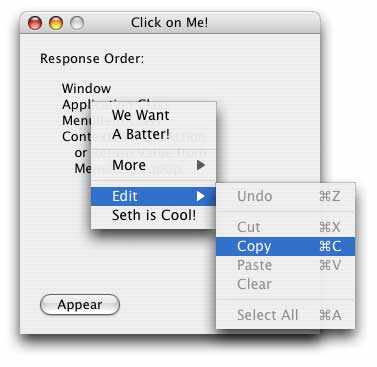
New Contextual Menu Events
The example project for this tutorial is very scattered and it'd be funky to try to explain everything everywhere. Basically, when you Right-Click or Control-Click on the window it displays a contextual menu which has many items in it (as shown above), and are handled differently. Some items are handled only by the ContextualMenuAction event, Edit->Copy is handled by the Window, and the very bottom menu item ("Seth is Cool!" above) is a custom class implementation with its own handler, a handler in the window, a handler in the application class, and if none of those actually handle it (by returning true in the handler) then the ContextualMenuAction event gets it last. The "Appear" button pops open the same method manually and simply exhibits the same handling.
ConstructContextualMenu
Function ConstructContextualMenu(Base as MenuItem, x as Integer, y as Integer) as Boolean
This Base parameter is the contextual menu itself. By adding items to Base, those items will appear in the contextual menu. X and Y are the location of the mouse when the click was made in the RectControl or Window in which this even is being fired. The return value from this even determines whether the control's parent's (or the window's if the control has no parent) ConstructContextualMenu event is fired as well. If you return true from the event, the menu is shown immediately. If you return false, then the parent gets a chance to add its menu items to the menu as well. After all the calling is done, Base will be displayed if it has at least one menu item in it.
In the example project, if you click on the canvas in the window, it will add its one menu item to the contextual menu and then return false so that the window can add its items to it as well. This is a major advantage to this new design rather than the old icky ContexualMenu class.
ContextualMenuAction
Function ContextualMenuAction(HitItem as MenuItem) as Boolean
This HitItem parameter is the menu item the user selected. That's pretty self explanitory. The ContextualMenuAction event, however, is at the bottom of the menu handler chain for the selected item. When the user selects an item, the first place REALbasic looks for a menu handler is the window. If the window has a handler for the menu item (based on the Name property) then it calls it. If that handler returns false, all is well and the process stops. If it returns true, the application's menu handler for that item is called. If it returns true, the Action event in the MenuItem itself (if it's a MenuItem subclass) is called. If that returns true, then lastly, the ContextualMenuAction event is called. Pretty crazy! The project demonstrates how this works by randomly returning true or false so you can see how it would work in different situations.
MenuItem.Popup Method
Function MenuItem.Popup([x as Integer, y as Integer]) as MenuItem
The Popup method is very simple.... it pops up the menu at the optionally-given screen coordinates. All of the handling behaves the same as specified above with exception that instead of a ContextualMenuAction event being called if the menu item is not handled anywhere else, that menu item is return as the result of the Popup method. If it was handled elsewhere, it returns nil.
Finished
So that's it. No code presented here, but as always, you can download the project here. You really need to look at the project and poke around a bit to really experience how it works. Words just don't do it justice. Or, at least the amount of words I'm willing to put here don't do it justice. :^)