
Drawing Dashed Lines
This topic came up on REAL Software's Getting Started mailing list a few weeks ago and I posted a solution that I wrote in a few minutes. The downside was, I realized it was wrong but in my limited testing I didn't catch it. Anyway, here's a correct version that works correctly and builds such beautiful artwork as shown below!
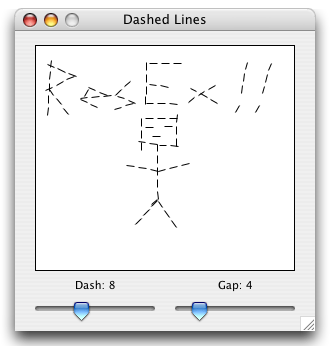
A Dashed DrawLine Method
The implementation of the DrawLine method will be extended by adding the following method to the Graphics class by placing it in a global module. There are two additional parameters, dash, and gap. Dash is the length of the line segments, and gap is the space between them. So 8, 4 would be 8 pixel long lines, and 4 pixel gaps in between. Here's the code:
Sub DrawLine(Extends g as Graphics, x1 as integer, y1 as integer, x2 as integer, y2 as integer, dash as integer, gap as integer)
dim x, y, angle as Double
dim xStep, yStep, lineStep as Double
dim xDash, yDash as Double
dim steps, iter as integer
// Length of Entire Pattern and Line
lineStep = dash + gap
// Angle Of Line
angle = atan2(y2 - y1, x2 - x1)
// Component Lengths of the Pattern and Dash
xStep = cos(angle) * (lineStep)
yStep = sin(angle) * (lineStep)
xDash = cos(angle) * dash
yDash = sin(angle) * dash
// Initial Coordinates
x = x1
y = y1
// Number of Dashes to Draw (length of line / length of pattern)
steps = sqrt((x2 - x1) * (x2 - x1) + (y2 - y1) * (y2 - y1)) / lineStep
// Draw Dashes
for iter = 0 to steps
g.DrawLine x, y, x + xDash, y + yDash
x = x + xStep
y = y + yStep
next
End Sub
What we do is find the length of the line, and count the number of dash-gap patterns will fit into it, loop that many times, and draw a line segment at the beginning of each of those pattern offsets, which are calculated by moving down the length of the line by adding the component (x and y seperately) lengths of the dash and gap added together. It's actually quite a simple idea, though it doesn't always yield peeerfect results. Sometimes the segments can appear to be at a slight angle from the slope of the line they're supposed to be building. This is simply a limitation of the DrawLine method. If we used a true pen pattern like from QuickDraw, we would no longer have cross-platform abilities, but it would work better on the Mac.
Finished
So there you have it. Here's a quick and easy way to add dashed lines to whatever kind of drawing you're trying to do. It doesn't work as well as a true pen pattern would, nor as efficiently, but for a pure RB implementation, it works! As always, you can download the project here.