
Good Morning, Class
Other than handling input and textures, the previous article covered everything or gave you a foundation project to start doing anything with in REALbasic and OpenGL. So, naturally, in this article we'll hit on both of these topics. RGB texture handling is done via a nice little class written by Asher Dunn (and slightly modified by moi) and input handling is a piece of cake so there's not much to talk about there.
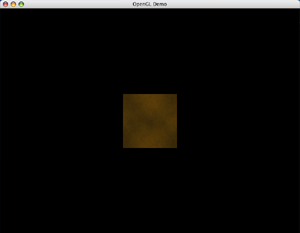
Getting a little fancier now. It rotates a textured square.
The GLTexture Class
Asher's GLTexture class takes a REALbasic Picture type (as well as some other OpenGL parameters) and deconstructs the image pixel by pixel and builds an RGB buffer in a MemoryBlock. The GLTexture class doesn't support any other texture types (ie no RGBA) but it wouldn't be very difficult to extend it to do so as the process of building the MemoryBlock is a piece of cake. It then generates a texture handle using glGenTexture and creates the texture with glTexImage2D. If you just want to get a texture loaded you really don't need to concern yourself with how it works, because It Just Does. So all we have to do is:
tex = New GLTexture(PicTexture, GL_LINEAR_MIPMAP_LINEAR, GL_LINEAR)
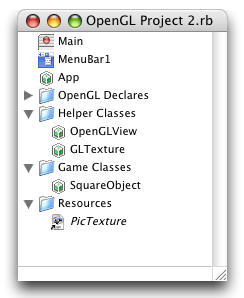 And we actually do this in the constructor of our new class, SquareObject, which represents the 3d (actually 2d in 3d space) square we're drawing. The Main window now has a property Square as SquareObject and instantiates it in the Thread's Run event before calling OpenGLView1.Run. In the OpenGLView's Render event it simply calls Square.Render.
Later if we had more objects in our world we could create a whole class structure and have each class either derrive from a common base or implement a common GLObject3D interface and fill an array full of them. Then to render each frame, the OpenGLView would just run through the array and call the Render method of each of the items causing them to draw. Of course we're not there yet, so let's not think about that.
Here's the new SquareObject Render method. Note that the SquareObject class has two new properties, tex as GLTexture (which is created in the SquareObject constructor using the line of code above) and Rotation as Double.
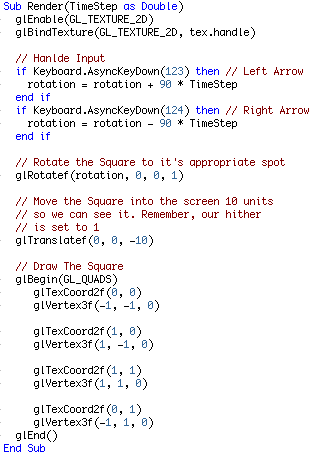
As you can see, this code also handles input by reading the keyboard for the left arrow and right arrow being pressed down. This is a simple demonstration of how you can read the keyboard for the state of keys. The value passed to AsyncKeyDown is a KeyCode, not an ASCII value. KeyCode values can be found in the User Guide on page 319 in the version I have. Your page may vary.
Finished
So there's handling input, and more importantly adding textures. Next week we'll see about loading them MD2 files. It's going to take a long time to write that tutorial! As always, you can download the project here.