
Multiple Menu Bars
Some applications are so packed full of different "mini" applications that the often remove entire menus and add new ones when switching between windows. AppleWorks is the first one that jumps to mind for me, but I know I've seen others over the years. AppleWorks is not only just a word processor, but it is a drawing, painting, spreadsheet, and also a presentation program. With all of this functionality, it's hard to squish all the necessary menu items into a single menu bar. I bet you'd have to have a big 20" widescreen monitor or more!
So the solution is simply to swap menu bars. When one kind of document is active, it uses a certain set of menus, and when it switches to a document of another kind, it removes the old menus and adds the menus appropriate for the current document type.
For a long time this wasn't possible in REALbasic, but in 5.0 REAL Software redesigned the menu system and allowed us to do this.
How it Works
At any point in time in you program, you can change the menu bar entirely. Before you used to only have one menu bar and that was it, but now create as many of them as you want, and set the current menu bar to any of them at any time.
There are two places to do this though. Both the Application class and Window class have a "MenuBar" property (of type "MenuItem" which is how menu bars are represented). If you want the new menu bar to be used for the entire application (when there are no windows open, and when any one of any of the open windows are active) then you set App.MenuBar to the new menu bar. If you want the menu bar to be specific to a certain window (like the currently active one) you can set the Window's MenuBar property.
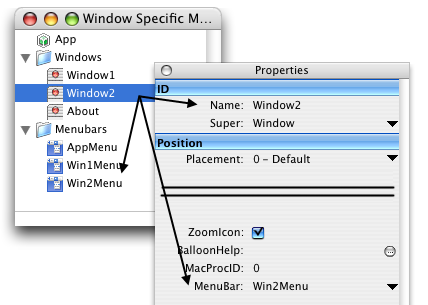
You can also either do this at runtime or at design time. If you were writing an AppleWorks-like program that had multiple document types, you could simply set the MenuBar property to the appropriate menu bar inside of the IDE at design time. Looking at the example above, any instances of Window2 (lets say it was our drawing "program") would automatically use the "drawing" menu bar Win2Menu. If you do the same for Window1 and have it use Win1Menu as its menu bar, when switching between two documents of different types, it would switch the menu bar for you.
Also, the App instance has it's own menu bar. Since all of the windows have their own menu bars, what you need to do is give one to the Application as well so that it knows what menu you want to use if their are no windows open. Menu Handlers and enabling menu items and all of that same way as they did before.
Finished
It's pretty simple, yes, but an interesting little part of REALbasic that's a little difficult to see considering MenuBar is waaaay down at the end of the properties window. As always, you can download the project here.