
Double Clicks
Well, I don't suppose I need to tell you what double clicks are, so I guess I'll just tell that we're going to make a canvas subclass which accepts double clicks on every platform, using the actual system double click time!
Design
Okay, it's really simple. Create a new class named "DblClickCanvas" with a super of Canvas. Create one new event named "DoubleClick", a property "mLastClickTicks as Integer", and a new protected method "WasDoubleClick() as Boolean". (Note that the image below doesn't show that it's protected. I'm too lazy to make a new image!) In the MouseDown event of our canvas we'll return true so that the MouseUp event is called. In the MouseUp event we'll simply ask: "if WasDoubleClick then DoubleClick" which will call the DoubleClick event when appropriate.
The WasDoubleClick Method
On the Mac, the toolbox command GetDblTime() returns the maximum number of ticks that can pass between clicks. On Windows, the function GetDoubleClickTime() returns the maximum number of milliseconds. What we'll do is convert the milliseconds value on windows into ticks by dividing by 1000 and multiplying by 60 (a tick is 1/60th of a second) to make the very very core of the code the same for each platform.
The code to get the double click time in ticks for every platform is:
dim doubleClickTime as Integer
#if TargetCarbon then
Declare Function GetDblTime Lib "CarbonLib" () as Integer
doubleClickTime = GetDblTime()
#else
#if TargetMacOS then
Declare Function GetDblTime Lib "InterfaceLib" () as Integer
doubleClickTime = GetDblTime()
#endif
#endif
#if TargetWin32 then
Declare Function GetDoubleClickTime Lib "User32.DLL" () as Integer
doubleClickTime = GetDoubleClickTime() / 1000 * 60
#endif
Once you have the doubleClickTime, all you need to do is check that the difference of the current time and the time of the last click (mLastClickTicks) is less than or equal to it! If it is, we return true. Regardless of whether it is or isn't, we always need to set mLastClickTicks to the current Ticks value since we need to record the time of each click.
// If the two clicks happened close enough together in time
if (Ticks - mLastClickTicks) <= doubleClickTime then
return true
end if
mLastClickTicks = Ticks
The Finished Product
That's all there is to it. Drag an instance of the DblClickCanvas class to a window and put some code in the DoubleClick event. Pretty simple! You can download the project here.
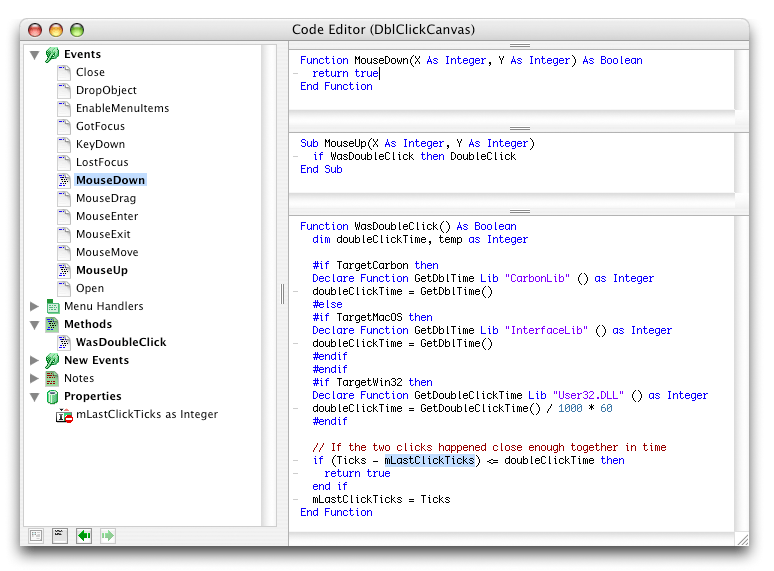
(Click on the image for a full view of the class)