
When you use the REALbasic Listbox control, sometimes it's nice to offer an "auto-find" feature. As you press keys on the keyboard, the Listbox should attempt to locate any rows that display text that matches the pressed keys. The REALbasic Listbox doesn't perform this functionality, but it's not difficult to implement it yourself. This week we'll show you how.
Prep
capitals, states, currentkeys Launch REALbasic and open the Code Editor for the default window - Window1. Add three properties to the window by choosing Edit-New Property.
Build the Interface
To create the interface for this project, open Window1 and add a Listbox, a Timer, and a StaticText control. Set the Timer's Period to 2000 in the Properties Window. Then, rearrange the various controls in the window to look like this.
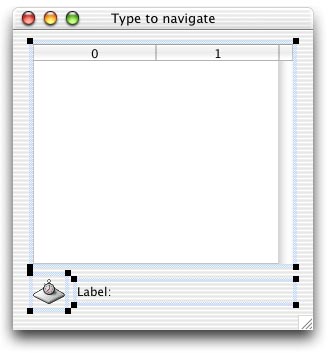
Add the Code
To set things up, add the following code to the Open event of Listbox1.
 //initialize things
 PopulateStates
 PopulateCapitals
 currentkeys = ""
Then, add the following code to the KeyDown event of the Listbox. This is where we track the keys that a users presses. As they press keys, we keep a running sequence of those keys. We also check to see if there is a match in the list using the LocateState method.
Listbox1.KeyDown//ignore the up and down arrow keys if (asc(key)=30) OR (asc(key)=31) then return false end if //accumulate and display the keystrokes currentkeys = currentkeys + key staticText1.text = currentkeys LocateState(currentkeys) return true
Next, add a little code to the Action event of Timer1. This resets the sequence of keypresses once every 2 seconds.
Timer1.Action//Reset the string //that tracks the keystrokes. //Apple says that this Timer's Period should //not be any longer than 2 seconds currentkeys = "" staticText1.text=""
Finally, add the code for the three methods you created earlier. One method does the search for a match between keypresses and the Listbox contents. The other two methods populate the Listbox with state and capital names.
LocateState
 dim i as integer

 for i=1 to 50
   if left(states(i),len(state)) = state then
     //found the keystroke
     listBox1.listindex = i-1
     //exit the for-loop
     //in a brute force fashion
     i = 51
   end if
 next
 dim i as integer

 states.append "Alabama"
 states.append "Alaska"
 states.append "Arizona"
 states.append "Arkansas"
 states.append "California"
 states.append "Colorado"
 states.append "Connecticut"
 states.append "Delaware"
 states.append "Florida"
 states.append "Georgia"
 states.append "Hawaii"
 states.append "Idaho   "
 states.append "Illinois"
 states.append "Indiana"
 states.append "Iowa"
 states.append "Kansas"
 states.append "Kentucky "
 states.append "Louisiana "
 states.append "Maine"
 states.append "Maryland"
 states.append "Massachusetts"
 states.append "Michigan"
 states.append "Minnesota"
 states.append "Mississippi"
 states.append "Missouri"
 states.append "Montana"
 states.append "Nebraska"
 states.append "Nevada"
 states.append "New Hampshire"
 states.append "New Jersey"
 states.append "New Mexico"
 states.append "New York"
 states.append "North Carolina"
 states.append "North Dakota"
 states.append "Ohio"
 states.append "Oklahoma "
 states.append "Oregon"
 states.append "Pennsylvania"
 states.append "Rhode Island"
 states.append "South Carolina"
 states.append "South Dakota"
 states.append "Tennessee"
 states.append "Texas"
 states.append "Utah"
 states.append "Vermont"
 states.append "Virginia"
 states.append "Washington"
 states.append "West Virginia"
 states.append "Wisconsin"
 states.append "Wyoming"
 listBox1.heading(0)="States"
 for i=1 to 50
   listBox1.addrow states(i)
 next
 dim i as integer

 capitals.append "Montgomery"
 capitals.append "Juneau"
 capitals.append "Phoenix"
 capitals.append "Little Rock"
 capitals.append "Sacramento"
 capitals.append "Denver"
 capitals.append "Hartford"
 capitals.append "Dover"
 capitals.append "Tallahassee"
 capitals.append "Atlanta"
 capitals.append "Honolulu"
 capitals.append "Boise"
 capitals.append "Springfield"
 capitals.append "Indianapolis"
 capitals.append "Des Moines"
 capitals.append "Topeka"
 capitals.append "Frankfort"
 capitals.append "Baton Rouge"
 capitals.append "Augusta"
 capitals.append "Annapolis"
 capitals.append "Boston"
 capitals.append "Lansing"
 capitals.append "St. Paul"
 capitals.append "Jackson"
 capitals.append "Jefferson City"
 capitals.append "Helena"
 capitals.append "Lincoln"
 capitals.append "Carson City"
 capitals.append "Concord"
 capitals.append "Trenton"
 capitals.append "Sante Fe"
 capitals.append "Albany"
 capitals.append "Raleigh"
 capitals.append "Bismarck"
 capitals.append "Columbus"
 capitals.append "Oklahoma City"
 capitals.append "Salem"
 capitals.append "Harrisburg"
 capitals.append "Providence"
 capitals.append "Columbia"
 capitals.append "Pierce"
 capitals.append "Nashville"
 capitals.append "Austin"
 capitals.append "Salt Lake City"
 capitals.append "Montpelier"
 capitals.append "Richmond"
 capitals.append "Olympia"
 capitals.append "Charleston"
 capitals.append "Madison"
 capitals.append "Cheyenne"
 listBox1.heading(1)="Capitals"
 for i=1 to 50
   listBox1.cell(i-1,1) = capitals(i)
 next
Conclusion
That's it for this week. As usual, you can download the completed project instead of typing it in. See you next week!