
Ever wonder how REALbasic programmers implement the "Check for Updates" feature found in so many apps today? This week we'll look at a simple example of how to do this.
Build the Interface
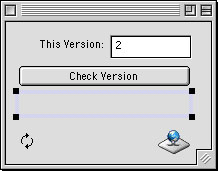
Launch REALbasic and open Window1. To this window, add a PushButton, an EditField, a StaticText control, a ChasingArrows control, and a Socket. Change the properties of each to match the following table:
| Control Type | Name | Other Info |
| EditField | EditField1 | |
| PushButton | PushButton1 | Caption = "Check Version" |
| Socket | httpSocket1 | super = "httpSocket" |
Notice that you don't have an httpSocket in your project yet. If you want to follow along, download the httpSocket from Dan Vanderkam and drag the httpSocket class into your project. Then go back and change the Super property of the httpSocket1 to httpSocket. If you don't feel like finding the parts, you can download the completed project at the end of this tutorial.
Arrange the interface to your liking. For example, it might look like this:
Source Code
Double click PushButton1 to open the Code Editor and add the following code to its Action event:
dim theURL as string
// a sample version-number-file on the resex server
theURL = "/realbasic/articles/old_articles/downloads_02/05-30-02_version.txt"
// Display the ChasingArrows
// to show we are at work
ChasingArrows1.visible = TRUE
// Prep the Socket and get the file (as a variable)
// The resulting variable will be available in the
// DLFinished event of httpSocket1
httpSocket1.httpSocket
httpSocket1.storeInFile=true
httpSocket1.Method = 1
theURL = httpSocket1.FormatURL(theURL)
httpSocket1.GetFile(theURL)
Finally, navigate to the DLFinished event of httpSocket1 and add this code:
dim myversion as integer
statictext1.text=txt
myversion=val(editfield1.text)
// Hide the ChasingArrows
// to show we are at finished
ChasingArrows1.visible = FALSE
if val(txt)>myversion then
MsgBox "You need to update!"
elseif val(txt)<myversion then
MsgBox "Your version is newer than the currently available version!"
else
MsgBox "Your software is current."
end if
Conclusion
That's it...short and sweet. The code downloads a file I've placed on the Resex server which holds a version number. Once downloaded, we simply compare the version number that is in that text file with the version number we've designated for this application. Then, we display an appropriate message. You can download the finished project here. See you next week!