
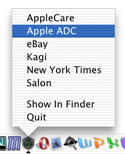
 If you're like me, you have a dozen passwords that you use for a variety of sites on the Internet. After your collection grows beyond a few passwords, it becomes very difficult to memorize them all. Today we'll built a quick little utility that displays your favorite sites in the OS X Dock. Selecting a site will place your password for it on the clipboard.
Introduction
Today's project requires that you first go to Will Cosgrove's site to download his Carbon Events Plugin. He charges a nominal fee to use the plug-in, but it's well worth it if you are a Mac OS X developer. The plug-in adds all sorts of useful OS X functions to REALbasic. The demo plug-in will let you see how it works and is functional enough to complete this tutorial.
Interface
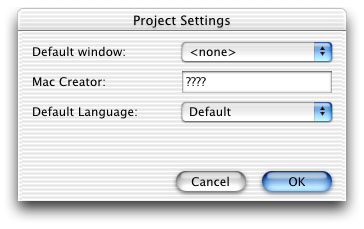
The interface for today is very stripped down. In fact, there really isn't an interface except for the the items listed in the Dock. After installing the plug-in in the Plugins folder, launch REALbasic and select Edit-Project Settings. Choose "None" from the "Default Window" popup menu.
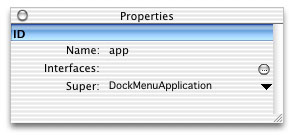
Next, create a new class by selecting File-New Class. Name the class "app" and choose "DockMenuApplication" for the Super property.
Source Code
The code for today's project is also pretty simple. We will add a list of our favorite sites (sites that require passwords) to the popup menu of our application's Dock icon. Navigate to the Open event of the app class and enter the following code:
AppendDockMenuItem "AppleCare"
AppendDockMenuItem "Apple ADC"
AppendDockMenuItem "eBay"
AppendDockMenuItem "Kagi"
AppendDockMenuItem "New York Times"
AppendDockMenuItem "Salon"
Finally, navigate to the HandleDockMenu event of the app class and add this code:
dim s as string
dim c as clipboard
c=new clipboard
s = GetDockMenuItemText(index)
select case s
case "AppleCare"
c.SetText "123"
case "Apple ADC"
c.SetText "456"
case "eBay"
c.SetText "789"
case "Kagi"
c.SetText "abc"
case "New York Times"
c.SetText "def"
case "Salon"
c.SetText "ghi"
end select
This list of passwords is fake, but you get the idea. Whenever a user chooses, say, AppleCare from the Dock menu, the HandleDockMenu event fires giving us the dock menu item's index. We then use that index to learn about the text that is contained in that menu item and act accordingly by pasting a "password" to the clipboard. A resourceful REALbasic programmer will notice that this project can be improved in many ways. Generally it is a bad idea to hard code information like passwords and web site names. These clearly would have a better home in a text file. That way you could add more links to the list later and the application will just display them. For the sake of this demo, we chose to hard code the information.
Conclusion
Well, that's it for this week! As usual, you can download the finished project in case you get stuck. Have fun and see you next week!