
This week's project is a quick little hack that has some unique uses. We'll look at how to execute JavaScript in a browser remotely from a REALbasic project. This functionality gives you many opportunities for saving time as well as for playing practical jokes.
Preparation
For this project, we will use Internet Explorer as the browser. Internet Explorer has the ability to execute JavaScript code via AppleScript. And, since you can use AppleScripts in REALbasic, you can in turn control JavaScript from REALbasic project. To get started, launch the AppleScript Script Editor and create the following script:
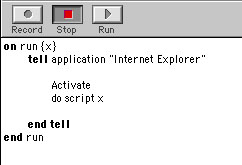
Save the script, naming it "DoScript.script" (without quotes) and quit Script Editor.
Build an Interface and Add the Code
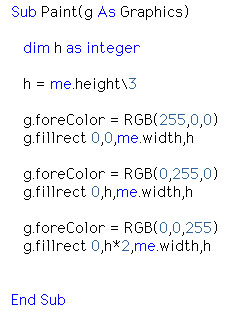
Launch REALbasic and open the default window, Window1. From the toolbar, add a Canvas control and resize it to fill the window. Double click the Canvas and navigate to the Paint event. To it add the following code:
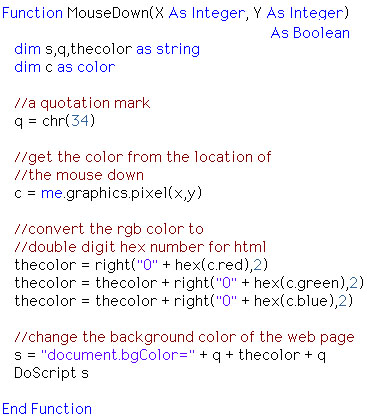
Next, move to the MouseDown event of the Canvas and enter this code:
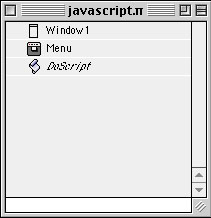
Finally, drag the AppleScript you created earlier into the REALbasic Project window.
Conclusion
When you run the project, it should look something like this:
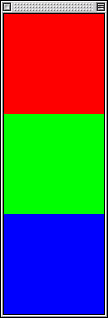
Clicking on a colored square will cause the background color of the current web page to change. This might be useful if you navigate to a web page that is difficult to read due to background and text colors clashing. If you are an "old-school" HTML scripter, you might appreciate this script for testing potential web page colors. It can also be used as a funny little trick to play on your friends. Just set a REALbasic Timer to periodically change your unsuspecting victim's web page color. Whatever your choice, it illustrates a neat function and hopefully also gives you some ideas for exploring how JavaScript and REALbasic can interact to produce some interesting tools and hacks. As usual, you may download the completed project. Have fun and see you next week!