|
12/26/01
Today's News by Cletus™ We have a winner in the PolyPhontics theme contest. Congratulations go out to "Fimwat" who designed the very orginal "Camouflage" theme shown below. Thanks go out to all who entered from ResExcellence and BEST Software Design's Software.
Have a Press Release? Software or General News? Submit it here: Suggestions!
Polling Place 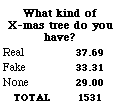 Polling Place by Michael Coyle Polling Place by Michael CoyleIt was pretty much a three-way tie in this week's poll. Interestingly, the ResEx poll results are very close to the results posted by the National Christmas Tree Association. While the family has enjoyied the return to a live tree this year, ask me in a week after I have spent the afternoon pulling needles off the carpet! Because of our shortened week, there will be no Polling Place this week.
Tools of the Trade Tools of the Trade. by Michael CoyleThis Christmas, I used my Powerbook and digital camera to make the night a little more special. At the end of the evening, the guests took with them a freshly burned CD full of photographic memories. Maybe by next December, I'll have a digital camcorder!
If you haven't tried it in a while, now would be a good time to take another look at Mozilla, the Open Source web browser. As each revision moves closer to the 1.0 release, this browser is becoming outstanding. I use it daily in MacOS 9, MacOS X, and PPC/Linux.
The Hess Memorial Macworld Events Page is up with information on the festivities planned for the upcoming convention in San Francisco.
12/24/01 - 12/25/01
Ho Ho Ho! Merry Christmas, and Happy Holidays to one and all!
The staff of ResExcellence will not be updating the 24th and 25th. If you really need a UI fix, browse the various sections of ResExcellence. I'm sure there must be something you previously missed!
Thanks to Scott Meinzer for the special Christmas ResEx Logo.
Today's News by Cletus™ Contest is officially over. Please check back on Wednesday to see if you won.
The last plug for the final contest of 2001 at ResExcellence. Let's make the last two days the biggest for the PolyPhontics Theme Contest. Download the program, create a super cool theme and submit it. Your name and theme could live forever on BEST Software Design's theme page!
 There are very few programs that I "can not live without". Perhaps first on the list is TypeIt4Me by Riccardo Ettore. So when Riccardo allowed me to beta test TypeIt4Me X. I did not hesitate. I was anxious to get even partial functionality back with a beta. Wrong! With the first beta I tried, I had almost 90% functionality. By the time we received the Public Preview version we had 99.9% functionality. Now for some mass testing. Download the new Public Preview of TypeIt4Me X for Mac OS X. Try it out. Send reports and let's contribute to a super great program! I have included a couple of shots of the new TypeIt4Me for Mac OS X below: There are very few programs that I "can not live without". Perhaps first on the list is TypeIt4Me by Riccardo Ettore. So when Riccardo allowed me to beta test TypeIt4Me X. I did not hesitate. I was anxious to get even partial functionality back with a beta. Wrong! With the first beta I tried, I had almost 90% functionality. By the time we received the Public Preview version we had 99.9% functionality. Now for some mass testing. Download the new Public Preview of TypeIt4Me X for Mac OS X. Try it out. Send reports and let's contribute to a super great program! I have included a couple of shots of the new TypeIt4Me for Mac OS X below:
 |  | | TypeIt4Me in the Dock | Menu bar while running TypeIt4Me | NoShift Needed 3.1 is the newest version of this program that changes number keys to their punctuation equivalents. Useful solution in a variety of situations.
Closed Folders 1.0.1 requires Mac OS 8.5 - 9.2.x and helps keeps track of recently closed folders in the Finder. Full details on the release are available here. Sounds pretty cool!
Eyecon 1.0.1 is a utility to quickly arrange and align icons in the Classic MacOS Finder's Folder Windows; it can create icon patterns out of images, and serves as a general layout program for Classic MacOS folders.
Simpleshade 1.0 uses scripting to collapse/uncollapse finder windows. "Keep Simpleshade in your dock to immediately collapse or uncollapse all Finder windows with a single mouse click. To put it into your dock, just double-click its icon."
Startup Doubler 2.6.2 by Marc Moini provides software acceleration that "compensates for less-than-optimal disk performance to make extensions, control panels, the Finder and startup apps load faster." Version 2.6.2 is a maintenance release adding support for Mac OS 9.2.2.
AppleScript Central updates once again with several new scripts. Most are for Entourage or Outlook Express. One is called "iTunes Control Suite 1.0.0" and is for [surprise] iTunes! Stop by the site and look around.
Edward F. O'Rourke has checked back in to report that a new version of Classic? is available. Release a couple of weeks ago, it had to be pulled because of a nasty memory leak. This problem has been addressed and the new version is ready for download. Classic? places an icon in the Dock indicating if the Classic system is running or not. Matthew Fahrenbacher let me know that Alarm Clock S.E. has just been updated to version 2.0. The new release sports a calendar/day planner with built in reminding system, nicely complementing the advanced alarm system already built into S.E. Also of note is the much update documentation, which can be found here. Also the cool new sinusoidal and linear volume and rate settings for playing music. Cron like scripting ability is still intact; other random bug fixes and optimizations were also performed.
Folder Icon X 1.0.8 is an application providing a simple way to create a customized folder and document icons by placing another icon on a standard plain icon. It fully supports "drag & drop", live icon resize, and can load any icons from any files or folders. New in this update: Saved icons are now in ".icns" format.
Have a Press Release? Software or General News? Submit it here: Suggestions!
Tools of the Trade Tools of the Trade. by Michael CoyleDo you use Apple's Personal Web Server? Ted Pearson found how to modify the error pages you receive from MacOS Web Sharing. The secret is in the Web Sharing Extension. The "html" resources contain the error pages. For example, 404 error, page not found. The text contained in these ID numbers is simple html. Just paste in your cool pages from a favorite html editor. 
KDE-Look is like ResExcellence for KDE. They have tons of themes and icons for the Linux Desktop (including a few from yours truly). Even if you don't run Linux, take a look at all the desktop pictures. They're sorted by size and the majority would look great on your Mac.
One downside to continually updating MacOS X is recreating all the customization tweaks. Icons, Dock, and hacks all need to be reapplied. That's why I was surprised that after updating to MacOS X 10.1.2. all of my tweaks remained in place. The most noticeable change on my Powerbook is that it now recognizes my Compact Flash PC Card adapter from my camera. But hey Apple, I see a flaw in the Software Update Control Panel! If you do not want to install a listed upgrade, there is no way to delete it. For example, I couldn't care less about the Security Update for Internet Explorer. I don't use the browser. Yet I must continually be prompted to update by the Control Panel. Updated: Doh! Jason Miller was the first to tell me I'm a knucklehead. It seems you can omit items from the Software Update program with the menu option Update--Make Inactive. More info can be found at Mac OS Hints.
User Contributed Splash Screens User Contributed Splash Screens. by Michael CoyleWin a PowerMax gift certificate worth $50 by contributing to ResExcellence! (How?)

Replace your desktop with a real time-rendered image of the earth!
Snapshots by Jeremy Hoesly Snapshot Theme: The last grains of sand fall in 2001’s hourglass. Now would be an excellent time to submit a snapshot commemorating this year or hailing the coming of the new year. Please include “Snapshot Theme” in the subject field of your email to ensure priority.
Feast upon Friday’s snapshot banquet: - A desktop picture comprised of brilliant shades of red and a modified version of Kazuomi Suzuki’s Metal Fish K-Scheme debut in this submission from Jeremy Erhart. iTunes is shuffling soundtracks in the upper left.
- This snapshot from Luvr touts the “Indigo Apple” desktop picture. iTunes is rounding up songs in the lower left, and MenuCalendar, a handy little calendar menubar utility, is displayed in the upper right.
- This contribution from Minchan Shim sports the “Global City Lights” desktop picture from NASA’s Planetary Photojournal. Windows XP Professional is running under emulation at lower center, and iTunes is cranking out music in the lower right. Icons from Xicons are scattered throughout.
- Alan Thompson contributes this screenshot touting Digital Blasphemy’s “Fluorescence” desktop picture. Pine, a Unix mail program, is running in the Terminal window along the top. Icons from Xicons and Stimpsoft wander about.
Show us how you use your Mac. Read the guidelines and then send away!
Icon & Desktop News: by Dan  Ho Ho Ho, Our Holiday Postcard Section is overflowing with Christmas Cheer! So, why not take a few minutes and browse the selection of great cards to see what sort of cards you might wish to send to someone you care about. It only takes a few minutes, costs nothing, and will certainly bring a smile to someone's face. You will be glad you did! Ho Ho Ho, Our Holiday Postcard Section is overflowing with Christmas Cheer! So, why not take a few minutes and browse the selection of great cards to see what sort of cards you might wish to send to someone you care about. It only takes a few minutes, costs nothing, and will certainly bring a smile to someone's face. You will be glad you did!
Icons - Desktops - Postcards: Tiz the season for some GUI goodies! To hold you over the long well deserved holiday, We've got (6) New Desktops, (3) New Icon Sets, and of course, updated "News From Around the Web". All on display for today's update!
- "Xenogenisis Toolbar Icons" submitted by Mathew Bice, are the official toolbar icons for the Macintosh OS X.1 replacement theme Xenogenesis v.1.2. This new Theme for Duality is available for download (with icons already integrated) at http://www.desktopper.net.
- Just in case you don't have enough Christmas decorations or are a last minute shopper, "OSXmas Icons" by Flax Creations will make a nice stocking stuffer. This holiday icon set includes a large assortment of festive items, with everything you might need from candles to stockings.
- How about a little holiday nostalgia from MAJArch Studios? Web Mistress Melissa provides us with a set of 4 Classic icons starring the "White Christmas" quartet!
- "Think Stooges" and "Art Desk #9" are two new creations from the desktop master himself, Scott Chitwood of Rampant Mac. Think Stooges was born when Scott's sister-in-law gave him a really cool mouse pad for his birthday back in October and it was just begging to be scanned. The Art Desk Series gains a new sibling, albeit very subdued in color compared to the others in his series, but Scott thinks it looks quite sharp on ye ole desktop. Both backdrops are available here in 1280x resolution, other sizes can be found at Rampant Mac.
- "Waterdrop Vortex" by Mario Garza illustrates a dynamic 3-D illusion without all the fancy software. Lovingly crafted in Photoshop, this one comes in 1024x and 800x resolutions.
- The preview doesn't do this one justice, so you might want to take a closer look at "Swirls", created by Bradford J. Wiles of the popular MacMonkies website. This interesting "other worldly" backdrop comes in 1024x and 800x resolutions.
- Bill Meador bravely submits "Golden Orbs" the results of his first attempt at using Bryce 5. Bill teaches Tech Apps at a small Junior High School and is just getting into teaching his students how to make 3D pictures. I'm sure you all will agree that Bill has a nice head start on his students. Comes in 1024x resolution.
- Not planning on upgrading to OSX for some time or god forbid not at all, but long for all the goodies? "OSX Desktops" are the first of numerous sets to come that include some of the beautiful abstract compositions which come bundled with Apple's upgrade. Volume one includes 3 backgrounds in 1280x resolution.
 Seasonal Desktop Enhancements: Seasonal Desktop Enhancements:
(All the holiday stuff you may have missed and can't live without)
"Smily Xmas" Icons by Ramon Tejas of Live Pencil "Tannenbaum-2001" by Scott Chitwood of Rampant Mac "XBulbs" by Samuel Krueger of PixelJerk "Merry Christmas" and Happy Holidays from Macmonkies "Green Bows" from Lorin Rivers, product manager for Real Software (Real Basic) "Dreaming of a White Christmas" from MAJArch Studios "Ol'Time Xmas" by Micah Wright "Christmas Desktops" by Scott Meinzer  News From Around the Web: News From Around the Web:
Live Pencil updates with new icons, animations, and all sorts of other great things to fill your stocking with! Franks Second Corner updates with 12 new Desktops (the December Collection) To everyone at ResEx and all Visitors and Users: The Best for 2002. Have all a nice Christmas. Eye9design, Home of the original "Cube Wrapper" is opening it's doors wide and staying open all night long to provide you with and incredible assortment of goodies. Ra's Page updates with 4 new desktops pics. White Fire Ministries updates it's image gallery with a new 3D rendered series by Andy Moraitis entitled Seasons of The Heart. The site design has also been revised and is now fully dynamic! Please stop by and check out their latest happenings. Mandolux updates with 10 new desktops about the USS Aircraft Carrier Kitty Hawk and 20 new desktops continuing his series of the United States Marine Corps. MacMonkies announces their Crazy Coconuts Holiday Giveaway! Over $200 in merchandise are up for grabs. Prizes include: A brand new Phillips DVD Player with remote, Jim Carrey's "How the Grinch Stole Christmas" on DVD, and "The Family Man" on DVD. Hurry over and register for your chance to win one of these great prizes! Also, MacMonkies updates with new News and pics to Make Your Mac Happy! Check 'em out! Flax Creations updates with 5 beautiful new desktop pictures. Check them out! The Iconfactory is pleased to announce that its latest freeware icon collection is now available for download in The Iconfactory Showroom. World of Aqua: "OSXMas" contains festive hard drives, ornaments, aqua snowflakes andmore that are sure to bring holiday cheer to any Mac OS X desktop. DV Graphics will be releasing a new icon set called "Glass IV" in the coming weeks. Rene of Happicon announces the birth of some new icons: XmasOnes (2 fun icons) Matthew Bice updates his OSX Icons page with some new icons. Our favorite icon artist Ilona Mellis of iliCon came up with a great idea, and is releasing a comprehensive collection of her unique desktop artwork on CD. You can be a proud owner of the iliCon-on-CD, which includes more than 2500 icons and hundreds of images. All your favorite iliCon stuff is on this CD and more since it is for both Mac and Windows! So what's up WWW? Icons? Desktop pictures? News? Inform us! We'll post it!
REALbasic Tutorial: ResExcellence Holiday Lights by Erick Tejkowski | Just in time for the holidays, ResExcellence has some nifty decorations to light up your desktop. Choose color and direction or even mass produce them. These lights won't tangle and the bulbs never burn out. String some up today!
(Continued...) |

Today's News by Cletus™ How does a $60.00 gift from BEST Software Design's and ResExcellence sound for Christmas? Pretty darn good if you ask me. That is exactly what one lucky ResExcellence reader will receive for winning the PolyPhontics Theme Contest this week. The PolyPhontics Theme Contest requires a little creativity and imagination from you. But the prize is well worth it. Create a theme, submit it and you are entered. BEST Software Design will choose the winner. Full details are available here.
 Default Folder 3.1.3 from St. Clair Software, offers several new features and bugs fixes to this Open/Save dialog box enhancement for the Classic side of the Mac. By the way, there is going to be a Mac OS X version of Default Folder. In fact it is already up and running according to this page. Default Folder 3.1.3 from St. Clair Software, offers several new features and bugs fixes to this Open/Save dialog box enhancement for the Classic side of the Mac. By the way, there is going to be a Mac OS X version of Default Folder. In fact it is already up and running according to this page.
Jerome Foucher has updated his premier software A-Dock. This Classic application switcher performs very similar to the Dock in Mac OS X. Changes in this version include: - Should have fixed the "black-text on black-background" tool tip problem (although I've never been unable to reproduce this problem)
- Dragging a document without any creator type and any file type (like a document coming from a Mac OS X volume for instance) onto an application in A-Dock would fail to open it. Fixed
- Updated the built-in QuickTime skin
- Installation of new skins is now even simpler : just double-click on the skin file. A-Dock will copy the skin file in its skins folder, and select this new skin.
Smart Scroll 3.7.3 is a maintenance release adding support for Mac OS 9.2.2 to this Control Panel which allows scroll speed control and proportional scroll bar tabs.
 PandoCalendar hasn't seen an update in a while, but that has changed with the release of version 5.7.5. PandoCalendar is an excellent small Christian calendar. Works with systems Mac OS 9.1 or higher with CarbonLib and Mac OS X 10.0 or higher. Here is a partial summary of changes in this version: PandoCalendar hasn't seen an update in a while, but that has changed with the release of version 5.7.5. PandoCalendar is an excellent small Christian calendar. Works with systems Mac OS 9.1 or higher with CarbonLib and Mac OS X 10.0 or higher. Here is a partial summary of changes in this version:
Worked around a bug in Mac OS 9 that would cause importing and exporting to fail. Fixed a bug that would cause importing of recurring notes from versions 5.0-5.0.3 to fail. Fixed a bug that could cause search result windows to display very thin and not be able to resize wider. Worked around a bug in Mac OS 10.1 that would cause sheets attached to the calendar window to display in the wrong place.
HexEdit v.1.75 has been updated. From the read me: "The major features in 1.75 (over 1.74) is the addition of Find and Replace! Also, you can no longer edit a file in two windows, there are new warnings about editing an empty fork (file), all versions can now safely open files starting with a period, and several display bugs were fixed.
piDock 1.4.4 fixes a bug that caused menus to appear half-off the screen and also fixed a bug that caused menus to close prematurely.
SwapTop allows users to set up a schedule to "automatically select a random desktop picture, to download a new picture every day, and to search the WebShots image archive. SwapTop runs natively on Mac OS X, supports multiple monitors, and maintains an archive of previously downloaded pictures."
The very popular WindowShade X was recently updated to version1.5. This "Haxie" adds WindowShade features to OS X. Something that should have been there to begin with. Oh...IMHO!
Have a Press Release? Software or General News? Submit it here: Suggestions!
Tools of the Trade Tools of the Trade. by Michael Coyle After reading the recent MacOS X tutorial on disabling the System Beep while changing the volume via the keyboard, Dan Sauve sends this tip for tricking the system into disabling the alert sound at any volume level regardless of how and where you change the level. I thought you might like to know that it's easier just to create an empty (no sound) Silence.aiff file and place it in the /System/Library/Sounds/ directory on your Mac OS X volume. The file will be visible in the Sound PrefPane in the System Preferences app. Selecting it will result in no sound (an empty sound) being played when you change the volume.
Tom Whalen was clever enough to use the free iMovie an audio editor.
- Make your mix by importing files, making fade ins and fade outs and using apple-T. (used to spilt a video or audio file at playhead)
- Once you're done, convert the movie to quicktime format.
- Open iTunes, and go to Convert To MP3.
- Pick the converted quicktime file.
- Have it converted and...ba bing! Instant edited audio!
Setting Mouse Button Emulation in YDL Linux.  Since the Apple computers ship with a single button mouse, emulation of the second and third buttons is necessary under PPC/Linux. The default install of Yellow Dog Linux 2.0 and 2.1 assign the buttons to F11 and F12. This may work well for you, but if you're left handed like me, the upper right corner of the keyboard is a little awkward. This little tutorial will allow you to change the two keys for mouse button emulation to just about anything. (Continued...) Since the Apple computers ship with a single button mouse, emulation of the second and third buttons is necessary under PPC/Linux. The default install of Yellow Dog Linux 2.0 and 2.1 assign the buttons to F11 and F12. This may work well for you, but if you're left handed like me, the upper right corner of the keyboard is a little awkward. This little tutorial will allow you to change the two keys for mouse button emulation to just about anything. (Continued...)
The latest version of Benjamin Herrenschmidt's rsync kernel works great on my new Titanium Powerbook. Airport and Sleep are supported (update your pmud) as are screen dimming and sound. PenguinPPC has comments from Ben on additional items supported in his latest work, but if you've never compiled your own kernel, let's see if I can make your life a little easier. Download my prepared kernel and libraries and follow the instructions to install them. If it is AirPort support in which you are primarily interested, follow the instructions on this page and adapt them for your network. Good Luck!
User Contributed Splash Screens User Contributed Splash Screens. by Michael CoyleWin a PowerMax gift certificate worth $50 by contributing to ResExcellence! (How?)
Snapshots by Jeremy Hoesly ’Tis the season to be submitting. Now’s the time to start sending in those holiday snapshots, and please make sure to denote your contribution with “Christmas” or another holiday term in the subject line of your email for priority.
Fix your eyes on Wednesday’s snapshot selections: - This snapshot touting a rendered desktop picture of Earth, Luna, and Solar is featured from an anonymous dropbox contributor. Awesome!
- Dragan Bajs showcases another meshing of OS X and X-Windows in this submission. PWM, an X-Windows window manager, works in tandem with XDarwin to bring X applications to Apple’s new OS. Icons from Xicons are distributed throughout.
- This OS X submission from Blackintosh sports a woodgrain desktop picture. SoundJam is standing by along the top.
- Well you’ve seen him do his dirtywork on automotive industry logos; so I guess I shouldn't be surprised to see that Calvin got a hold of the Windows XP logo as seen in this contribution from Benjamin Harrison. iTunes is cranking out music in the lower left, and Calvin icons from Xicons lurk about.
Feel the joy of submitting! Give us a gander of your desktop.
Icon & Desktop News: by Dan Ho Ho Ho, Our Holiday Postcard Section is getting chock full of Christmas Cheer! So, why not take a few minutes and browse the selection to see what sort of cards you might wish to send to someone you care about. And, if you're in the mood, by all means go ahead and whip up a couple of your own greetings to add to the Archive. Click here to read the guidelines for Postcard making and submissions, and get yourself in that holiday spirit.
Icons - Desktops - Postcards: Tiz the season for some GUI goodies! We've got (5) New Desktops, (2) New OSX Icon Sets, New Postcards and of course, updated "News From Around the Web". All on display for today's update!
- Aqua Gel Button Icons Vol.1" by Flax Creations, combines the best of both worlds with the Aqua interface. Stylish gel buttons merge with OSX System icons to create a useful and attractive set. Also included are a number of "fruity" colored folders, and an Aqua desktop pattern swatch to complete the look. Volume one features 19 different icons. Keep your eyes out for the release of volumes 2 and 3 soon.
- With the invention of 32 bit 128 x128 icon architecture and a few fantastic tools, darn near anything is possible. Hein Mevissen takes advantage of the fact with his "New Hard Drive Icons" for OSX. This small set includes four bad-boy hard drive icons for you to choose from.
- The people have spoken! Mario Garza's original Glass Applet desktop has been downloaded so many times in the last month, that he decided to expand the offering with "Glass Applets-Colors" This new set of desktops includes the original Glass Applet pic, now transformed into 5 different colors, all in 1024x resolution.
- Tigger, the photogenic tabby can be found most days lounging around Bradford J. Wile's house, and when in the mood "assists" with the production of Brad's popular website MacMonkies. Being the feline that he is, Tigger does his best to wish a purrrfect Merry Christmas to all, while trying not to look like such a "Scrooge!". This holiday desktop comes in 1024x and 800x resolutions.
- Melissa of MAJArch Studios turns her creative hand in a new direction with another "cool" Bryce 4 creation titled "Silver Mountain". This 3-D rendered desktop comes in 1024x resolution.
- Ever feel like you were "Switched" at birth? Bradford J. Wiles of Macmonkies ponders this interesting psychological question with his latest desktop creation. Comes in 1024x and 800x resolutions.
- Roy H. send us a stylish "Swirls" thingy desktop, made while he was doodling around in Photoshop. Comes in 800x and 1024x resolution.
Seasonal Desktop Enhancements:
(All the holiday stuff you may have missed and can't live without) "Smily Xmas" Icons by Ramon Tejas of Live Pencil "Tannenbaum-2001" by Scott Chitwood of Rampant Mac "XBulbs" by Samuel Krueger of PixelJerk "Merry Christmas" and Happy Holidays from Macmonkies "Green Bows" from Lorin Rivers, product manager for Real Software (Real Basic) "Dreaming of a White Christmas" from MAJArch Studios "Ol'Time Xmas" by Micah Wright "Christmas Desktops" by Scott Meinzer News From Around the Web: MacMonkies anounces their Crazy Coconuts Holiday Giveaway! Over $200 in merchandise are up for grabs. Prizes include: A brand new Phillips DVD Player with remote, Jim Carrey's "How the Grinch Stole Christmas" on DVD, and "The Family Man" on DVD. Hurry over and register for your chance to win one of these great prizes!Also, MacMonkies updates with new News and pics to Make Your Mac Happy! Check 'em out! Mandolux updates with here are 15 new desktops, continuing the United States Marine Corps Collection. Flax Creations updates with 5 beautiful new desktop pictures. Check them out! The Iconfactory is pleased to announce that its latest feeware icon collection is now available for download in The Iconfactory Showroom. World of Aqua: "OSXMas" contains festive hard drives, ornaments, aqua snowflakes andmore that are sure to bring holiday cheer to any Mac OS X desktop. DV Graphics will be releasing a new icon set called "Glass IV" in the coming weeks. Live Pencil updates with all sorts of new goodies for the Holidays! Rene of Happicon announces the birth of some new icons: XmasOnes (2 fun icons) Matthew Bice updates his OSX Icons page with some new icons. Our favorite icon artist Ilona Mellis of iliCon came up with a great idea, and is releasing a comprehensive collection of her unique desktop artwork on CD. You can be a proud owner of the iliCon-on-CD, which includes more than 2500 icons and hundreds of images. All your favorite iliCon stuff is on this CD and more since it is for both Mac and Windows! So what's up WWW? Icons? Desktop pictures? News? Inform us! We'll post it!
REALbasic News by Erick Tejkowski - Buy REALbasic 3.5, get REALbasic 4 FREE
- Ono? Oh yes!
- Office Buttons
- Counting Words?
Find this and more in today's REALbasic News. (Continued...)
Replace your desktop with a real time-rendered image of the earth!
Today's News by Cletus™ I think we can squeeze in one more giveaway in 2001. This giveaway will call on the creative juices of all ResExcellence readers. BEST Software Design's is offering a free registration to the person who can design the best theme for their sound authoring software— PolyPhontics. That is a $59.99 value! PolyPhontics is the only full featured DLS and SoundFont® compatible authoring tool available for the Macintosh today. Creation of themes is very easy. Simply download PolyPhontics, open up one of the current theme files, and work on the 4-5 PICT resources. Details about the contest are available here.
Your ResExcellence Software Editor has been very sick with the flu. I am sure if you will understand a brief update. I know many of you have written in with suggestions for items. I will try to get to them next update. Body permitting.
Edward F. O'Rourke IV had to pull Classic? because of a nasty memory leak. He is working hard on correcting the problem. In the mean time, he has released another Mac OS X item. It is called "Classic Startup Sound." It allows you to play a sound when you login. Similar to placing a Startup Sound in the System Folder.
 FileGeek 3.3.4 is a tool for viewing and editing file attributes. It is now compatible with 9.2.2. No longer crashing the system when you try to get the icon for a file. FileGeek 3.3.4 is a tool for viewing and editing file attributes. It is now compatible with 9.2.2. No longer crashing the system when you try to get the icon for a file.
HotApp 1.0RC6 allows hot keys to be assigned any Mac OS X app, file, or URL. This update provides several fixes and enhancements: - HotApp is now a daemon and do not show up any user interface on the system (not even in the menu bar!)
- HotApp is now part of the System Preferences of Mac OS 10 : start the System Preferences application in order to configure HotApp
- The HotApp Preference Pane let you start and stop the key listener application at will
- New system action : Go To Finder and hide other
- New system action : start Classic environment
- New system action : start Screen saver
The Kaleidoscope Scheme Archive has also seen a recent update. Adding three new and nine updated schemes to its vast archive.
Have a Press Release? Software or General News? Submit it here: Suggestions!
Polling Place  Polling Place by Michael Coyle Polling Place by Michael CoyleOuch! 24 percent of readers have had troubles because of the @Home/ATT Broadband debacle. I know a lot of the people around the office have been complaining too. In many cases the service in intermittent or if you have been switched to another provider, configurations don't work and the systems appear top be overloaded. What a mess. Hopefully, what ever system emerges from this mess will be more stable and provide better service. While the Christmas Tree is most closely associated with the Roman Catholic religion, I know many of my fiends from a variety of religions erect a tree as a festive holiday decoration. This year in the Coyle house, we switched back to a real tree that was cut down at a farm over the Thanksgiving weekend. This week's Polling Place asks, "What kind of X-mas tree do you have?"
Tools of the Trade Tools of the Trade. by Michael Coyle The mysterious Duality 3 has been released as a public beta. It's the newest theme installation utility from Colin Cornaby. Not only does Duality install theme files, but now it can handle system icon sets! And like the Software Update control panel, Duality can query a remote server to look for new themes. Please report any bugs you encounter. It would be nice to see this take hold as a standardized way of installing theme elements and icon sets.
X3, the process monitor dock applet, has been updated with 8 more spinning objects, improved memory management, Dock menu and Process menus, and more goodies.
 Disable Beep When Changing Volume in MacOS X Disable Beep When Changing Volume in MacOS X
This helpful tip from Ammon Skidmore will save me plenty of embarrassment on the train. The problem arises when I leave my sound level set on the maximum. As I sit on the quiet train for the ride home, eventually the Powerbook speakers squawk with an error. My fellow passengers must suffer though a series of beeps as I use the keyboard volume buttons to lower the volume to a manageable level. This little modification removes the audible feedback as you change the volume. (Continued...)
User Contributed Splash Screens User Contributed Splash Screens. by Michael CoyleWin a PowerMax gift certificate worth $50 by contributing to ResExcellence! (How?) - What is it about the winter season that has guys making MOSS of woman in bikinis? Oh well. Here's a nice one of Brooke Burke from David Messick!
- We can try to squeeze in one more holiday submission. Gift Wrap is the newest iTunes Skin from André Guay.
- Taking a break from making his cool icons, Hein Mevissen put together a Dock Poof featuring the flagship of the Federation: The Enterprise.
- Brian Freeman updated his Mosters Inc MOSS for macOS 9.2.2.
- A contributor named "Bleeding Red Paint" sent us a splash for Netscape.
- Scott Meinzer spins an iPod in his latest MSN throbber.

Calendar & Appointment Scheduler for Mac OS X
Snapshots by Jeremy Hoesly ’Tis the season to be submitting. Now’s the time to start sending in those holiday snapshots, and please make sure to denote your contribution with “Christmas” or another holiday term in the subject line of your email for priority.
Monday’s snapshots have arrived at your desktop: - This screenshot from Conrad sports Plastic Bag’s “Plastic” desktop picture. iTunes is juggling songs in the lower right. Selections from Andy Runton’s Classic X icons and Icon Factory’s World of Aqua collections share the spotlight.
- A desktop picture extracted from a WindowMaker theme and the Xenogenesis Theme are showcased in this Christmas contribution from Roberto Dohnert. Xmas Lights decks the menubar with a string of Christmas lights.
- Andrew Krakowski sends this yuletide dual-monitor snapshot. Holiday Lights strings festive bulbs along the perimeter of the main monitor. SoundJam, outfitted with a Transformer skin, is cranking out tunes along the left edge of the second monitor.
- A Christmas desktop picture from MacDesktops and Steve’s Christmas Theme debut in this holiday contribution from Andy Melchers. CD cover images snagged from the Yahoo website serve as custom icons in Andy’s MP3 collection folder.
Feel the joy of submitting! Give us a gander of your desktop.
Icon & Desktop News: by Dan Ho Ho Ho, Our Holiday Postcard Section is getting chock full of Christmas Cheer! So, why not take a few minutes and browse the selection to see what sort of cards you might wish to send to someone you care about. And, if you're in the mood, by all means go ahead and whip up a couple of your own greetings to add to the Archive. Click here to read the guidelines for Postcard making and submissions, and get yourself in that holiday spirit.
Icons - Desktops - Postcards: Tiz the season for some GUI goodies! We've got (4) New Desktops, (2) New Icon Sets, and of course, updated "News From Around the Web". All on display for today's update!
- Once again , MSN Messenger for the Mac has become outdated. It has always had fewer features, and now the Windows versions has, among other things, new and redesigned Emoticons (figures). Jan Van Boghout set out to correct that glaring imbalance, and made a little ResEdit required patch for the Mac version. Now your Windows using friends will just have to find something else to one up you with.
- From Charlie the Tuna, to the Pilsbury Doe Boy, "Mr. Food Icons" by Mathew Bice feature 7 of the worlds most recognizable food advertising characters ever made in full 128x128 pixel glory.
- Ramon Navajas pays homage to the passing of the great Beatle George Harrison with his "Engraved in the sky" desktop. Ramon admired him greatly, and hopes to never forget him. This desktop tribute comes in 1024x resolution.
- "Happy Holidays" is from the many pictures of the cool cats that hang around Bradford J. Wile's house and "assist" with the popular MacMonkies website. The lovable Wobbles is from a litter of 4 and currently lives with her sister B.C. and her mom Suds. The desktop come in 1024x and 800x resolutions.
- Melissa of Majarchs Studio turns her creative hand in a new direction with a Bryce 4 creation titled "Desolate". This 3-D rendered desktop comes in 1024x resolution.
- "Snow Scene" sent in by Marty King conjures up a peaceful night time snow fall in some secluded woods. Or does it? Marty slyly reveals that the forest itself is in fact a greatly enlarged bar code scan from a soup can, and that the snowflakes are made from computer generated fonts. This not-what-it seems to be desktop comes in 1024x and 800x resolutions.
Seasonal Desktop Enhancements:
(All the holiday stuff you may have missed and can't live without) "Smily Xmas" Icons by Ramon Tejas of Live Pencil "Tannenbaum-2001" by Scott Chitwood of Rampant Mac "XBulbs" by Samuel Krueger of PixelJerk "Merry Christmas" from Macmonkies "Green Bows" from Lorin Rivers, product manager for Real Software (Real Basic) "Dreaming of a White Christmas" from Majarchs Studio "Ol'Time Xmas" by Micah Wright "Christmas Desktops" by Scott Meinzer News From Around the Web: Flax Creations updates with 5 beautiful new desktop pictures. Check them out! The Iconfactory is pleased to announce that its latest feeware icon collection is now available for download in The Iconfactory Showroom. World of Aqua: "OSXMas" contains festive hard drives, ornaments, aqua snowflakes andmore that are sure to bring holiday cheer to any Mac OS X desktop. The folks at MacMonkies have a very special announcement coming your way this Wednesday, December 19th! Be sure and stop by and see what kind of fun those Monkies are up to this time! DV Graphics will be releasing a new icon set called "Glass IV" in the coming weeks. Mandolux updates with 25 new desktops about the United State Marine Corps available now. Live Pencil updates with all sorts of new goodies for the Holidays! Rene of Happicon announces the birth of some new icons: XmasOnes (2 fun icons) Matthew Bice updates his OSX Icons page with some new icons. Our favorite icon artist Ilona Mellis of iliCon came up with a great idea, and is releasing a comprehensive collection of her unique desktop artwork on CD. You can be a proud owner of the iliCon-on-CD, which includes more than 2500 icons and hundreds of images. All your favorite iliCon stuff is on this CD and more since it is for both Mac and Windows! So what's up WWW? Icons? Desktop pictures? News? Inform us! We'll post it!
REALbasic Mac OS X Icon Tutorial by Erick Tejkowski The Mac OS has had the ability to display 32 bit icons for a few years now and they look beautiful compared to their lesser-colored cousins, the 8 bit icons. Mac OS X extends this beauty by also displaying large icons. But, how does one incorporate them into a Mac OS X application made with REALbasic? This week we'll show you how! (Continued...)

Visit the Mac Experts!
|