| 7/31/00
 It looks like it took a long time, but most Claris Emailer users have moved on... :) It looks like it took a long time, but most Claris Emailer users have moved on... :)
A funny thing happened to Microsoft on its way to grabbing the browser market, it also grabbed the emailer market! Now if they just gave away their OS, I bet they could get a monopoly in that market too! Oh. Never mind.
Eudora, my emailer of choice, made a respectable showing with 21%.
Unless you have been alone on an island trying to win a million dollars, you may have heard about the little spat Apple and ATI had the day before Macworld opened. To sum up: ATI sent out a press release the day before the show that mentioned Apple's upcoming hardware. Apple got angry and deleted all references to ATI's new graphics chips from the keynote and pulled the cards from the Macs on the show floor. This week's Polling Place question asks, "Was Apple correct to spank ATI for the leak?".
Our Applescript buddy, Twist created another cool script. After you customize a couple of lines in the Script Editor, drop it in your Startup Items folder and everytime you start your computer your Keychain will be unlocked. It will even work with Multiple Users so long as you do not share the Startup Items folder.
ResEx reader David was looking for a CPU load indicator like the ones he sees in Linux snapshots. One Linux example is wmmon, which I use. The closest thing on a Mac is the Busy Graph Control Strip Module.

Michael Chandler has updated his web site with over 20 new cursors for you to download!
George Krueger told me about this page that lets you perform a ResEdit tweak on the game Diablo II so that it will recognize ATI's Rage128 acceleration.
"Silence Means Security" is the name of Propaganda's sixth set of 40 desktop images. Converted for the Mac, you can browse them online, or download the Stuffit archive.
User Contributed Splash Screens:
You can now upload your contributions (include a READ ME) to the
ResExcellence ftp drop box, and let us know with an email.
- Here is a big package of splash screens with a common theme from Nicholas Francisco. Called Serenity, the bundle contains:
- Scott Bower sends his latest MOSS featuring a young lady. This time it's Sarah Michelle Gellar.
- Another nice splash for Hotline was submitted by Ethan. You can find more of his creations at Chemicon.
- Here is a new look for your iMac from Anthony Kwon in this MOSS.
- For you Palm lovers, Sundeep Chauhan created replacements for Palm Desktop and Hotsync.
7/28/00
There's nothing like a good antibiotic I always say. Thanks to everyone who sent well wishes and particularly for the cup of virtual chicken soup.
It took over two years for ResEx to serve its first million home pages, but only seven months to make it to 2 million! Thanks to everyone who stops by to read our little site.
Twist wrote a cool Applescript that mounts your iDisk without jumping through those Name/Password hoops. Just modify to lines in the simple script to add your User Name and Password and you'll be ready to go.
As an added bonus, stop by Twisted Technology and download some great looking Audion Skins.
Do you use Outlook Express or Netscape for your mail? MacInstruct has a tutorial on how to set up filters to ease the spam load on your In Box.
Kim Vexborg offers this interesting "downgrade" for Outlook Express.
Just wondering if there's anybody out there who uses Outlook Express 4.5, likes the look of Outlook Express 5, but doesn't want to use it because of the crappy News Reading functions! If so, then I have made a small solution for the problem.
Download this file. It's a ResEdit file (Almost Outlook Express 5.sit) and it contains replacement icons and splash screen resources...
How to do it:
- Open a copy of your Outlook Express 4.5 in ResEdit and open the Almost Outlook Express 5 file.
- In the Almost Outlook file you will see the following resources: BNDL, icl4, icl8, ICN#, ics#, ics4 and ics8, PICT. Copy and paste all these into your copy of Outlook Express 4.5
- Now all you have to do, is to save your copy of Outlook Express 4.5, restart your Macintosh, and rebuild the desktop. You now have an Outlook Express with the functions from OE 4.5, but with the look of OE 5.
User Contributed Splash Screens:
You can now upload your contributions (include a READ ME) to the
ResExcellence ftp drop box, and let us know with an email.
- Jérôme Canavero created a chilly looking MOSS featuring snowboard champ Devun Walsh.
- If you have no snow and skateboarding is your thing, Rusty submitted a Netscape throbber with a clumsy cartoon character working a pipe.
- This humorous splash for Microsoft Word by shmerek features a three-toed sloth.
- Fans of Dawson's Creek will like this MOSS of Katie Holmes by Scott Bower.
- And if you can't limit your infatuations to one female teen heartthrob, Tim Bowden created a MOSS featuring five lovely ladies. I particularly like the look on Smilin' Mac's face.
- A new splash for Internet Explorer by Sergio Lima e Silva features supermodel Gisele Bündchen. (Remember ladies, I don't make them, I just post them!).
- Apocalypse Now is the theme of this Hotline splash by Elliott Roessler.
7/26/00
 As a ResEx reader, there is a 50/50 chance that you have participated in online auction. Most of the participants were buyers. While I have signed up for an account at ebay, I haven't come across anything for which I was willing to bid. Initially, I had wanted an old MacPlus, when it came time to push the big bid-button, I chickened out. As a ResEx reader, there is a 50/50 chance that you have participated in online auction. Most of the participants were buyers. While I have signed up for an account at ebay, I haven't come across anything for which I was willing to bid. Initially, I had wanted an old MacPlus, when it came time to push the big bid-button, I chickened out.
I know from the server logs which browsers readers are using, but what about your email program? This week's Polling Place asks, "Which is your Email Program?".
A long time ago, when Quicktime 3 was released, we posted this, but with all the new Mac users, Carbon thought it could be posted again:
I recently learned of a very cool trick to kill the "QT4 Pro Upgrade" splash screen and thought that you guys might want to post it on your site. This trick will allow users of QuickTime 4.0 (or 3.0) to get rid of that annoying "Upgrade to QuickTime 4 Pro Today" message that comes up every time you launch the program.
- Open the Date & Time Control Panel and change the year to 2050 (or whatever floats your boat)
- Close the Control Panel, saving the changes made to the year
- Launch QuickTime 4.0, then dismiss the "QT4 Pro Upgrade Message" like you would normally do (stating that you will "upgrade later").
- Quit QuickTime, open the Date & Time control panel and reset the date to the year 2000, save the changes.
- Launch QuickTime again and you will not see that message appear again until the year 2050 on the exact same date -- and hopefully you won't still be using QT4 and the same CPU in ~50 years!
Woo-Hoo. Another set of Propaganda desktop tiles is available. Volume 5, Follow the Leader contains 39 images.
 Marco Wessel was the first of many kind readers to say there is a higher quality copy of "Gravity Well" at Customize.org. Marco Wessel was the first of many kind readers to say there is a higher quality copy of "Gravity Well" at Customize.org.
"Ask MacInstruct" is now called Dear Mac! In this edition they cover the following topics:
- "Is it possible to open '.exe' files on my Mac?"
- How to set your Mac up for DSL.
- How to change the font in the Control Strip.
- How to set your Mac up for ISDN.
- How to get your screenshot published on ResExcellence. (I did NOT make this one up!)
The last question deals with the authors attempt to become my Son-in-Law!
A good read. :)
User Contributed Splash Screens:
Cletus loading ResEx on all the iMacs
 |
7/21/00
Macworld NY:
Enter Netscape's Theme Contest! The latest version of the browser, 6PR1, has added support for themes. If you design a winner, you can become the proud owner of a plasma TV. Winning themes will be included with the final release of Netscape 6.
Their representative at the show (who thought ResEx was cool) says watch for PR2 in a couple of weeks.
It would be great if a Mac user (who we all know are the most talented people on Earth) created the winning theme that will be distributed with all versions of Netscape. It would be icing on the cake if the creator was from ResExcellence reader.
MacOS X influence seen at our hotel
 |
MusicMatch passed out about a million CD's of Jukebox 1.0, their free MP3 Player/Ripper. I talked with them about skins for the new player, and unfortunately, you can only make square themes.
"Director's Cut" is a cool device that takes composite or S-video from any source (VCR, analog camera) and spits out a digital video signal on Firewire. At a $260 show special price, I would have snatched one, but they were soldout.
Cletus was happy to pick up a CD of CopyAgent (with TurboKeys) from Connectix. The new program brings to MacOS 9 the SmartCopy feature of the old SpeedDoubler.
The latest volume of Propagada desktop tiles has been converted and is ready for you to browse and download. "One Nation", contains 37 images.
After Jeremy posted my most recent Linux desktop in the Snapshot section, many readers emailed to ask where I found the desktop image. It was part of a theme I downloaded from themes.org, and while I can't find the original source, You can download my copy here (60k).
Akio has created more Explorer Skins! Stop by his web site to check them out.
 Hey Patrick! What took you so long? ;) Hey Patrick! What took you so long? ;)
Within hours of the G4 Cube announcement, Patrick Kelleher posted a new browser throbber on his web site. He reports that ThrobberEdit is almost done, and it will allow folks to apply Netscape and Explorer Throbers without ResEdit.
There's a new Q&A at MacInstruct! The topics covered in this edition include:
- How to save settings for two ISPs.
- "Why doesn't QuickTime play the whole video?"
- A FileMaker question answered
- "Do I need both Remote Access and TCP/IP?"
- How to tell how much space is left on your hard drive.
- How to meet girls at MacWorld (OK, I made that one up...)
User Contributed Splash Screens:
You can now upload your contributions (include a READ ME) to the
ResExcellence ftp drop box, and let us know with an email.
- Peter McHugh has been contributing to ResEx for so long, his first stuffit archives have dust on them! Today he sends some replacement icon resources and instructions on modifing Netscape.
- When my son was younger, I hated Transformer Toys. I could never get them to convert from a truck to a battling robot. Rick Roe from icons.cx must have found it easy though because he created two Giant Transformer MOSS!
- Bill Gates and the Borg! Together again and having fun in this Explorer Splash by Glenn Batuyong.
- Fam Chee Cheng created a nice looking Liquid MOSS.
- This Matrix splash for Hotline by E.Roessler shows a seldom seen shot from the movie.
7/19/00
My bags are packed, and I'm ready to go...
Cletus and I are off to MacWorld. Watch for surprise updates throughout Friday. I'm a little concerned though, Cletus' wife warned me he snores.
The next volume of Propagada desktop tiles has been converted and is available as Stuffit and tarball achieves. "No Sympathy for Redmond", contains 55 images.
Psst. Hey buddy, ya wanna deal? Right now you can pick up two of ResExcellence's favorite utilities, DragThing and Kaleidoscope, and save $15. Get the lowdown here.
Erica Mackenzie remapped the keyboard on her Powerbook to assign new functions to the F-keys.
To change F12 to an option key and F10 and F11 to PageUp and PageDown keys:
- Open KMAP resource (in system 8.6). Open resource ID 0 and find offset $73 (which is the key F12). Change it from $6F to $3A.
- Change offset $71 (which is the key F10) to $74. Change offset $6B (which is the key F11) to $79.
- Next, open the ROv# resource.
- Double-click on ID number 1917 to open it.
- Go to the end of the list and select the last item - it will look like ****.
- From the Resource menu select "Insert New Field" (Command-K).
- In the TYPE box insert KMAP, and in the RES ID box insert 0.
That's it! Works like a charm on my old 250MHz G3 (Kanga) PowerBook. Now I just need a clever hack to give me a bigger screen...
LinuxToday has a depressing article on Operating System market share. While the MacOS experienced 27% growth in 1999, it's a drop in the bucket compared to the dominance of Windows.
User Contributed Splash Screens:
You can now upload your contributions (include a READ ME) to the
ResExcellence ftp drop box, and let us know with an email.
- Graham Brown has sent another MacOS X contribution! This one is a MOSS replacement. Oddly enough, under MacOS X, the MOSS is a pdf file! Gee, do you think they wanted to make life easier for ResEx readers?
- Usually it's the Borg and Microsoft, but Richard Rice likes the Invid in this splash screen for Internet Explorer.
- Another in the JJ series from Jeff Miles. This splash is for Outlook Express.
- A stark black and white MOSS by Ryan Schwartz would great on any Powerbook!
- If you have the older version of Hotline, here's another fine splash from Ethan.
7/17/00
 ResEx readers are a tougher crowd than I had at first assumed! Over two-thirds of you will buy MacOS X even if it is more difficult to use than the current MacOS. But what about my lovely Mother-in-Law? Will I have to explain to her what an administrator is and why she needs to turn off her telnet access? ResEx readers are a tougher crowd than I had at first assumed! Over two-thirds of you will buy MacOS X even if it is more difficult to use than the current MacOS. But what about my lovely Mother-in-Law? Will I have to explain to her what an administrator is and why she needs to turn off her telnet access?
This week is the opening of the MacWorld Expo. Hopefully we will be treated to another Quicktime stream of Steve Jobs showing of the next generation MacOS. When even more details are revealed, it may be clear just how much more difficult this new OS will be to use.
This week's Polling Place was suggested by Lucas Everett from Interfacelift. To read the trade magazines and hear the buzz around the water cooler, it would seem that that the garage sales of the future are taking place in online action rooms. This week's question is, "Have you participated in online auctions?".
Another volume of Propagada desktop tiles has been converted. Titled, "The Menudo Conspiracy", this set of 25 images is available as Stuffit and tarball achieves.
I subscribe to several Linux magazines, and each month I throw away several CD's of Intel Linux distributions. It occurred to me that I could try installing one under VirtualPC 3. This could aid it taking snapshots of the login screen for the Linux Icebox, and I could get a feel for the difference between Linux on Intel vs. PowerPC.
I was amazed at how similar the experiences were. Virtually every Icebox edit applied to an Intel install. One drawback was speed. Emulation is substantially slower than running Linux native. While that's to be expected, I would hate for a reader to make a decision on installing Linux on their Mac based on VirtualPC Linux.
The snapshot on the side is an odd one! It shows LinuxPPC running Mac-On-Linux, and under MOL, VirtualPC Linux is running!
If you are interested in installing Linux on VPC, read "Virtual PC Using Other OSes" in the Extras Folder.
More Q&A at MacInstruct! Today's "Ask MacInstruct" ponders:
- How to secure your Mac.
- Sending PDF files as e-mail attachments.
- Dwayne Wright from A FileMaker Affiliction answers a FileMaker question.
- Server questions answered.
- How to run a Mac class at your high school.
- Playing 45 rpm records on your CD ROM drive... (ok, I made that one up.)
MacThings has posted five more Finder Pictures featuring MacCaster, Diablo, Warcraft, and two for Quake. They also opened a new site called Mac Composer. They will be covering editorials, Reviews, articles, and interviews.
User Contributed Splash Screens:
Starting today, watch for regular postings of the Propaganda desktop tiles. Bowie Poag, the artist who created these 700+ desktops has moved on and shut down his site. While the files have been available on themes.org, their format has been decidedly Linux based.
For example, while the MacOS supports long file names, Linux supports really long file names. As a result, if you downloaded the tar-zipped archives, viewing the images with the supplied html was often broken because of truncated file names.
In addition to fixing the html, all the archives will be posted as both tar-balls and Stuffit Archives. So far, I have volume one complete - Project Frozen Eagle. This is absolutely the best selection for desktop tiles available (IMHO).
Activating the KDE Login Manager for kdm.
If you followed the previous Icebox tutorial for switching from gdm to kdm for managing your login, this little addition will make it work even better.
If you ever looked under Applications in the KDE Control Panel, there are a group of settings for the Login Manager. In order to get it to work, you need to modify this file. (Continued....)
Linuxnewbie has posted an interesting article, Misadventures of a Linux Newbie from the Mac World. It discuses the steep learning curve associated with Linux. (but we knew that already! :)
Freeware Gems Revisited.
Once again, Jeremy Hoesly explores the freeware offerings from almost a dozen different developers. So if you're not interested in shareware nags and crippleware, checkout these offerings that leave your cash in your pocket. (Read More...)
The midnight oil is smoldering at MacInstruct! Their latest tutorial is on getting the most out of iMovie. In addition, Ask MacInstruct answers the following questions:
- Web site viewing issues solved.
- How to connect a Quadra 605 to the internet.
- How to open files you can't.
- How to view Mac files on PCs
- Should you upgrade to MacOS X?
- Is it really in bad taste to wear shiney white shoes before Memorial Day (ok, I made that one up...)
User Contributed Splash Screens:
You can now upload your contributions (include a READ ME) to the
ResExcellence ftp drop box, and let us know with an email.
- We have our first User Contribution for MacOS X! Graham Brown sent a replacement splash for the MacOS X login panel. Installation is a breeze. Even if you don't have MacOS X, download the file to see a the desktop snapshot included with the instructions.
- John Park submitted a nice MOSS and About this Mac combo. They feature Faye Valentine from the anime series Cowboy Bebop.
- Long time resEx contributor Matthew Theobalds sent this funny Outlook Express splash titled Outlook Distress.
- Another nice looking Giant MOSS was created by Erik Fritz. This one is title, "Glass&Canvas".
- Yikes! Tim Bowden created an Explorer splash featuring Carmen Electra.
- "Tangerine Tower" is the latest MOSS (also a Giant one!) created by DJPolk.
Patrick Kelleher's throbber site has launched THROBB-A-THON! A contest for the the creation of the best browser throbber! A panel of distinguished judges (including our own Ilona Melis) will pick a top-ten list. The YOU the viewing public will decide the winners in an online poll. Sort of like the TV show Survivor, except you don't have to eat rats. It may even be a way for you to win a coveted ResExcellence T-shirt! Stop by to view the current entries, and good luck!
While this is not the type of usual item we cover at ResEx, it is so funny, in a pathetic sort of way, that I thought I would share it. Apparently, a gentleman at TheMacJunkie stung a Mac Rumor site by feeding him a bogus rumor. Here is another site with more info.
Add more colors to your AOL mail
The latest version of AOL 5.0 only gives you 16 colors for use in your email and Instant Messages. This simple edit inspired by Joe Lushinski will give you over 200 web-save colors! This edit does not require that the receiving copy of AOL also have the edit. (Continued...)
In the words of William Shatner in his latest Priceline.com commercial, "Does anybody really know what time it is? Does anybody care?". Well they care a lot over at MacInstruct! Their latest tutorial by Bruce Glazer is titled, "Want the Correct Time on Your Computer?".
If you tried to visit MacThings over the weekend, and got a Japanese porn site instead, the party's over. The problem with their ISP has been fixed, so stop by to see what Marcos did with his downtime.
On Friday the 21st of July, Cletus and I will be packing out toothbrushes and heading to MacWorld New York! While the convention is interesting, the real question is, "Where are the parties?".
To find out where "who is drinking what where", be sure to visit The (Un)Official Hess Macworld Events Site. Ilene Hoffman has once again done a great job of cataloging the seminars, dinners, and partys that take place during the MacWorld Expo!
User Contributed Splash Screens:
7/10/00
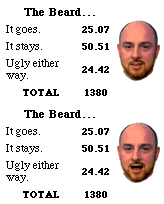 By the smallest of margins, ResEx readers gave a thumb's-up to my beard. Unfortunately, I have to agree with the 25% who feel I'm fairly ugly either way! Perhaps if I let it grow and dye it white, by Fall I can be one of Santa's Helpers! By the smallest of margins, ResEx readers gave a thumb's-up to my beard. Unfortunately, I have to agree with the 25% who feel I'm fairly ugly either way! Perhaps if I let it grow and dye it white, by Fall I can be one of Santa's Helpers!
While Aqua and popup docks with swelling icons are certainly cool looking, I worry the new MacOS X will be more difficult for beginning users to manage. Will MacOS X be the first Apple OS to ship with a hefty manual?
While the readers of ResExcellence are a smart bunch, I wonder how much additional burden you would be willing shoulder. That's what this week's Polling Place asks.
Are you a Macintosh software developer? iTest is a company that brings together developers and beta testers. Previously for Windows only, iTest would now like to offer its services to the Mac community. Right now they are waving all listing fees for first three Macintosh companies who have products to test.
In a recent ResExcellence Snapshot, Toren Valimer displayed a a cool looking beta skin for Macast. Many readers have written asking about it's release, and unfortunately, due to legal wrangling, development of the skin has stopped.
If you ruthlessly hack your System Folder, you may be interested in this Applescript by Rick Bargerhuff. It will reinstall from a backup key files needed by the System.
MacInstruct has published a new issue of it's 'Ask MacInstruct' column. Topics covered this week include:
- How to change your Mac's startup screen.
- How to get RealPlayer and QuickTime to work behind a firewall.
- How to view JPEG files.
- Where to find info about the AppleCare Technician Training Program.
- How to change splash screens.
User Contributed Splash Screens:
You can now upload your contributions (include a READ ME) to the
ResExcellence ftp drop box, and let us know with an email.
- Brian Freeman submitted two funny MOSS screens. The first features a cartoon from Non-Sequitur, and the second one is NoBS.
- The most popular Lady in all of gaming is featured on this Eudora Splash by Jaime O. Hilario.
- Ultima feels the Hotline toolbars have become a lost art. In this archive he sent to ResEx, you can easily try four new toolbars for Hotline 1.2.x.
- In the first in this series by Jeff Miles, you can see his whimsical style in a Netscape splash.
- Looking like it's carved from a piece of aluminum, this MOSS by John Schultz is industrial strength.
7/7/00
For ResEx readers that live in Australia, Mike Harris wrote a Modem Script to dial into the Australian Telecommunications Environment. I'll let him explain:
Australia's main telecommunications carrier (Telstra) picked a unique way to call divert and wait. Aussies must first dial #43#, then hang up to disable call waiting, *then* dial their ISP to have a trouble free Internet connection (unlike other countries where one needs only the prefix and the ISP's number with a specific series of digits). At the end of a session, the user must hang up, and then dial *43# to turn call waiting back on.
The attached modem script, when used with Open Transport & OT/PPP, will automate this process. Commented out in the script is the provision to divert calls to another number (e.g.: mobile phone). so if you're tying up your home phone, you'll still get your incoming calls.
This functionality is not available in FreePPP or Windows95/98. I often gloat to my Wintel using friends about my mac's ability to do all this automatically.
Too bad I'm not in Australia; I can't check this script out. It sounds like a nice piece of work.
MacThings has posted 6 new Finder Pictures. This batch is created from actual MacOS X images.
Questions, questions, so many and so little time! Well you can scratch a few of them off your list with this week's issue of Ask MacInstruct :
- Should Mac users upgrade to MacOS 9?
- Real Audio playback problems solved
- Sharing one internet connection on your home network
- Eudora connection problems solved
- How to create different profiles in Netscape
Outlook Email Archive is a handy little piece of shareware to aid in storing all those "Make Money Fast" emails you've been saving.
 If you're part of Team ResExcellence, Elliot Robinson was the first to write with information on a new RC5DES cracking client. If you're part of Team ResExcellence, Elliot Robinson was the first to write with information on a new RC5DES cracking client.
A new 462 build of the MacOS PPC client has been released, not to mention an FBA, after 2 long years of waiting. Not to mention MacOSX/Server/Darwin savvy versions for an even faster cracking speed. Imagine that! :)
Below are a list of changes in the new client /s:
- 68K: Supports every Mac ever built, from the 68000 to the G4
- 68K: Modified glue code results in up to 4% more speed
- OS 7: Now supports all variants of System 7
- OS 7-9: Uses GUSI for networking again, but now with Open Transport support
- OS 7-9: Client is now controllable via AppleScript
- OS 7-9: Faceless Background Application version available
- OS 7-X: New PowerPC OGR core by Nate: about 12% faster
- OS 7-X: New 604/604e/604ev core by Roberto Ragusa: about 2% faster
- OS X: native (BSD subsystem) client for Server and DPs
- OS X: separate builds for MacOSX and MacOSXServer
- OS X: the AltiVec cruncher is now available on MacOSX
- OS X: MP support is now available under MacOSX
- OS X: full LURK support under MacOSX
- All: Priority adjustment works fine now
- All: Process detection for "pause-if-running" now works
Among the changes to the non-platform-specific common code:
- project switchover no longer 'hangs'.
- OGR nodecount network packet ordering fixed.
- reported OGR noderate is no longer unacceptably high.
- partially complete OGR stubs are now loaded first.
- will now flush to a proxy/server that is empty.
- setting clock back during network operations could hang.
- block counts during fetching do not fluctuate anymore.
- user changes to time-of-day won't affect "Summary:"
- pre-2.8000 .ini settings always upgraded properly
- time threshold uses fetch work threshold > 0 as minimum number of work units to be fetched.
- out-buffer thresholds have been removed entirely; use the "additional buffer-level checking" to support updating/flushing more frequently than buffer exhaustion.
A new Haiku from MacNN's David Bradbury:
(Added to the Computer Haiku Archive...)
 So just where is that pesky new splash screen in Netscape 6? So just where is that pesky new splash screen in Netscape 6?
Try PICT ID# 512 in the new application.
To further customize the browser, pay a visit to ChromeZone and download the lateset skins.
User Contributed Splash Screens:
You can now upload your contributions (include a READ ME) to the
ResExcellence ftp drop box, and let us know with an email.
- A new MOSS variation on the supercomputer HAL has been created by ekosonic.
- Arica Law contributed a Y.A.L.L. (Yet another Lovely Lady) splash screen. This latest one is for Internet Explorer.
- Today we have two new Giant MOSS from Erik Fritz. The first called LonelyOS features a peaceful countryside, and the other displays Elizabeth Hurley.
- Featuring a cool looking photo of a lighthouse, Dan Wiencek sent this latest Netscape splash.
- This splash replacement for MS Word shows us the real-life Lara Croft.
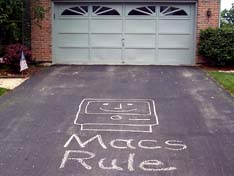
While I occasionally receive a disgruntled email from a reader, never has one been as anti-Mac as the one I received yesterday. Simply stating that "Macs suck" over and over, I was initially fuming, then something about the email domain looked familiar. A quick search of my out-box revealed that the email was from my buddy down the street, a Windows guru.
I'm sure he felt he had the last laugh - until he went to get his snail-mail and saw his driveway!
The masked "ResExer" strikes again...
 |
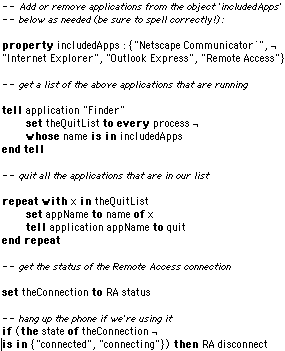
Dave sent this cool Applescript that gives several excellent examples of how to build a list and take actions on the list.
Here is an Applescript that I wrote for quitting a list of internet applications and hanging up the phone if it's in use. Just modify the 'includedApps' list for the programs you use. Thanks to Michael Askew for his script, which gave me the idea to look for a list of programs that may be running (I had been using a script that quit each specific program).
HolyMac has a little Newbie Tutorial on Applescript if somehow you are the last ResExcellence reader on the planet Earth who has never played with Apple's free scripting language. : )
And under the Wacky-Rumor Department, HolyMac has a story about Apple buying a chunk of Sealand, the little island-state started after WWII.
MacInstruct has posted a new tutorial, one their best to date: "Networking 101". Initially published at Mac Gamers Ledge, this handy FAQ will be regularly updated by the MacInstruct crew.
User Contributed Splash Screens:
You can now upload your contributions to the ResExcellence ftp drop box, and let us know with an email.
- If you're a fan of the anime character Rei, you will like the About this Mac replacement by John Park, with one caveat - it's for MacOS 8.6. Come on John, time to pop for that MacOS 9 CD!
- Arica has sent another in the "Beautiful Women in Microsoft Splash screens" series. This splash is for Outlook Express.
- In an example of what can happen if you upload a file to the ftp server without a READ ME, this cool looking Explorer splash of a crushed inflatable world. The author will remain unknown until I receive an email from him/her.
- CastleOS is a nice looking Giant MOSS by Erik Fritz.
- Next in his series of Netscape splashes, Alan Janes sends us "Space".
- "SS3 GokouX" created a little makeover for Apple's Control Strip. In addition to modified tabs, there are some other little goodies.
7/3/00
 Today we resume the Polling Place with an important question. A rare opportunity for readers to have their opinions heard regarding the look of ResExcellence - or at least the look of the WebMaster!! During my recent vacation, I grew a beard. Does it stay or does it go? Today we resume the Polling Place with an important question. A rare opportunity for readers to have their opinions heard regarding the look of ResExcellence - or at least the look of the WebMaster!! During my recent vacation, I grew a beard. Does it stay or does it go?
José Benitez from Italy sent this nifty Applescript to toggle the visibility of the Application Switcher.
-- hide & show Application Picker on fly
on run
tell application "Application Picker"
if visible of palette is false then
set visible of palette to true
else if visible of palette is true then
set visible of palette to false
end if
end tell
end run
You can use it with OSA Menu (place it in Universal Scripts folder) or as an Application (in Apple Menu)
Throbber Guru, Patrick Kelleher, released Throbber Author 1.0pr1:
There is a new Throbber creation tool on board at pkelleher.com. Throbber Author is a Photoshop Action that takes layered Photoshop images and converts them into an Internet Explorer 5 Throbber. Cool huh? A few others and I have been using it for a while now. It's free and it cuts out a lot of grunt work from the IE throbber creation process.
MacInstruct has published the latest edition of Ask MacInstruct column.
Topics covered this week include:
- Configuring Remote Access to disconnect by itself
- Saving attachments to your hard drive
- Troubleshooting crashes and freezes
- Configuring Netscape Messenger to save your password
User Contributed Splash Screens:
You can now upload your contributions to the ResExcellence ftp drop box, and let us know with an email.
- Casey D'andrea has put together a great looking collection of replacement elements in a set called "Shivra". There is a MOSS, an About this Mac replacement, and an Internet Explorer splash. All three are tastefully done.
- Featuring an attractive young lady, Arica Law created replacement splashes for Microsoft Excel and Word.
- Erik Fritz created another nice looking MOSS. This one features Mrs. Michael Douglas - Catherine Zeta-Jones!
- The prolific Alan Janes created a pleasant Netscape splash called "River".

Click here to learn more about Toast 6 Titanium
Previous News Page...
|