|
Today's News by Cletus™ The Extesnsions Strip Contest is now over. Thanks! Round two ends and round three begins in the Extensions Strip Giveaway. The entry is the same, just resubmit entries from the contest page. Congratulations to the second set of winners:  Wapp pro 3.2 has hit the shelves. Wapp pro is a windows/applications switcher. It will display a menu that lists the windows of the front most applications, the background applications and their respective windows in submenus. You can activate any window from this menu. Wapp pro 3.2 has hit the shelves. Wapp pro is a windows/applications switcher. It will display a menu that lists the windows of the front most applications, the background applications and their respective windows in submenus. You can activate any window from this menu.
- Added options to fine-tune the application-switcher inside the menubar
- Fixed a crash when clicking & holding on the titlebar of the Application Switcher's window
- Brings support for exclusion lists to the application-switcher inside the menubar
- Added support for Eudora 5.1
One of the best extension, control panel, CSM & CMM info tools you can get is Extension Overload. Recently updated to version 5.8.3, it provides a comprehensive database with a total of 4700 extensions, control panels, CSM and CMM. This version also updates the version history for many extensions, control panels, CSM and CMM. If you're not sure what Extension Overload is or can do for you, read Jeremy's Review!  Icon Machine 3.0b1 is the newest release of this icon editor by David Catmull. Icon Machine is a Macintosh icon editor designed to take advantage of the great features of the Mac OS to give you the power to make the icons you want. Icon Machine 3.0b1 is the newest release of this icon editor by David Catmull. Icon Machine is a Macintosh icon editor designed to take advantage of the great features of the Mac OS to give you the power to make the icons you want.
- Support for all icon sizes, from 128x128 Thumbnail to 16x12 Mini
- Redesigned interface
- Fully Carbonized
SoundHack 0.890b8 is now out. This "esoteric" sound programs release fixes a bug which may have caused random output file corruption. Geoff Henry dropped me an e-mail about his new site called Old Mac Games. He thought you may be interested in it. If your weather is rainy like it is here, it may be a good idea to drop by his site, download a few classic games and play this weekend! Calindock 1.0.2 fixes a problem people were having with Mac OS X 10.0.3. A memory leak was also plugged. Again the author is looking for input into this dockling. Drop him a note with your ideas. Scheme News: IZA Dark Tuned 1.0 is the newest K-Scheme release of IZA. I like the colors of this scheme and think it is well done. System0 v1.0.4 is the newest update from Butt_O'sigh. Both schemes are available at Desktopper. Submit Software and General News Suggestions!

Register to Win an iPod at Smalldog.com
Animate your Dock by Erick Tejkowski Of all the new toys in Mac OS X, perhaps the most fun to play with is the dock. REALbasic does not yet permit drawing in the dock, but with the help of a plugin or two, you can. Not only can you draw on the dock, but you can change the picture over time, thus creating an animation. Fun stuff, indeed! Before you can get started working on the animated dock project, you need to download a plugin. I have created a free plugin especially for ResExcellence readers, which you can download here. (Continued...)
Tools of the Trade by Michael Coyle
Everyone can stop sending me emails. The new search engine is up! The format is similar to many you've encountered. Typing "ResExcellence Rocks" returns files with either word (OR). Typing "+ResExcellence +Rocks" only returns the files with both terms (AND).
Vadim Plessky has released 20 new themes for the KDE2 Linux desktop. Not only that, but there are QT Widget sets and tutorials on installing the themes.
I'm certainly not as talented as the icon artists that hang out at ResExcellence, but look at this set I have been working on for MacOS X. When finished, which I hope will be soon, I'll release these as resources you can paste right into your HItoolbox.
Full image in new window
 |
MacOS X Tip by Michael Coyle
System icons for MacOS X are stored in the HIToolbox.rsrc file. in the past, I have edited this file while in MacOS 9 and then booted X to see the results. If you're comfortable in the Terminal, you can swap out the HIToolbox and then relaunch the Finder to see the results.
The most annoying part of this is typing the ridiculously long directory path to the file! That's when the light bulb above my head went off and I realized it would easy to set up terminal aliases for commonly typed directory paths.
Open the alias.mine file we created previously and a enter on a single line the text below:
alias go-icons 'cd /System/Library/Frameworks/Carbon.framework/Versions/A/
Frameworks/HIToolbox.framework/Versions/A/Resources/''
|
Now when you want to switch to the HIToolbox directory, just type: go-icons.
User Contributed Splash Screens: by Michael Coyle
- Row, row, row your boat? Tash Treacy sent a cool looking throbber for Explorer of a paddler on a creak.
- Continuing the series, here are two more MacOS X Boot Panels from Martin Sundstrøm in the colors of Charcoal and Blueberry.
- When he's not making Themes, Michael Rabe is skinning iTunes! Look at his musical interpretation.
- For owners of the new iBook, Steve Sobek has created an Explorer splash.
- Rich Taylor submitted this very retro MOSS based on the boot text of a Commodore 64!

Support ResExcellence by Visiting our Sponsors!
Snapshots by Jeremy Hoesly Dig in, folks! We’ve got some especially interesting snapshots for Friday: - This submitter, known only under the moniker Freak Off His Leash, contributes this OS X snapshot with a simple black backdrop. Audion, equipped with the CyberPunk face, is kicking out soundwaves in the lower left-hand corner.
- Mac OS X and well-known programs from the open source community converge in this submission from Michael Hanson. Audion, retooled with the SlickCorner Graphite face, is shuffling music tracks in the lower left-hand corner. XDarwin allows X-Window programs such as The Gimp drawing program and WindowMaker window manager to run under OS X. Icons from RAILhead Design roam about.
- A Cognitive Distortion desktop picture and the Black Gold K-Scheme are showcased in this submission from Scott Kleinberg. iTunes is cranking out music in the lower right-hand corner. Icons from Xicons and icons.cx inhabit the desktop.
- Akio’s “SharpTang” desktop picture and Maury McCown’s ever popular AquaX III K-Scheme debut in this contribution from Oscar Marsh. Audion, retro-fitted with Akio’s SlickCorner Graphite face, is serving up music in the lower left-hand corner. A smattering of icons from Rampant Mac, Icon Factory, and RAILhead Design are scattered throughout.
- T. Salzano contributes this screenshot sporting the custom “Wrong Button” desktop picture with a modified Aqua Theme. Cool, or after looking at the temperature readout in Metronome, I should say hot!
- Adriaan Tijsseling sends this submission of Darwin running XFree86. The WindowMaker window manager configured with the AfterStep theme provides the interface.
Have a desktop masterpiece you’d like to share with the Mac masses? Read our submission guidelines and then bring it on!

Kensington TurboMouse Only $155 at Smalldog.com!
Icon/Desktop News 05-18-01 Icon & Desktop News: by Dan  While doing a little bit of maintenance work on the Desktops archive the other day, I was awestruck by just how many submissions have been displayed in the last two years and are housed on our server. It would take a person a couple of years to use all them all, one for each day. So, when you're long on time, and searching for that perfect backdrop, take a tour deep into our archives, I guarantee you won't be disappointed. While doing a little bit of maintenance work on the Desktops archive the other day, I was awestruck by just how many submissions have been displayed in the last two years and are housed on our server. It would take a person a couple of years to use all them all, one for each day. So, when you're long on time, and searching for that perfect backdrop, take a tour deep into our archives, I guarantee you won't be disappointed.
Icons - Desktops: We've got (8) excellent desktops to fill your decorating needs over the weekend. All on display for today's update. - Tray, from Tray's Trove submits a classy desktop called "BBX Mercury desktop", designed to compliment the recently released (awesome) BBX Mercury Kaleidoscope scheme by William Bart . This one comes in 1024x resolution.
- Fast forward to 7-21-01, and to the release of the new Planet of the Apes movie "Rule the Planet". Joe Sainson sends us the Official splash screen for the movie to commemorate the event in several resolutions.
- Stephen Saunders peers far into the future with his "Raiders" desktop. Will Microsoft still be robbing Apple's technology? Perhaps some things will never change. Download this humorous 3-D desktop in three different resolutions.
- We dip once again into the pile of superb 3-D rendered desktops submitted by digital dynamo Henry Stidston . Today's selection is titled "Water Bottles" and brings 3-D realism at it's best to your desktop in 1024x resolution.
- For those who have the need for speed, but are willing to settle for a Ferrari photograph instead of the real thing, this desktop submitted by Joe Sainson is for you. Comes in multiple resolutions.
- "Burning Bush" by Donnie Fischer of the White Fire Ministries was created in Bryce 2, and is the trademark image used on the White Fire web site. This nicely done 3-D rendered desktop comes in 1024x resolution.
- "The Promise" by Bradford J. Wiles, is the third in a series of three in the Rainbow Variations. All three share the same "DNA," that is, the same elements in the Working window or Bryce scene. However, various things were done to vary, or in some cases, completely transform the original scene. As many as 20 or more variations can be created before a single picture is considered final! Comes in 1024x and 800x resolutions.
- Soul Rocka Nasty Nene returns again to share another of his fun, funky and very off center desktops with "Ripplets". He also reminds us to "Keep on Macin', keep on keepin' it Mac!" (1024x resolution)
News From Around the Web: Dean's Design's updates with one new desktop this week. Mac.axonz.com updates with an iTunes-Visualizer-Inspired Desktopz! Colheres updates with a New icon set: my favorite things (by Ana) Rene of Happicon notes that the address to his website is still http://members.ams.chello.nl/ymollema
and that it takes a little while before things start loading due to a redirect. Rampant Mac updates this week with one new desktop, a new set of icons and a minor update to his 'PhotoDeluxe Makeover Kit. Paul from Renaissance Design announces the addition of another new desktops to his site and another experiment added as well. Tray's Trove updates 5/13/01 with eight new desktop designs. The Devil's Desktop has finally been updated with 3 new icon sets. Powerpuff Girls, Out There and Wonka! New site design coming in June! Mike Davidson's Mac File Library has been updated to include a beautiful transparent desktop, Apple Rising. Yosh from Chillyday informs us that he has posted 4 new desktop pictures today and wanted you to know that. Brycetopia (after an unexpected long hiatus) has returned with 8 new images for your pleasure. Check them out! Aussie photographer Andrew Symington has a small website where you can find more of his excellent Nature scenery photographs available for download. EVERY WEEKEND Live Pencil lets you see a new animal moving around, just to give you a smile. Don't forget to check it when you are getting ready to begin you week. * On a more serious and sad note, it appears that Ramon will shortly be abandoning his work of love, "Live Pencil", and will be moving on to other things. Drop him a line and let him know how much you have appreciated his awesome and playful artworks. So what's up WWW? Icons? Desktop pictures? News? Inform us! We'll post it!

Support ResExcellence by Visiting our Sponsors!
iSnow - in the Archive now!
 |
Theme News by Michael Rabe
Everyday there are about 5 to 10 emails asking, "I want to make a theme, but I don't know how. Can you help?"
I have started writing a How-To for the "Classic" themes. It's almost finished and will be up very soon.
Talking about classic themes, iSnow has been added to the Theme Archive. I think it looks really good on the new iBook.
See ya on the flip flop!
If you have a theme you wish to add to the Archive, drop me an email.
5/17/01 Snapshots by Jeremy Hoesly Thursday’s snapshots are only a few clicks away: - Kin Camacho submits this two-part submission with a unique twist by not only sporting a snapshot of the desktop but also a snapshot of the computer that created it! The desktop consists of the “UFO 1” desktop picture and the Cream K-Scheme. MacAmp, retooled with the M-5110 Orange skin, is churning out music along the top.
- Rob Hanlon sends this OS X contribution touting Swiss-X Design’s “Real Foam” desktop picture. Audion, overhauled with Akio’s SlickCorner Grpahite face, is shuffling sound tracks in the lower left-hand corner.
- This OS X screenshot from Keith Mason sports RAILhead Design’s “Basic” desktop picture. iTunes, tweaked with SplashPlace’s Graphite makeover, is tickling the eardrums at lower center. Icon Factory’s Smoothicons and Titanium icon sets lurk about the desktop.
- Mike Odle shares his desktop sporting MacDesktops’ “Aqua G4” desktop picture and Maury McCown’s AquaX III K-Scheme. iTunes is managing the background music along the top.
- A custom desktop picture and Takashi Izawa’s IZappy-D K-Scheme are showcased in this snapshot from Frank Robertson. Audion is cranking out selections along the left edge, and icons from Icon Factory roam the desktop.
- A custom “Ferrari” desktop picture and Michael Rabe’s GlassWorks Theme debut in this submission from Joe Sainson. The Mettalicons, Spiffy Apps, Cyan HG, and custom icons are also present.
Have a desktop masterpiece you’d like to share with the Mac masses? Read our submission guidelines and then bring it on!

Pocket 48GBs and 30 Bucks with LaCie's PocketDrive - visit Smalldog.com
Today's News by Cletus™ Round one of the Extensions Strip Giveaway has officially come to an end. Round two is just now getting underway. Remember that if you entered previously, you will need to re-enter. The "magic" word will remain the same. What could be simpler? Congratulations to the winners from Round One! Ammon will be contacting you this week.: - Len Ford
- Daniël van der Munnik
In case you didn't notice, Extensions Strip has moved into another phase of beta testing as well. Version 2.0b6 is now available for download. It provides the following features: - Fixed a crash that occurred when clicking on the "Default Folder Strip" module.
- Fixed a rare crash with the feature that collapses a strip when it covers the front window.
- Tweaked the menubar mode a bit more.
- Renamed some items in the strip contextual menu (thanks to suggestions from John Bailey).
- Menubar mode. Clicking and moving the mouse around the strip will popup the menus of other modules. (Process Manager users should install the new version included in this package so menubar mode works properly. HandyMan users should use at least version 2.1b1.)
- "Iconize when mouse leaves strip" feature (control-click a strips tab to access this)
- Iconize when covering front window" feature (control-click a strips tab to access this)
- Mini modules won't shrink long modules like Apple's battery CSM
- Clicking on the border of a strip clicks on the module underneath, rather than moving the strip
 Calindock 1.0.0 is a Mac OS X dockling from Critical Matter, Inc. that displays a monthly calendar in the Dock. Users can move forward and backward through the calendar via the dockling's menu. Best of all it is free. If you have any ideas or suggestions for the dockling you can e-mail here. Calindock 1.0.0 is a Mac OS X dockling from Critical Matter, Inc. that displays a monthly calendar in the Dock. Users can move forward and backward through the calendar via the dockling's menu. Best of all it is free. If you have any ideas or suggestions for the dockling you can e-mail here.
Gideon Greenspan from Sig Software is announcing the release of MADE 1.7.5. MADE's most valuable feature is its glue code which provides a unified wrapper for much of the Classic and Carbon APIs. This allows developers to use a single source code base to build versions of their software that run natively on OS 7 through to OS X, with no CarbonLib required. MADE includes several features to help the development process, such as assertions, memory trashing, allocation tracking and leak testing. Version 1.7.5 is updated for full compatibility with the latest CodeWarrior 6 compiler and Carbon headers, adds more accessors and functions to the Classic/Carbon glue code, debug-friendly error reporting and more. Let's visit the forum and a few interesting topics: What will happen at MacWorld New York? What is your impression of BBX•Mercury? I want to change my Desktop Font color! Scheme News: The KSA has updated with 5 new schemes. Several of which I have mentioned throughout the past week or so. BBX • Mercury™ & BBX • Mercury™ Be, Quicksilver, Gold Inlay and KateS. Stop by and try them all out. They all are very well done! Themes.org has five new themes and five new screenshots posted. I really like to check these out. What ideas they can spawn for ResExcellence snapshots for Jeremy! Submit Software and General News Suggestions!
Register to Win an iPod at Smalldog.com
Tools of the Trade by Michael Coyle
After talking about extracting images from screensavers last update, Derek Gordon sent some related info about an app called SaverLab that plays screensaver modules in a desktop window.
It also has the ability to run them full screen and with the Quartz engine we have desktop layers so it has the ability to run them in the background as an animated desktop just like in Linux. It hogs CPU cycles, but you can also pause the ScreenSaver and freeze it in any position you want. Anyway I thought I would pass this along to the readers.
You know how you can customize the Finder's button bar in MacOS X? Brian Ellis thinks the same premise should be assigned to the Dock. Take a look at the Preference Mockups he created as he states his case.
Two new fonts (Warlords of Mars, Suckerpunch Blues) and a new desktop picture from Fontosaurus Text.
I don't place a lot of value in these, but it can't hurt either. Matt Anderson has started a petition to encourage Apple to ease their stance on themes in MacOS X.
MacOS X Tip by Michael Coyle
One unexpected result of dual boot MacOS X/MacOS 9 system is that I have two copies of many applications - a beta for X and the older version for Classic. Specifically, I have two versions of Interarchy and Eudora. (While Interarchy is not beta, it is not recommended you do not run the X carbon version in Classic. In fact, there is no quit command if you do!)
The problem is regular MacOS 9 keeps launching the beta carbon apps instead of the standard. These apps are particularly unstable in classic. Open the application in ResEdit and from the File menu select "Get Info" to bring up the window that allows you to make the following change.
To fix this, I did something rather unconventional. I changed the creator code of the two beta apps. I chose RESX and ResX. Now clicking on an Interarchy bookmark in MacOS 9 launches the correct application. This isn't an ideal situation, but it will get us this transition period.

Support ResExcellence by Visiting our Sponsors!
User Contributed Splash Screens: by Michael Coyle
- Did you get your new iBook? Then check out this Boot and Login combo for MacOS X from Robert Marking.
- Joe Sainson uploaded a cool Catseye About this Mac screen. Take a look and if it's right for your desktop
- Four very beautiful nature scene splash screens for MS Office were created by Joel Schou. The little previews don't do them justice, but such is the cruelty of the bandwidth gods.
- She wasn't the last one left standing in the Aussie Outback, but she's the first to have her own Explorer splash screen! Elisabeth is featured in this creation by Matt Turner.
- If you liked the Vampirella Photoshop splash, take a look at John Rose's MOSS.

Support ResExcellence by Visiting our Sponsors!
Snapshots by Jeremy Hoesly Houstin, the snapshots have landed: - Peter Farago contributes this OS X submission bearing a desktop picture extracted from the Abstract screensaver. Four web savants, OmniWeb, iCab, Mozilla, and Internet Explorer, display key sites in the Mac community.
- Hutchison submits this OS X snapshot featuring the WebObjects Builder utility. It looks like a cross between a web development program and a compiler.
- This screenshot from Ben Lewis sports ExitMusic’s “Camp Chaos” desktop picture. Audion, overhauled with Akio’s SlickCorner Graphite face, is pumping out soundwaves in the lower left-hand corner. Icons from icons.cx and Xicons strut their stuff.
- A modified version of the “Quantum Foam” desktop picture and Butt O’ Sigh’s Desaturation K-Scheme share the spotlight in this snapshot from John McHugh. Audion, outfitted with the Sheep face, is serving up songs in the upper left. Icons provided by Xicons are also visible.
- This screenshot from Michael Rabe, duke over our Theme Section, touts Hoeslyvista’s (that’s me! :-D) “Down the Potomac” desktop picture coupled with Aisys’ Aerial Theme. iTunes, tweaked with a marble texture, is sitting in as digital DJ in the lower left-hand corner.
- Must… resist… the urge… to pop bubbles! The “Bubblewrap” desktop picture and Maury McCown’s AquaX III Graphite K-Scheme debut in this contribution from David Yoon. iTunes is churning out music in the upper left-hand corner. Custom icons reside on the desktop and in the menubar.
Have a desktop masterpiece you’d like to share with the Mac masses? Read our submission guidelines and then bring it on!

Ilicon Graphic Design
Icon/Desktop News 05-18-01 Icon & Desktop News: by Dan While doing a little bit of maintenance work on the Desktops archive the other day, I was awestruck by just how many submissions have been displayed in the last two years and are housed on our server. It would take a person a couple of years to use a them all, one for each day. So, when you're long on time, and searching for that perfect backdrop, take a tour deep into our archives, I guarantee you won't be disappointed.
Icons - Desktops: We've got (8) excellent desktops to fill your decorating needs over the weekend. All on display for today's update. - Tray, from Tray's Trove submits a classy desktop called "BBX Mercury desktop", designed to compliment the recently released (awesome) BBX Mercury Kaleidoscope scheme by William Bart . This one comes in 1024x resolution.
- Fast forward to 7-21-01, and to the release of the new Planet of the Apes movie "Rule the Planet". Joe Sainson sends us the Official splash screen for the movie to commemorate the event in several resolutions.
- Stephen Saunders peers far into the future with his "Raiders" desktop. Will Microsoft still be robbing Apple's technology? Perhaps some things will never change. Download this humorous 3-D desktop in three different resolutions.
- We dip once again into the pile of superb 3-D rendered desktops submitted by digital dynamo Henry Stidston . Today's selection is titled "Water Bottles" and brings 3-D realism at it's best to your desktop in 1024x resolution.
- For those who have the need for speed, but are willing to settle for a Ferrari photograph instead of the real thing, this desktop submitted by Joe Sainson is for you. Comes in multiple resolutions.
- "Burning Bush" by Donnie Fischer of the White Fire Ministries was created in Bryce 2, and is the trademark image used on the White Fire web site. This nicely done 3-D rendered desktop comes in 1024x resolution.
- "The Promise" by Bradford J. Wiles, is the third in a series of three in the Rainbow Variations. All three share the same "DNA," that is, the same elements in the Working window or Bryce scene. However, various things were done to vary, or in some cases, completely transform the original scene. As many as 20 or more variations can be created before a single picture is considered final! Comes in 1024x and 800x resolutions.
- Soul Rocka Nasty Nene returns again to share another of his fun, funky and very off center desktops with "Ripplets". He also reminds us to "Keep on Macin', keep on keepin' it Mac!" (1024x resolution)
News From Around the Web: Mac.axonz.com updates with an iTunes-Visualizer-Inspired Desktopz! Colheres updates with a New icon set: my favorite things (by Ana) Rene of Happicon notes that the address to his website is still http://members.ams.chello.nl/ymollema
and that it takes a little while before things start loading due to a redirect. Rampant Mac updates this week with one new desktop, a new set of icons and a minor update to his 'PhotoDeluxe Makeover Kit. Paul from Renaissance Design announces the addition of another new desktops to his site and another experiment added as well. Tray's Trove updates 5/13/01 with eight new desktop designs. The Devil's Desktop has finally been updated with 3 new icon sets. Powerpuff Girls, Out There and Wonka! New site design coming in June! Mike Davidson's Mac File Library has been updated to include a beautiful transparent desktop, Apple Rising. Yosh from Chillyday informs us that he has posted 4 new desktop pictures today and wanted you to know that. Brycetopia (after an unexpected long hiatus) has returned with 8 new images for your pleasure. Check them out! Aussie photographer Andrew Symington has a small website where you can find more of his excellent Nature scenery photographs available for download. EVERY WEEKEND Live Pencil lets you see a new animal moving around, just to give you a smile. Don't forget to check it when you are getting ready to begin you week. * On a more serious and sad note, it appears that Ramon will shortly be abandoning his work of love, "Live Pencil", and will be moving on to other things. Drop him a line and let him know how much you have appreciated his awesome and playful artworks. So what's up WWW? Icons? Desktop pictures? News? Inform us! We'll post it!
Support ResExcellence by Visiting our Sponsors!
REALbasic News by Erick Tejkowski Today's REALbasic News: - New tools for extending you Mac OS X projects in REALbasic
- OpenGL comes to REALbasic for Mac OS X
- New applications built with REALbasic
- Or, maybe you just want to know what Michael is staring at?
Find information about all of this and more in today's REALbasic News. (Continued...)
Portlandia - in the Archive now!
 |
Theme News by Michael Rabe
This past weekend, MacShades sent me an email with a classic theme I had never seen before called "Portlandia" by Sean Goluban. Today it has been added to the ever growing Theme Archive!
A lot of preparations are being made to get ready for the release of my next "X" Theme titled Glass, due to be out in a few days. We will keep you updated on the progress of this and other themes.
Be sure to stop by Thursday to pick up your copy of iSnow.
See ya on the flip flop!
If you have a theme you wish to add to the Archive, drop me an email.
5/15/01 Snapshots by Jeremy Hoesly Chow down on Tuesday’s helping of snapshots: - LanceArmstrong.com’s “Lance in Times Square” desktop picture and Peter Harte’s Aqua II+ K-Scheme are showcased in this submission from Dan Bailey. Audion, equipped with the Argonaut face, is taking music requests in the upper right. Fontographer is showing off the Uhop Deluxe font from his site, Fontosaurus.
- Derek shows off the first fruits of his labor: a dock switching program created with help from our first RealBasic tutorial! iTunes is providing the music in the upper right-hand corner.
- A custom desktop picture and the Mac OS X K-Scheme debut in this three-part contribution from Tim Fong. A smattering of icons from Xicons, icons.cx, and the like roam the desktop.
- This OS X snapshot from Jeff Geerling sports a “Matrix” desktop picture from our Desktop Archive. Although only the title bar is visible, the Fractal Generator stats reveal the raw processing power of the G4’s Velocity Engine.
- The Dark Knight pays a visit to the Snapshot Archive in this submission from MidNyte touting the custom “Flaming Batman” desktop picture. A custom icon is also nestled in the upper right-hand corner.
- Regular contributor Manuel Velazquez provides us with a two-part snapshot bearing another one of his Metaphysical series desktop pictures: “Worlds Apart.” Audion, retro-fitted with Toren Valimir’s I/OS face, is cranking out tunes in the lower right-hand corner of the second shot.
Have a desktop masterpiece you’d like to share with the Mac masses? Read our submission guidelines and then bring it on!

Support ResExcellence by Visiting our Sponsors!
Today's News by Cletus™  After taking a week off, ResExcellence is gearing up for another great giveaway contest. This week Ammon Skidmore is offering a total of six free registrations for Extensions Strip. This is one of my all time favorite applications. Extensions Strip is a replacement for Apple's Control Strip. Full details about the contest can be found on the Extensions Strip Contest page. After taking a week off, ResExcellence is gearing up for another great giveaway contest. This week Ammon Skidmore is offering a total of six free registrations for Extensions Strip. This is one of my all time favorite applications. Extensions Strip is a replacement for Apple's Control Strip. Full details about the contest can be found on the Extensions Strip Contest page.
The BBX•MERCURY GUI Overlay Kit for Macintosh is now available for download. William Bart noticed my confusion last week and sent me an explanation of what it is and how it all works. Give this a try and see how it works! "The project is an attempt at creating a visually-integrated Mac user environment utilizing a collection of skinz, faces, schemes, icons, desktops, soundsets, startup screens and even construction sets for advanced users. These items have all been designed to run in tandem, creating a seamless interface experience set in a sleek and futuristic hi-tech silver. The kit has been pain-stakingly crafted with high attention to detail and an emphasis on extended, unobtrusive use." The "Eyes" have it! Everyones favorite cursor tracking software, Eyes has been updated to version 1.1.1. Once Eyes is launched, a pair of eyes will appear and follow the mouse cursor around the screen. You can customize almost every aspect of the eyes -- all without editing any text files.  Updated Eyes dockling compatibility Updated Eyes dockling compatibility
- Removed Eyes Dock icon -- control now from popup menu
- Faster refresh cycle
- Increased line width range
- Better behaved with screen resolution changes
DVolume 1.2 has been updated. DVolume is a simple Dockling, much like the Sound Control Strip in OS 9. It will allow you to set the System Volume and the Alert Volume from the Dock. This version includes an updated library from Brian Webster to eliminate the warning which occurs when running Mac OS X 10.0.2. There is no word on the site whether there is any compatibility problems with Mac OS X 10.0.3. Iconizer Pro 1.4.3 is now available for download. Iconizer Pro allows the creation of images in CD windows and folder windows. Lots of changes in this version! - Add Border Mask command in Edit menu to create transparent border.
- Add Center Image command in Edit menu to place image centrally.
- Added two types of gap-filled border.
- Border Mask : This type is a transparent border, i.e. no extra white area appears.
- White Border Default : This type is an old default white border in Iconizer Pro 1.4.2 or older.
- White Border Center : This is a new white border.
- Fix bug in "Show visible items only" command in "Navigation Service Choose Folder" dialog.
Scheme News: Toren Valimir sent me an e-mail announcing an update to the site. It seems that he and Richard Bensam have been hard at work on a new Kaleidoscope scheme. It is called Quicksilver and in Toren's own words- "I like it as much as I/OS X." It really is a well done scheme. Cudo's to Toren and Richard. Hang on a moment! Let's not forget about Toren's I/OS X Special Edition either, which was updated to take advantage of Kaleidoscope 2.3 with tanslucent menus. Submit Software and General News Suggestions!
Kensington TurboMouse Only $155 at Smalldog.com!
 Polling Place by Michael Coyle Polling Place by Michael Coyle
When Multiple Users was released, Steve Jobs stood on a stage and uttered, "My voice is my password". It appears most readers have taken a pass on voice passwords. I tried it for awhile, but the recognition was hit or miss and it was cumbersome to setup. I guess it won't be missed by many in MacOS X.
This weekend, the wife and I switched to a new wireless phone company. Rates are so low, I can understand why Ameritech is loosing 30,000 subscribers a month to wireless phones. A lot of the younger guys at work have never had a wired phone! How about you? This week's Polling Place wants to know.
And while I'm on the topic of my new Nokia 5156, I'd like to connect it to my Powerbook so I can access the internet from my train ride to work. Ositech makes some interesting cell modems. If you have any experience with this, please email me and I'll post my results.
Tools of the Trade by Michael Coyle
Melissa has added four new sites to the ResExcellence Links page. This is the first time she hasn't posted 6 and she's feels quite bad about it. Is that it? Has every Macintosh site containing icons, desktops, etc., been listed? I think not! Use the form on the bottom to send her any she is missing.
And while I'm on the topic of Melissa, this evening she asked me to look at this Snapshop from Jeremy's archive and find out how André Behrens extracted the beautiful images from a MacOS X screensaver.
She's my daughter so I had to do it - ASAP!
The screensavers are in this directory: /System/Library/ScreenSavers. If you control-click on the Cosmos saver, you can examine the package contents. The images are in this package directory: /Contents/Resources/Images.
The images are standard jpegs, so you can copy them to Home/Pictures and use them as desktops. Forest, Beach, and Abstract also contain images.
Missing Desktop Folder in MacOS X by Michael Coyle
Recently, I showed you how to use the command line to recreate a link to the Classic Desktop Folder incase you deleted yours as I did. It seems there is a better way to do this, and there are more benefits!
At the root level of your boot partition is a file named .hidden. Because the name starts with a period, it's hidden. Clever those engineers at Apple.
This file contains the names of all the files or directories that are to be hidden in the Finder. One of the folders listed is the Classic's Desktop Folder. Delete it and the folder will reappear when you relaunch the Finder.
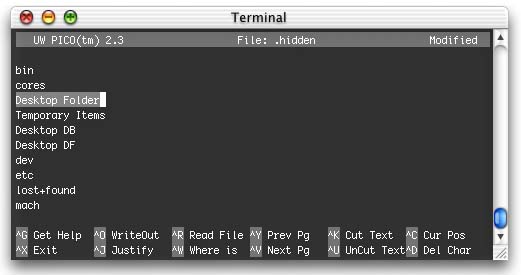
You can even add folders that you want to hide! For example, my boot drive showed a Temporary Items folder from the Classic OS. Adding it to .hidden removed it from the Finder window.
Unfortunately, I can't seem to hide or reveal directories on other MacOS partitions. If anyone finds a solution to this please let me know.
Support ResExcellence by Visiting our Sponsors!
User Contributed Splash Screens: by Michael Coyle
The download counters at ResExcellence have been updated. If you are a contributor who notices a counter rest, please email. I hope I have finally fixed this problem.
- I never tire of the many variations of contributions based on The Matrix. Robin Lydeén sent this cool looking MOSS of a green tinted Trinity.
- Looking like a ball bouncing in zero gravity, Levent Ozayan created this throbber for IE 5.
- It reminds of the clock on the wall in my elementary school. Check out this analog replacement clock face for MacOS X by Tomas Backelin.
- Hey, for a cartoon, she's rather attractive. John Rose made a splash for Photoshop featuring Vampirela!
- David Quakenbush sends two great items for MacOS X. The first is a circular Dock Poof, and the second is a set of replacement pdf's for the Dock.
Support ResExcellence by Visiting our Sponsors!
Snapshots by Jeremy Hoesly I now have enough snapshots in reserves to once again return to my six snapshot update schedule. Thanks to all for the submissions, and do keep them coming!
Do you thirst for more snapshots? Grab a six-pack: - Enfuse’s “GOcreation” desktop picture and a custom theme are showcased in this OS X submission from Chris Donovan. iTunes is dishing out songs in the lower right-hand corner. Icons from Xicons are also scattered throughout.
- A custom desktop picture and the Gnome Gradient Theme debut in this LinuxPPC screenshot from Andy Moraitis. Interesting.
- Michael Rabe, our resident theme-master, contributes this snapshot featuring his newest OS X theme, Glass, included with a matching “Glass” desktop picture. iTunes is cranking out music in the lower right-hand corner.
- This OS X submission from Rich sports the Star Wars Modeling Alliance’s “Coruscant” desktop picture. iTunes is shuffling music tracks in the upper left-hand corner.
- Jason Showers contributes this snapshot touting a modified version of the BeOS K-Scheme. A smattering of icons from our Icon Archive are also present.
- Toren Valimir provides us with the first preview of his Quicksilver K-Scheme, co-developed with Richard Bensam, along with Toren’s “Quicksilver Apple” desktop picture. Audion, tweaked with the F2 face by Ric Zito and Paul Johnson, is kicking out soundwaves in the upper right.
Have a desktop masterpiece you’d like to share with the Mac masses? Read our submission guidelines and then bring it on!
Ilicon Graphic Design
Icon/Desktop News 05-14-01 Icon & Desktop News: by Dan  The flow of artwork into the Icon and Desktop archives has been outstanding. Thanks to all those who have sent their artwork. If you don't see your submission posted right away, don't get mad or panic, as I try and post as many as is practical for each update, and display them in the order they were received. The flow of artwork into the Icon and Desktop archives has been outstanding. Thanks to all those who have sent their artwork. If you don't see your submission posted right away, don't get mad or panic, as I try and post as many as is practical for each update, and display them in the order they were received.
Icons - Desktops: We've got (8) excellent desktops, (1) OSX set of icons and an OSX 'Kineticon' set to start your week off. All on display for today's update.
- Rene Mollema of Happicon appears to have finally settled in from his long distance move, and presents us with "Docklings" icons for OSX. The set includes 10 different dock replacement icons created in Rene's signature style.
- For those devoted to using the cool icon animation program, Kineticon, Derek Gordon created a set of "OSX Kineticon Icons" just for you. Included are a Flaming X trash can, a Burner-iTunes Kine, A Screensaver Kine, and a Startup-OSX like throbber Kine.
- Jason Johnson premieres his second stylish Beatles desktop titled "Aqua Beatles". This one comes in 1024x resolution.
- "Aqua Desktop" is the latest desktop creation from the very talented Dean Fusaro of Dean's Designs. View the preview here, and visit the website for the download where you will find this fine desktop and others available in 1024x resolution
- The spider is a much feared, awesome creature about which most of us know little. Peter Mac has attempted to soften this fear by adding an artistic interpretation to his latest group of photographic desktops titled "Aracnophobia". This is a large set of backdrops featuring various Aussie members of the spider family, all in creepy crawly 1024x resolution.
- "Earth" by Bradford J. Wiles is the third in a series of three from the Rainbow Variations set . All three share the same "DNA," that is, the same elements in the Working window or Bryce scene. This one comes in 1024x and 800x resolution.
- Paul of Renaissance Web Design sends us another preview of one of his recent complex digital masterpieces titled "Rendesk 4". Visit Paul's amazing website for the download, and be sure to spend some time poking around this cutting edge site.
- We dip once again into the pile of superb 3-D rendered desktops submitted by digital dynamo Henry Stidston . Today's selection is titled "Desk Lamp" for obvious reasons, and comes in 1024x resolution.
- Soren Laulainen submits a simple piece of art he whipped up titled "Wave". This refreshing desktop picture comes in 1024x resolution.
- Manny Velazquez returns with "Worlds Apart", yet another of his beautiful desktop creation from the renowned "Metaphysical" series. A visit to his website reveals these backdrops to be expressions of Manny's own personal view on spirituality, and is well worth the read for those who want to take a deeper look. This one comes in 1024x resolution.
News From Around the Web: Paul from Renaissance Design announces the addition of another new desktops to his site and another experiment added as well. Tray's Trove updates 5/13/01 with eight new desktop designs. The Devil's Desktop has finally been updated with 3 new icon sets. Powerpuff Girls, Out There and Wonka! New site design coming in June! Mike Davidson's Mac File Library has been updated to include a beautiful transparent desktop, Apple Rising. Yosh from Chillyday informs us that he has posted 4 new desktop pictures today and wanted you to know that. Brycetopia (after an unexpected long hiatus) has returned with 8 new images for your pleasure. Check them out! Aussie photographer Andrew Symington has a small website where you can find more of his excellent Nature scenery photographs available for download. EVERY WEEKEND Live Pencil lets you see a new animal moving around, just to give you a smile. Don't forget to check it when you are getting ready to begin you week. * On a more serious and sad note, it appears that Ramon will shortly be abandoning his work of love, "Live Pencil", and will be moving on to other things. Drop him a line and let him know how much you have appreciated his awesome and playful artworks. Exitmusic has 6 new desktops available for download. The series is titled Heat, and the more perceptive will know why. Hansworks Design, has released a new desktop picture. Steve Sobek updates with seven new desktop pictures. Dean's Designs has updated this week with 2 new desktops. Ra reports news flash, my website URL is no more "www.multimania.com/raool" but "www.raspage.com". In addition, he made 4 new desktops.
So what's up WWW? Icons? Desktop pictures? News? Inform us! We'll post it!
Support ResExcellence by Visiting our Sponsors!
Today's News by Cletus™ It has been a little while since Jerome Foucher has updated A-Dock. That has changed with the release of 2.3.1. A ResExcellence favorite, this version provides a fix and a few enhancements. - You can now add separators inside the favorite section
- Smoothed animations
- Provided a fix for the upcoming CarbonLib 1.3
Another program that has not seen much activity recently is SpeedApp. Now at version 2.1b, SpeedApp launches apps by typing part of their name in a window. Changes in this release include: - Added a feature to minimize the main window.
- SpeedApp is now a Drag and Drop application, you can now drag & drop the file you wish to open on the SpeedApp icon
- The gray editing effect code has been rewritten, this now allows SpeedApp to handle Japanese and all other two bytes characters.
MenuStrip 1.8 for Mac OS X. MenuStrip is a multi-purpose utility for Mac OS X that allows quick access to frequently used settings, such as the computer volume, monitor resolution, and color depth, right from the OS X menubar. MenuStrip now supports plugins! We will soon be releasing example code to allow third parties to create plugins for MenuStrip.
"We will soon be releasing several new plugins which extend MenuStrip's feature set and add more functionality to the OS X menu bar! SoundSchemes is the first plugin to be released  SoundHack 0.890b7 is the newest version of this sound effects processing utility. This version provides for many bug fixes and better mp3 processing. SoundHack 0.890b7 is the newest version of this sound effects processing utility. This version provides for many bug fixes and better mp3 processing.
Clixsounds has posted "Block Heads" as their new alert sound for the week. Stop by and check the site out for other lurking sounds as well.  Prefling 1.2.1 is a Dockling for accessing system preferences directly in the Dock. Version 1.2.1 runs without warnings on Mac OS X 10.0.2 and fixes a glitch when run on Japanese systems. Prefling 1.2.1 is a Dockling for accessing system preferences directly in the Dock. Version 1.2.1 runs without warnings on Mac OS X 10.0.2 and fixes a glitch when run on Japanese systems.
Submit Software and General News Suggestions!
Pocket 48GBs and 30 Bucks with LaCie's PocketDrive - visit Smalldog.com
Tools of the Trade by Michael Coyle
Did you delete your Classic Desktop Folder from MacOS X and now you can't get it back? Michael Holdren found a way. Open the Terminal and type:
|
cd /
ln -s "Desktop Folder" "Classic Desktop"
|
This will create a visible folder on your boot drive called "Classic Desktop". While you cannot move this file without breaking the link, you can make aliases of it and place them anywhere.
ResEx regular Edward O'Rourke has discovered a conflict between a some popular utilities: TaskMenuBar and USB Overdrive.
The problem is not so evident at first, but if you try to add a Control Strip Module to to TaskmenuBar it will not work correctly.
The solution is to have USB Overdrive load before Task Menu. I set USB Overdrive to start as near first as possible.
This can be done by adding a space or 2 to the beginning of the USB Overdrive Control Panel.
I do not happen to use either of these utilities, but if you are experiencing problems, email the authors of the programs.
If you have been wanting to dabble in programming Cocoa for MacOS X, Cocoa Dev Central posted a tutorial to walk you through the building of the childhood game Hangman
Setting List Colors PART II by Michael Coyle
Part I of this tutorial showed you how to compile newer versions of several common terminal applications, and add aliases (shortcuts) for command line programs.
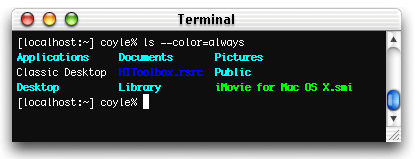
One of the updated utilities is the venerable 'ls', the list command. As an added benefit, this new version could color code directory listings. Today, I'll show you how to customize those colors and add support for newer Mac file extensions. (Continued...)
Support ResExcellence by Visiting our Sponsors!
User Contributed Splash Screens: by Michael Coyle
The download counters at ResExcellence have been updated. If you are a contributor who notices a counter rest, please email. I hope I have finally fixed this problem.
- John Bailey sent a makeover that changes the icon where the inside of the “Q” in the QuickTime CSM would not be transparent. This will also change some of the menu items’ names. This makeover is for use with the QuickTime Preview 5.0.1, but will more than likely work with other versions.
- For Internet Explorer, Peter Dooley sent a Colossus splash.
- After seeing all the Hotline splashes in the archive, April Tenney took it upon herself to send one for another client, Carracho.
- The first two in the series of great looking MacOS X Boot panels from Martin Sundstrøm get posted today!
Support ResExcellence by Visiting our Sponsors!
Snapshots by Jeremy Hoesly Friday is here at last! Celebrate with another round of snapshots: - André Behrens contributes this OS X snapshot sporting a graphic extracted from an OS X screensaver as a desktop picture. The dock has been hacked to run left justified as opposed to centered. Icons from Xicons and Icon Factory reside in the dock.
- Ha’Te submits this OS X snapshot touting the “Suriyothai” desktop picture. Custom icons abound.
- This dual-monitor screenshot from Jasper Hauser features custom desktop pictures. iTunes is pumping out soundwaves in the lower left-hand corner of the second screen. Icons from William Bart’s BBX Platinum K-Scheme and Icon Factory’s Generic Aqua pack are scattered throughout along with some custom icons.
- MacDesktops’ “LMatrix” desktop picture and JinSan’s NeXT Capriccio K-Scheme debut in this minimalist submission from Andy Moraitis. Icons from Icon Factory line the right edge.
Have a desktop masterpiece you’d like to share with the Mac masses? Read our submission guidelines and then bring it on!
Register to Win an iPod at Smalldog.com
Icon/Desktop News 05-11-01 Icon & Desktop News: by Dan  Thanks to all who so generously shared their Nature oriented desktops with our readers, I hope the tour was as much fun for you as it was for me. On a more serious note, I need to remind those who do submit artwork that they MUST be your own original creations, and in no way "borrowed, filtered or scrambled" from someone else's labor. Please abide by this. Also, don't forget that we do provide a handy ftp drop box for those "larger" submissions. Some jumbo e-mail attachments may get bounced or undelivered by my isp, and end up in cyber limbo. Thanks! Thanks to all who so generously shared their Nature oriented desktops with our readers, I hope the tour was as much fun for you as it was for me. On a more serious note, I need to remind those who do submit artwork that they MUST be your own original creations, and in no way "borrowed, filtered or scrambled" from someone else's labor. Please abide by this. Also, don't forget that we do provide a handy ftp drop box for those "larger" submissions. Some jumbo e-mail attachments may get bounced or undelivered by my isp, and end up in cyber limbo. Thanks!
Icons - Desktops: It's another Theme day in the Desktop Department. We've got (8) Mac-Apple only desktops and (1) OSX set of icons to show off. All on display for today's update.
- Hein Mevissen appears to be very taken with OSX, and everything about it. So much in fact that he's created a new icon set dedicated to all the stuff that came right out of "The Box". This set includes 6 different 128 x 128 icons illustrating everything that you can expect to get when you purchase OSX.
- Long time reader and occasional contributor to ResExcellence Dan Wiencek submits two desktop patterns: Apple Dock and Simple Apple. They're available, along with many other designs, in other colors and resolutions on his new site, www.nonsuchworks.com." These two come in 1024x resolution.
- Dragontongue, the author of "Blue Stripe Alien" has been reported to have mysteriously vanished in his triangular Bermuda shorts from the face of the earth. Perhaps it has something to do with the extraterrestrial nature of this desktop, which comes in 1024x resolution.
- Soul Rocka Nasty Nene returns again to share one of his funky desktops with "Lemon Macintosh OS". He also reminds us to "Keep on macin', keep on keepin' it mac!" (1024x resolution)
- Jeff Dinkins was longing for the old "Classic Rainbow Apple", but couldn't locate any cool desktop pix with it, so he decided to create his own. Made with Photoshop 6 and KPT 5, this favorite symbol of the Mac-gone-by comes in 1024x and 1600x resolutions.
- Here is the first of hopefully many desktops to come by through the collaboration of Michael and Shanon Blosch. It's titled "Very Blue Apple" and comes in 1024x resolution.
- "Ocean Graphite" is a nicely done set of high tech style desktops by Jasper Hause. The folder includes two different variations on a theme, and come in 1024x and 1152x resolutions.
- "Just some desktops of the Ti" iBook, no big deal" says Paul Sahner. We disagree! This is a nicely done set of four different backdrops with metallic backgrounds. All come in 1024x resolution.
- Gigi believes that somewhere out there in the universal spaces a "Primordial Creation" has taken place. How else could so much creativity flow from the mind of Apple Computer, and right on to your desktop? See for yourself where it all began, in 1024x resolution.
News From Around the Web: Yosh from Chillyday informs us that he has posted 4 new desktop pictures today and wanted you to know that. Brycetopia (after an unexpected long hiatus) has returned with 8 new images for your pleasure. Check them out! Aussie photographer Andrew Symington has a small website where you can find more of his excellent Nature scenery photographs available for download. EVERY WEEKEND Live Pencil lets you see a new animal moving around, just to give you a smile. Don't forget to check it when you are getting ready to begin you week. * On a more serious and sad note, it appears that Ramon will shortly be abandoning his work of love, "Live Pencil", and will be moving on to other things. Drop him a line and let him know how much you have appreciated his awesome and playful artworks. Exitmusic has 6 new desktops available for download. The series is titled Heat, and the more perceptive will know why. Hansworks Design, has released a new desktop picture. Steve Sobek updates with seven new desktop pictures. Dean's Designs has updated this week with 2 new desktops. Ra reports news flash, my website URL is no more "www.multimania.com/raool" but "www.raspage.com". In addition, he made 4 new desktops.
Colheres updates with a new icon set (flower power) and a new desktop by Daniel C. KCz Custom Desktops posts eight new and psylightly psychedelic desktop pictures for your enjoyment. Flax Creations updates this week with six really nice desktops. So what's up WWW? Icons? Desktop pictures? News? Inform us! We'll post it!
Support ResExcellence by Visiting our Sponsors!
Text Clippings Made Easy by Erick Tejkowski Of all the great technologies available to Mac users, perhaps the most overlooked is that of the Clipping file. Clipping files permit you to store data in a file that can be viewed from the Finder. REALbasic makes it a cinch to work with the resources contained within text clipping files. Text clippings are already very versatile, but sometimes it is a nuisance to constantly open the clipping file to view its contents. This example shows you how to keep tabs on your text clippings and make them more helpful than ever. (Continued...)
iSage - in the Archive now!
 |
Theme News by Michael Rabe
All is quiet on the theme front as of late (too quiet)!
Today iSage has been added to the Theme Archive. Next Thursday iSnow well be added as well.
See ya on the flip flop!
If you have a theme you wish to add to the Archive, drop me an email.
5/10/01 Snapshots by Jeremy Hoesly Heads up! Thursday’s snapshots are coming at ’ya: - AsabalkSol contributes this OS X submission touting a custom desktop picture and custom icons. Both bare the symbol of a three-legged crow, a figure in Korean mythology.
- Sebulba from Star Wars Episode I stars in this snapshot from Max featuring Wallpapers HQ’s “Sebulba” desktop picture and Arlo Rose’s Onyx K-Scheme. GLTron, one of Max’s favorite games, is poised to play in the upper left-hand corner.
- Robert Vasquez submits this screenshot sporting a custom desktop picture. Audion, overhauled with the High Quality Sounds face, is churning out music at right center. Custom icons along with selections from icons.cx reside in the dock.
- Perfect Yosemite’s “HeavyDV” desktop picture and Maury McCown’s AquaX III Graphite K-Scheme debut in this contribution from Gerard Zandvliet. Audion, retro-fitted with Ric Zito’s F2 face, is shuffling music tracks in the upper left-hand corner. Icons from a generic Aqua iPack inhabit the desktop.
Have a desktop masterpiece you’d like to share with the Mac masses? Read our submission guidelines and then bring it on!
Support ResExcellence by Visiting our Sponsors!
Today's News by Cletus™ Check out the cool news on BBX•MERCURY™ below!  St. Clair Software has released a new version of Default Folder v.3.1.1, their popular enhancement for Open and Save dialogs. All existing Default Folder users are encouraged to download this free update. Changes to this superb dialog box enhancement tool include the following: St. Clair Software has released a new version of Default Folder v.3.1.1, their popular enhancement for Open and Save dialogs. All existing Default Folder users are encouraged to download this free update. Changes to this superb dialog box enhancement tool include the following:
- Default Folder now supports the new Navigation Services dialogs used by Adobe Acrobat 5 and Photoshop 6.0.1.
- Corrected a problem that could cause Omnis database queries to execute slowly.
- Cmd-up-arrow now works correctly in Navigation Services dialogs under Mac OS 8.6.
- "Click on greyed-out filenames" in Navigation Services save dialogs no longer stops functioning when users tab from the file listing to the filename box.
- Fixed a bug that could disable registration code entry on Japanese and French systems.
- Corrected an error that could cause Get Info comments to be truncated or missing in Default Folder's Get Info window.
 TinkerTool 1.32 is out of beta and now available for download. TinkerTool will help you alter the appearance of OS X. Have I mentioned before how much I like this .app? I think so. Here is what has changed: TinkerTool 1.32 is out of beta and now available for download. TinkerTool will help you alter the appearance of OS X. Have I mentioned before how much I like this .app? I think so. Here is what has changed:
- Corrected problem with Italian localization.
- Made clean-up of environment variables more reliable.
- Disabling Cocoa font smoothing for large fonts now works under all conditions.
- FAQ was extended.
WorkStrip 1.0.1 by Softchaos is now available. "WorkStrip is a new central hub for your desktop. Launch, quit, hide and activate applications, open and preview documents from one elegantly designed bar." - A problem which could cause memory corruption when Control Strip modules saved their preferences has been fixed.
- WorkStrip will now hide itself when MindControl’s command bar is displayed.
- WorkStrip no longer stays hidden when quitting Unreal Tournament.
- When loading Control Strip modules from the 'WorkStrip Modules' folder, some modules would report that they were unable to find themselves.
MacUpdate has expanded its services. Those who sign up for a free membership will get: A customizable Watch List:, daily email list of all new updates, tracking of your download history and a customizable Site Layout. Mac ToolKit v.1.4.5 by BlockSoft is a really cool little tool bar featuring many useful elements which will make the Mac all that much easier to use. It includes: •ScribblePad •MiniCalc •Wastebasket Emptier •Disk ejector •File-Info Checker •AppLauncher •System Info •Volume Menu •You can also conveniently restart, and shut down your computer.
Scheme News: William Bart dropped me a note about a new project he is working on for Kaleidoscope. I am a little confused myself on what exactly it is, so I will tease you with it also. :) He writes: "I've been hard at work for the past 4 months developing a new GUI Overlay Kit called BBX•MERCURY™ which will be fit for human consumption towards weeks end. In the meantime, I've released an online preview which can be viewed here." "BBX•MERCURY™ for Kaleidoscope is merely the hub of a much larger project which includes numerous interface skins, hacks and extras." Stay tuned....! The KSA has updated with 2 new and two updated schemes. The new schemes are: Storm by Gwendolyn and LCMS by Dale Critchley. Both schemes are very well done and deserve a try out! Submit Software and General News Suggestions!
Ilicon Graphic Design
Tools of the Trade by Michael Coyle
If you haven't yet, be sure to install the developer tools for MacOS X. It provides a lot of useful applications. PropertyListEditor and the handy terminal text editor Pico are just two. In fact, some terminal commands (changing the genie effect, for example) won't work at all. I also noticed superuser access performs as expected with the developer tools installed.
Watch out! After updating MacOS X to 10.0.2, you may notice an alias of the Classic Desktop folder on your MacOS X desktop. Don't delete it! It's the only way to access those items left on the Classic desktop.
I believe this problem occurs because I have X and Classic on the same volume. MacOS X may be trying to prevent confusion be hiding the classic desktop, but if you delete that folder alias, not even a command line symbolic link will get it back. I was lucky to have had my MacOS X beta install on another partition. After booting with that system folder, I recreated the folder alias to the Classic Desktop. I would be interested to hear if others have had problems.
Terminal Commands: Setting List Colors by Michael Coyle
A few months ago, Rob Griffiths from MacOS Hints contributed to ResExcellence new versions of the command line apps: df, ls, du, and others. These are all from a package of programs called fileutils-4.0.
In this tutorial, which is performed entirely under MacOS X, we will download the source for these utilities, compile it under MacOS X, and learn how to set several extra option for terminal listings that were not previously available. (Continued...)
- Moochcat, a groovy little script font
- Helix 6, a techno font
- Turbine Sans, a sans-serif family
A couple of these are donation-ware, so be sure to send a couple of bucks if you like them.
Support ResExcellence by Visiting our Sponsors!
User Contributed Splash Screens: by Michael Coyle
The download counters at ResExcellence have been updated. If you are a contributor who notices a counter rest, please email. I hope I have finally fixed this problem.
- George Krueger's iTunes skin has been updated and reposted. This new version now works with Classic and MacOS X versions.
- A colorful new face for the MacOS X Clock.app has been created by Alain Bachellier.
- Levent Ozayan has spun out another throbber for Internet Explorer 5.0.
- We have another MOSS featuring a very popular subject: Dark Angel! This one is from John Rose.
- MacSnob sent a splash for Photoshop displaying a lovely lady in red.
Support ResExcellence by Visiting our Sponsors!
Snapshots by Jeremy Hoesly Feast your eyes on Wednesday’s snapshots: - Bungie’s “Oni” desktop picture and the custom Oni K-Scheme debut in this submission from Matt Heerdt. Icons from Gort’s Icons are nestled in the upper right-hand corner.
- This two-part snapshot from Oscar Marsh features both of his iMacs. The “Desk 36” and “Desk 40” desktop pictures from Mecompany are featured. Icons from Icon Factory, RAILhead Design, and icons.cx are also present.
- Brian Noon contributes this screenshot sporting Game Wallpapers’ “Ridge Racer V” desktop picture. Audion, equipped with Akio’s SlickCorner Graphite face, is managing the background music in the lower left-hand corner. Icons from Icon Factory abound.
- This screenshot from Kevin Scoville touts Animic Desktop’s “Neon Genesis Evangelion” desktop picture. iTunes is pumping out soundwaves along the right edge.
Have a desktop masterpiece you’d like to share with the Mac masses? Read our submission guidelines and then bring it on!
Pocket 48GBs and 30 Bucks with LaCie's PocketDrive - visit Smalldog.com
Icon/Desktop News 05-09-01 Icon & Desktop News: by Dan Thanks to all who so generously shared their Nature oriented desktops with our readers, I hope the tour was as much fun for you as it was for me. On a more serious note, I need to remind those who do submit artwork that they MUST be your own original creations, and in no way "borrowed, filtered or scrambled" from someone else's labor. Please abide by this. Also, don't forget that we do provide a handy ftp drop box for those "larger" submissions. Some jumbo e-mail attachments may get bounced or undelivered by my isp, and end up in cyber limbo. Thanks! Icons - Desktops: It's another Theme day in the Desktop Department. We've got (8) Mac-Apple only desktops and (1) OSX set of icons to show off. All on display for today's update.
- Hein Mevissen appears to be very taken with OSX, and everything about it. So much in fact that he's created a new icon set dedicated to all the stuff that came right out of "The Box". This set includes 6 different 128 x 128 icons illustrating everything that you can expect to get when you purchase OSX.
- Long time reader and occasional contributor to ResExcellence Dan Wiencek submits two desktop patterns: Apple Dock and Simple Apple. They're available, along with many other designs, in other colors and resolutions on his new site, www.nonsuchworks.com." These two come in 1024x resolution.
- For some reason the author's name of "Blue Stripe Alien" has mysteriously vanished from my files. Perhaps it has something to do with the extraterrestrial nature of this desktop, which comes in 1024x resolution.
- Soul Rocka Nasty Nene returns again to share one of his funky desktops with "Lemon Macintosh OS". He also reminds us to "Keep on macin', keep on keepin' it mac!" (1024x resolution)
- Jeff Dinkins was longing for the old "Classic Rainbow Apple", but couldn't locate any cool desktop pix with it, so he decided to create his own. Made with Photoshop 6 and KPT 5, this favorite symbol of the Mac-gone-by comes in 1024x and 1600x resolutions.
- Here is the first of hopefully many desktops to come by through the collaboration of Michael and Shanon Blosch. It's titled "Very Blue Apple" and comes in 1024x resolution.
- "Ocean Graphite" is a nicely done set of high tech style desktops by Jasper Hause. The folder includes two different variations on a theme, and come in 1024x and 1152x resolutions.
- "Just some desktops of the Ti" iBook, no big deal" says Paul Sahner. We disagree! This is a nicely done set of four different backdrops with metallic backgrounds. All come in 1024x resolution.
- Gigi believes that somewhere out there in the universal spaces a "Primordial Creation" has taken place. How else could so much creativity flow from the mind of Apple Computer, and right on to your desktop? See for yourself where it all began, in 1024x resolution.
News From Around the Web: Yosh from Chillyday informs us that he has posted 4 new desktop pictures today and wanted you to know that. Brycetopia (after an unexpected long hiatus) has returned with 8 new images for your pleasure. Check them out! Aussie photographer Andrew Symington has a small website where you can find more of his excellent Nature scenery photographs available for download. EVERY WEEKEND Live Pencil lets you see a new animal moving around, just to give you a smile. Don't forget to check it when you are getting ready to begin you week. * On a more serious and sad note, it appears that Ramon will shortly be abandoning his work of love, "Live Pencil", and will be moving on to other things. Drop him a line and let him know how much you have appreciated his awesome and playful artworks. Exitmusic has 6 new desktops available for download. The series is titled Heat, and the more perceptive will know why. Hansworks Design, has released a new desktop picture. Steve Sobek updates with seven new desktop pictures. Dean's Designs has updated this week with 2 new desktops. Ra reports news flash, my website URL is no more "www.multimania.com/raool" but "www.raspage.com". In addition, he made 4 new desktops.
Colheres updates with a new icon set (flower power) and a new desktop by Daniel C. KCz Custom Desktops posts eight new and psylightly psychedelic desktop pictures for your enjoyment. Flax Creations updates this week with six really nice desktops. So what's up WWW? Icons? Desktop pictures? News? Inform us! We'll post it!
Support ResExcellence by Visiting our Sponsors!
REALbasic News by Erick Tejkowski Lots of goings-on in the REALbasic community this week. REAL Software announces plans for the WWDC, Matt Neuberg posts tons of code examples, Split Software gives you a dash of color, and yes, even Mars on Earth! - Continued...
Theme News by Michael Rabe
 Just incase you missed it. The Doghouse has released an update to Theme Checker. Here is a list of the changes that were made: Just incase you missed it. The Doghouse has released an update to Theme Checker. Here is a list of the changes that were made:
- Added new check list to help you check your theme
- Added "Make a Preview"
- Added "Text" checker to the Controls
- Added link to the Appearance Control Panel under the "Edit" menu
- Added Disabled Tabs
- Added pop-up arrows to the Button Control
- Added little arrows to the Button Control
- Added 2 new Previews
- Organized the Controls
- Made It FREEWARE
We have received a lot of eMail asking if we are going to finish releasing the "i" themes. Well I have some good news. Yes, the "i" Themes will all be released. iSage is the next in line. It will be added Theme Archive Thursday, so don't forget to surf over to pick up your copy.
See ya on the flip-flop!
If you have a theme you wish to add to the Archive, drop me an email.
5/8/01 Snapshots by Jeremy Hoesly Got the urge for snapshots? Come and get ’em: - MacDesktops’ “Jennifer Love Hewitt” desktop picture is featured in this screenshot from Justin Conn-Powers. Terminal is playing Rogue at right.
- Konoko from Oni stars in this submission from Helen alongside the Paper Theme. Cool.
- Peter Blume’s painting, “The Rock” is showcased as a desktop picture with the Danish Modern K-Scheme in this contribution from Jay Lehrer. Audion, outfitted with the default wood-tone Console face, is cranking out songs in the upper right.
- John Schilling submits this OS X snapshot sporting a vibrant desktop. Coral Reef icons as well as some homegrown creations are featured.
Have a desktop masterpiece you’d like to share with the Mac masses? Read our submission guidelines and then bring it on!
Support ResExcellence by Visiting our Sponsors!
Today's News by Cletus™ Eric Reid has notified me of the winners of the Kaleidoscope T-Shirt contest. this contest definitley required some work on the part of the people entering. The lucky winners of the two shirts are: Timechanic Industries (creator of Boilerplate) 3765 and Michael Askew - 3768 There are 3740 individual .sit archives linked for downloading at the KSA. While we are talking about the KSA, I thought I would pass along and interesting article I found on Friday concerning the state of scheming and perhaps, the state of the GUI in general. Steve Sobek wants to know if it is really going to be "One World, One Interface?" in his column: The Daily Rant. We of course know how all ResExcellence readers will answer! I certianly have noticed the drop in NAUS updates over the last several months. What is the reason?  Michael Rabe, "theme guru" has posted an update to his software "ThemeChecker" v.3.0. ThemeChecker. lets you check the different parts of your themes or schemes. You can then make previews with ease. Changes to this version are: Michael Rabe, "theme guru" has posted an update to his software "ThemeChecker" v.3.0. ThemeChecker. lets you check the different parts of your themes or schemes. You can then make previews with ease. Changes to this version are:
- Added new check list to help you check your theme
- Added "Make a Preview"
- Added "Text" checker to the Controls
- Added a link to the Appearance Control Panel under the "Edit" menu
- Added Disabled Tabs
- Added pop-up arrows to the Button Control
- Added little arrows to the Button Control
- Added 2 new Previews
- Organized the Controls
- Made It FREEWARE
Mouse (direct download) was recently updated by John Rethorst. Mouse will place a small window on your desktop showing the current screen coordinates of your mouse, coordinates within the top window, changes in screen coordinates since the Option key was pressed, and the RGB and Hex color values of the screen directly underneath the current mouse point. New in this version: Mouse remembers its window location. Easier dragging and it no longer floats above all other windows. TinkerTool's latest release is 1.31a by Marcel Bresink, adds the Italian language package.
The Mac Observer has posted an article called "Making the Most of Mail.app." If you are using the Mac OS X Mail application, the set up process can be a bit confusing. At least according to the topics in various forums I have read. This will help get you up and running. A small departure from the norm here, but this looks like a really nice up and coming program for Mac OS X. Org Release 2.0 for Mac OS X and Mac OS 8/9: "Elegant and Powerful Personal Information Manger links your Appointments and ToDo List items to your Contacts in one simple interface."
"SukiSoft Technologies announces the availability of Org 2.0, a significant advance over our lightweight Macintosh PIM, DayLynx. Org 2.0 is a Macintosh PIM that lets you link your Appointments and ToDo List items to your Contacts with a flexible multi-view or efficient all-in-one-view interface." Scheme News: Several new and updated Kaleidoscope schemes have been posted at Desktopper. These include Hatsuyuki 1.0 and Yamabuki 1.0 by AloeDaioh. Both are new schemes to the Kaleidoscope world. Hanasusuki 2.0 and Hitoemume 1.1 are also by AloeDaioh and are updated versions. Desktopper has also posted an updated Aqua scheme "Aquacid 1.0.4" by the Aquacid Project. Submit Software and General News Suggestions!
Register to Win an iPod at Smalldog.com
 Polling Place by Michael Coyle Polling Place by Michael Coyle
45% of ResEx readers have already moved up to MacOS X! While I'm not surprised (since ResEx readers are bleeding edge), I do wonder what will happen this summer when Apple ships the OS preinstalled on new hardware. The engineers in Cupertino still have a lot of work to do getting hardware support up a state that equals Classic MacOS.
On the family iMac, Multiple Users is run so each member can have his/her own desktop, preferences and access permissions. Last week, Apple updated the software and while installing it, I wondered if anyone was still using the Voice Password feature. So that's this week's Polling Place question.
Tools of the Trade by Michael Coyle
The Coyle family and I went camping this weekend. Weather.com lied. Our supposedly sunny day were filled with clouds and rain. As a result, we all have a nasty strain of common cold. This didn't stop Melissa from posting six new sites to the ResExcellence Links page! The red area is for the progress bar, the blue represents the startup text area. Be sure to send your creations to ResEx!
Felix has posted instructions on how to remove the Apple logo from the Visualize Plug-ins. He also has three skins that may interest you.
David Dear sent this great tip for creating custom Terminal preference files. Open a terminal window and use the Preferences to set the font, colors, window name, etc. From the Shell menu, save the settings in the /Library/Terminal folder. You can open this file in the Property List Editor (from the Developer's Tools) or in any text editor. Listed below are just some of the settings you can modify.
Adjust the opaqueness for this window only
<key>TerminalOpaqueness</key>
<real>0.7</real>
Execute a command line program.
<key>ExecutionString</key>
<string>ping www.resexcellence.com
</string>
* Note: to execute a command, hit return after the command line. Notice how </string> is on another line.
One interesting command I couldn't get to work was the following. If any ResExers stumble upon the syntax, drop me a line:
<key>BGImageName</key>
<string>"file://localhost/Users/coyle/Pictures/pict.tiff"</string>
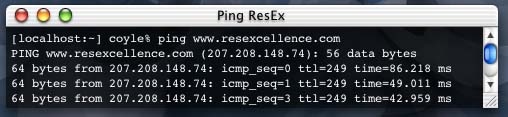
These custom .term files are handy for running programs in a small window. For example, to get the terminal featured in the image below, I launched a custom terminal preference file that opens a small window and pings the ResEx server to make sure it's up and running.
You can then make aliases of the terminal files, add custom icons, and place them in handy places for execution.
Snapshots by Jeremy Hoesly Thanks to all for the snapshots over the weekend! I’ll remain at four snapshots per update for a little while longer until I have a decent buffer zone.
Here’s your fresh Monday delivery of snapshots. Get ’em while they’re hot: - A custom desktop picture and the Drawing Board Theme are showcased in this screenshot from Gabhlan. iTunes, with an alternate skin, is serving music in the upper right-hand corner.
- Rob Hanlon submits this OS X snapshot touting Cognitive Distortion’s “Storm Brewing” desktop picture. iTunes is dishing out selections in the lower right-hand corner.
- The “Steps” desktop picture and Michael Rabe’s Emerald Forest Theme debut in this snapshot from Helen. Musashi, an email client with international appeal, is featured at center.
- Evan Sharp contributes this submission sporting a Shroomgfx desktop picture. Audion is kicking out soundwaves at two locations. Icon creations from Perfect Yosemite and Icon Factory are scattered throughout.
Have a desktop masterpiece you’d like to share with the Mac masses? Read our submission guidelines and then bring it on!
Ilicon Graphic Design
Icon/Desktop News 05-07-01 Icon & Desktop News: by Dan  I've got a special treat coming up for all those who love Nature and Scenery backdrops. On this coming Wednesday (5/9) all the desktops being featured will be a collection of the submissions I've assembled in that category. So, put on your sunglasses, lace up your hiking boots, get out your world Atlas and get ready to enjoy some beautiful places from around the globe. I've got a special treat coming up for all those who love Nature and Scenery backdrops. On this coming Wednesday (5/9) all the desktops being featured will be a collection of the submissions I've assembled in that category. So, put on your sunglasses, lace up your hiking boots, get out your world Atlas and get ready to enjoy some beautiful places from around the globe.
Icons - Desktops: We've got (2) brand new Icon Sets and (8) excellent Desktops to start your week off right. All on display for today's update.
- Lots of folks thought Apple's killing of the hand held Newton was a big mistake. Those who managed to buy one report really enjoying their use. John Schilling is one of those folks, and created a set of OSX compatible "Newton Icons" to say: "Long live the Newton!"
- This is the second set of eleven "Son of Mac" icons created by Tim Busscher, once again photo-realistic. He didn't really have a specific theme in mind, though he really likes using pics of space scenery.
- "Star of the Show" is the latest desktop creation from the very talented Dean Fusaro of Dean's Designs. View the preview here, and visit the website for the download, where you will find this fine desktop and others available in 1024x resolution.
- "Headplay" created by S W Dickson is just the start of a long line of simple designs with more emphasis on style than content. This one comes in 800x and 1024x resolution.
- "MidnightRainbow" by Bradford J. Wiles is the first in a series of three in the "Rainbow Variations series". All three share the same "DNA," that is, the same elements in the Working window or Bryce scene, but vary quite a bit. This unique desktop composition created in Bryce comes in 800x and 1024x resolutions.
- Jonah Greene wanted to share this cool "Sci-Fi desktop" with his fellow Farscape fans! This awesome backdrop comes in 1280x.
- The impending release of the newly designed "iBook 2001" is creating quite a stir. S W Dickson was so excited by it that he created this desktop approximately 10 minutes after it was announced. "It was so gorgeous" he says, "I just had to make one." Comes in multiple resolutions.
- Steve Sobek is also taken with the new "iBook", and created an interesting 3-D multi- dimensional backdrop in Bryce 4, using an imported photo of the new iBook. The folder includes two variations on the theme, and come in 1024x resolution.
- Jason Johnson is obviously a Beatles fan, and created this stylish set of desktops titled "Beatle Chrome". Both come in 1024x resolution.
- "Flame of Knowledge" by Manny Velazquez is the latest desktop creation from the inspiring "Metaphysical" series. A visit to his website reveals these backdrops to be expressions of Manny's own personal and esoteric view on spirituality, and is well worth the read for those who want to take a deeper look. This one comes in 1024x resolution.
News From Around the Web: Steve Sobek updates with seven new desktop pictures. Dean's Designs has updated this week with 2 new desktops. Ra reports news flash, my website URL is no more "www.multimania.com/raool" but "www.raspage.com". In addition, he made 4 new desktops.
There are 12 new Mechcommander 2 desktop pictures at Exitmusic. Colheres updates with a new icon set (flower power) and a new desktop by Daniel C. KCz Custom Desktops posts eight new and psylightly psychedelic desktop pictures for your enjoyment. Flax Creations updates this week with six really nice desktops. The Iconfactory announces the immediate availability of IconBuilder Pro v2.1. This update (free to registered users) corrects a small, but significant bug when IconBuilder was used in conjunction with Mac OS 9.1. Frank's Second Corner updates with 10 new Desktops, titled the "April Collection." Steve Sobek updates with three new desktops this week and two textures added to the pixels section. Epoch Icons updated with a new desktop pic: Final Fantasy - Maxim Aki.
Hansworks Design has released 2 new desktop picture named, Water! and it=B9s remix. Check out http://www4.plala.or.jp/Apple/index.html for some painfully creative kines for Kineticon. So what's up WWW? Icons? Desktop pictures? News? Inform us! We'll post it!
You can now upload your contributions (include a READ ME) to the ResExcellence
ftp drop box, and let us know with an email. Be sure to read the Submission Policy
|