|
Today's News by Cletus™  While we close in on yet another weekend, we also close in on the end of another contest. You still have two days left to enter the Kaleidoscope T-shirt giveaway. Drop over to the KSA and count the schemes! While we close in on yet another weekend, we also close in on the end of another contest. You still have two days left to enter the Kaleidoscope T-shirt giveaway. Drop over to the KSA and count the schemes!
 DragThing 4.0.2 is the next version of this premier launcher application. James Thomson also left us know that DragThing is now 6 years old. Congratulations James! Changes to this version are primarily for a few stray bugs that popped up in Mac OS X and some general overall fixes. DragThing 4.0.2 is the next version of this premier launcher application. James Thomson also left us know that DragThing is now 6 years old. Congratulations James! Changes to this version are primarily for a few stray bugs that popped up in Mac OS X and some general overall fixes.
- Fixed crash at startup when trying to use the backup preferences file.
- Fixed crash at startup when "Open DragThing Automatically" was enabled.
- Fixed crash when clicking the "Open DragThing Automatically" checkbox.
- Fixed problem with the login items being cleared at startup.
- Fixed problem opening Finder URL shortcuts.
SoundHack 0.890b4 is described as a "Unique esoteric sound effects processing utility." As a freeware utility, it performs many sound processing functions available nowhere else. PasswordMaster 1.0b6 has been released at RAILhead Design. Still in beta, Maury continues to improve the password storage application while having fun with it- adding Easter Eggs! - Added basic print capability.
- Added the new, finalized application icon.
- Reworked the text in the alerts, the About Box, reminders, etc. to fit Apple's Aqua UI Guidelines better.
- Began code targeting for straight OS X release, pre-OS X release, and Windows release.
- Began adding “Easter Eggs”…
Themes.org has several very interesting screenshot and themes posted at their site. Since we haven't visited them in a while, you may wish to spend some time this weekend cruising through previous posts. Here is a little project for all ResExcellence readers this weekend. Send Jeremy a snapshot of your desktop! That's it, that's all! Submit Software and General News Suggestions!

Register to Win an iPod at Smalldog.com
 Tools of the Trade by Michael Coyle Tools of the Trade by Michael Coyle
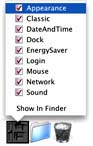
slackjaw sent this simple tip to create a popup dock folder that allows you directly jump to any control panel.
Find the preferences for the System Preferences. They are located in this folder: /System/Library/Preferences.
Then create a new folder titled Control Panels in your Home folder.
Make aliases of your most commonly used preferences and move them into the Control Panels folder. You can even rename and change the icon of the aliases.
Drag the Control Panels folder to the dock, and enjoy your popup menu. Selecting one of the aliases launches the Systems Preferences and brings up the correct panel.
Hey wake up! If you downloaded George Krueger's recent iTunes makeover for the MacOS X version, it is NOT compatible with the new version of iTunes. Watch for a new makeover within a few days. The old one has been temporarily pulled from the archive.
 Want to make a MacOS X Boot Panel? Martin Sundstrøm took the time to make a template for you. The download contains two images: a layered Photoshop file, and a PICT. Want to make a MacOS X Boot Panel? Martin Sundstrøm took the time to make a template for you. The download contains two images: a layered Photoshop file, and a PICT.
The red area is for the progress bar, the blue represents the startup text area. Be sure to send your creations to ResEx!
To use Apple's DVD Player 2.4 with Macsbug installed, Ammon Skidmore suggests you open the apps data fork and replace: 4182001438000130 with: 4282001438000130. It changes the conditional branch after the Macsbug check to never cause an exception to be thrown.
MacInstruct has posted a new tutoial by Chris Paine, How to Use MacMAME. an emulator for old arcade games.
| Instantly compare over a dozen USB CD Burners. Right Now! |
 |
User Contributed Splash Screens: by Michael Coyle
The download counters at ResExcellence have been updated. If you are a contributor who notices a counter rest, please email. I hope I have finally fixed this problem.
- George Sturges sent ZeroWing MOSS where all the text elements are from bad English translations in the anime show.
- Do you use the OT/PPP Control Strip? John Bailey created a little makeover for you.
- More rock and roll at ResEx! Andrew Krakowski created an Explorer splash for Anthrax lovers. Do you see the secret message?
- Cody Walton sent an Aqua-styled skin for iTunes.
- Featuring the entire cast of Angel, Mandy Gordon put together this MOSS.
- Thank brenda von ahsen for this nice looking Outlook Express splash.
| Way-cool! The RIO 600 Portable MP3 Player with Sound Jam |
|
Snapshots by Jeremy Hoesly Spring is in the air, and many of you are spending more time outside. As a result, I'm just about out of Snapshot submissions!. If you’ve been holding off on that special submission, now’s the time to send it!
Friday’s snapshots are here for your enjoyment: - This OS X submission from Jade Barton features a Matrix-style desktop picture. iTunes cranks out music along the top.
- The Jesus Project’s “Xpiritment 05: Burst” desktop picture coupled with Maury McCown’s AquaX III K-Scheme is showcased in this submission from Luki. SoundJam, retro-fitted with the eJam skin and G-Force visualizer, is dishing out tunes near the right edge. Icons from Xicons are also displayed.
- MacDesktops’ “OSX Shadow” desktop picture and the Next Capriccio K-Scheme debut in this contribution from Andy Moraitis. Icons from Icon Factory line the right edge.
- Faithful contributor Manuel Velazquez once more submits a snapshot bearing a desktop picture from his Metaphysical series, this time being “Flame of Knowledge.” Fascinating.
Have a desktop masterpiece you’d like to share with the Mac masses? Read our submission guidelines and then bring it on!

Ilicon Graphic Design
Icon/Desktop News 05-04-01 Icon & Desktop News: by Dan  Thanks to all those who responded to my "plea" for more Nature category desktops. I haven't been overwhelmed with the volume of them, but what I've received thus far is really nice stuff, and makes for pleasurable viewing. How about a few more folks? Thanks to all those who responded to my "plea" for more Nature category desktops. I haven't been overwhelmed with the volume of them, but what I've received thus far is really nice stuff, and makes for pleasurable viewing. How about a few more folks?
Icons - Desktops: We've got (1) brand new OSX Icon Set and (8) excellent Desktops to reward you for working so hard all week. All on display for today's update.
- For all you road raging, cycle hopping bikers, Tracy Bieneman goes the distance with a large set of "Motorcycle Helmets" Icons for OSX. This collection includes 26 different helmets sorted according to their makers.
- "Blue Apple" is one of the latest desktop creations from the very creative Dean Fusaro of Dean's Designs. Visit the website for the download, where you will find this fine desktop and others available in 1024x resolution.
- S W Dickson created "Eyedesk" with the express purpose of stopping his girlfriend from getting too comfortable at his computer. (what a guy) This eye popping desktop comes in 800x and 1024x resolution.
- The ever expanding dimensions of "Cyberbubble" by Bradford J. Wiles give this cyber optic fiber of light a sense of reflective infinity. This three-d desktop composition created in Bryce comes in 800x and 1024x resolutions.
- Gigi falls head over heals for his Mac with "I Wuv Apple". This attractive desktop also features one of Dragontongue's latest OSX Heartz icons as the center piece. This Apple-centric backdrop comes in 1024x resolution.
- Sometimes simple is better. Such is the case with this "OSX" desktop by Rob Smith. This understated but elegant background comes in 800x only.
- John Rose opens a slightly kinky part of his sketch book to us with his latest desktop creation "Vampi". This "on the edge" of R rated backdrop comes in 1280x resolution.
- The roving Aussie photographer Peter Mac submits what he calls the "WBGriffin"Desktop. Named after a great architect whom once ventured to this Australia with his wife. Together they changed the face of the land and set up the National Capital to be a leafy, tree filled city. He also designed Peter's home town of Griffith. This kaleidoscopic shot is taken in one of his forests, one of the few that were not Australian Natives. (most likely Pin Oaks) This backdrop comes in 1024x resolution.
- Cut, copy, and scan! "Junk" by Bradford J. Wiles contains random objects, one of which was cut from a box and plopped in the midst of this abstract piece. This Bryce creation comes in 800x and 1024x resolution.
News From Around the Web: Colheres updates with a new icon set (flower power) and a new desktop by Daniel C. KCz Custom Desktops posts eight new and psylightly psychedelic desktop pictures for your enjoyment. 'Exitmusic, a resource for desktop pictures, Internet Explorer 5 throbbers, and icons, has been completely redesigned. So drop on by! Flax Creations updates this week with six really nice desktops. The Iconfactory announces the immediate availability of IconBuilder Pro v2.1. This update (free to registered users) corrects a small, but significant bug when IconBuilder was used in conjunction with Mac OS 9.1. Frank's Second Corner updates with 10 new Desktops, titled the "April Collection." Steve Sobek updates with three new desktops this week and two textures added to the pixels section. Dean's Designs updates with more great desktop pictures. Epoch Icons updated with a new desktop pic: Final Fantasy - Maxim Aki.
Hansworks Design has released 2 new desktop picture named, Water! and it=B9s remix. Check out http://www4.plala.or.jp/Apple/index.html for some painfully creative kines for Kineticon. Nicolas Cardot opens his very own website to display his work. (*UPDATE 4/30) Nicolas has fixed a glitch with his downloads section, and is back in business. Ilicon updates with "GIANT" , a collection of gorgeous Desktop Pictures. Each pack contain 6 different, pattern like designs. 'Erik K. Veland just opened a website with huge (1600x1200) desktops and wide (1152x768)desktops for us lucky guys that run those resolutions and / or got a Titanium Power Book. So what's up WWW? Icons? Desktop pictures? News? Inform us! We'll post it!

Support ResExcellence by Visiting our Sponsors!
Take Control of your Command Line by Erick Tejkowski The release of Mac OS X marked the introduction of the Unix command line to thousands of Mac-o-philes all over the world. Despite feeling like a step backwards in time, the command line (typically accessed using the Terminal application included with Mac OS X) affords Mac junkies all sorts of tricks and hacks for customizing the Mac OS. REALbasic 3 introduces a new feature, called the Shell Class , which gives you the ability to use command line functions from within your own REALbasic project. This new feature makes it a cinch to give your OS X tweaks an interface as well as saving you from having to look up the hack each time. It also helps out those folks who are terrified of the command line (believe me, they're out there). Now, they can take part in the Mac OS X fun too. (Continued...)
5/3/01 Snapshots by Jeremy Hoesly Alas, I’m back in snapshot conservation mode. Please keep those submissions coming!
Quench your thirst for snapshots with Thursday’s four-pack: - Jeff Abraham contributes this screenshot sporting the “Excess” desktop picture and Toren Valimir’s I/OS X Graphite K-Scheme. SoundJam is providing the background music in the lower left.
- A custom desktop picture and Daisuke Yamashita’s Titanium7 K-Scheme are showcased in this submission from ARK. Interesting.
- They’re watching you: peering from the menubar, staring out of the desktop picture, and glancing from within the dock. The IRS? CIA? FBI? TGIF? Not today at least as can be seen in this OS X snapshot from Ben sporting a modified version of MacDesktops’ “Cartman” desktop picture. All the eyes except those in the desktop picture follow the cursor wherever it goes.
- The “Think” desktop picture and Michael Rabe’s Surged! Theme debut in this screenshot from Helen. iTunes is serving up music in the lower left-hand corner. The Doraemon and Nyabbit icons are scattered throughout.
Have a desktop masterpiece you’d like to share with the Mac masses? Read our submission guidelines and then bring it on!

Support ResExcellence by Visiting our Sponsors!
Today's News by Cletus™ Just a reminder that the Kaleidoscope Scheme Archive T-Shirt Giveaway is in full swing. I clarified the contest page a bit. It appears there was some confusion as to whether we wanted the overall scheme total or just the total possible .sit files- (some of which contain more then one scheme). What we are in fact looking for is the total possible .sit files available for download. That should make counting them a lot easier.  Program Switcher 5.6 is now available for download. This version fixes several bugs and adds the ability to define hot keys, or add applications to the launch/exclude list by drag and drop. This program is highly rated by its users. Give it a try if you haven't already. Program Switcher 5.6 is now available for download. This version fixes several bugs and adds the ability to define hot keys, or add applications to the launch/exclude list by drag and drop. This program is highly rated by its users. Give it a try if you haven't already.
Narattaphol Charoenphandhu has updated his set of icon tools, Iconizer Pro and Icon Calculator. Iconizer Pro allows you to build a group of icons from a picture to be a folder or CD background, While Icon Calculator calculates the size of the icon set for Iconizer Pro. Both programs received speed boosts and numerous other updates that can be found in the read me.  Eyes 1.1 is the latest release of this dockling that will follow your cursor around the screen with a pair of eyes. This update provides a much smoother "eye' movement, less CPU cycles requirement and improved preferences. Also available as a separate download is "Pupils" which will place a set of pupils on your desktop. A direct download for Pupils is here! A screenshot of both is shown here. Eyes 1.1 is the latest release of this dockling that will follow your cursor around the screen with a pair of eyes. This update provides a much smoother "eye' movement, less CPU cycles requirement and improved preferences. Also available as a separate download is "Pupils" which will place a set of pupils on your desktop. A direct download for Pupils is here! A screenshot of both is shown here.
TinkerTool 1.3 just keeps getting better and better. I really like this little program for Mac OS X. Besides putting the Trash can back on the desktop, and opening Mac OS X's several other hidden features, this version now provides the following: - Added new feature to control font-smoothing (anti-aliasing)
- Added new menu item to reset all TinkerTool settings to their original values
- The new version has English and German language packages only. The 1.2b release will still be available until all missing languages have been implemented
 A new preview version of Opera is now up at the main Opera site- version 5.0TP3. "Opera is a powerful browser - rich in enhancements and features. Speed is an issue we keep in mind at all times while coding, resulting in a faster browsing experience for the user. Opera features 128bit SSL encryption, version 2 and 3. The first browser on the market to support TLS 1.0." A full list of improvements is listed at the site. A new preview version of Opera is now up at the main Opera site- version 5.0TP3. "Opera is a powerful browser - rich in enhancements and features. Speed is an issue we keep in mind at all times while coding, resulting in a faster browsing experience for the user. Opera features 128bit SSL encryption, version 2 and 3. The first browser on the market to support TLS 1.0." A full list of improvements is listed at the site.
- Added Java
- Added JavaScript error-dialog
- Made Links visited work
- Removed confusing Window homepage
- Fixed popup width problem
New virus definitions are now available for May for Virex and Symantec NAV. Submit Software and General News Suggestions!

Kensington TurboMouse Only $155 at Smalldog.com!
Tools of the Trade by Michael Coyle
Antonio Flores Aldama let me know that Apple has released a few new networking utilities for MacOS X. His Modem Script generator should come in handy for those of you with an external modem. In fact, Apple has posted a large collection of software for MacOS X by third party developers.
ResEx regular Nicholas Cardot has posted his outstanding work on his own page! (Hey Nick, I hope you still plan to send your work to ResEx!)
Teknidermy is a relatively new online magazine for skinners on all platforms. While most of the articles are Windows based, there is info there on Gimp (Linux) and even an interview with Kaleidoscope developer Greg Landweber.
User Contributed Splash Screens: by Michael Coyle
- Rogier Derix sent a set of beautiful Boot and Login panels for MacOS X featuring tropical fish in a sandy ocean.
- Last update it was Frank Zappa, today it's Journey! Let's call this Cassic Rock week at ResExcellence. Chris Cunningham created this MOSS featuring the '80's rock band.
- In the first of his series of Explorer Throbbers, Levent Ozayan sends the US flag.
- brenda von ahsen sends this set of 10 textures for you to try in iTunes, Sherlock, or the Quicktime Player.
- Who is Jennifer!!! MacSnob sends more splashes featuring this unknow woman: one for Photoshop, and one for Explorer.
- John Rose sends a MOSS of Marilyn Monroe. The download contains customized images for the most rescent MacOS version releases.
Snapshots by Jeremy Hoesly Here’s your mid-week snapshot fix: - Chris Arends submits this OS X snapshot sporting a desktop picture from Game Wallpapers. Xicons’s Blizzard icons are on display in the dock.
- A custom desktop picture and the MIXBUS Blacklight K-Scheme debut in this screenshot from Matthew Grans. Musicmatch Jukebox is playing a song from his band, The Windowpanes, towards the bottom.
- The “Tintin” desktop picture and Michael Rabe’s “Pastel Red” Theme are showcased in this screenshot from faithful contributor Helen. iTunes is dishing out tunes in the upper left-hand corner. Tintin icons are situated along the right edge.
- This OS X contribution from Kyle sports MacDesktops’ “D’Konna” desktop picture. iTunes is kicking out soundwaves in the lower right-hand corner.
- Peer through the looking glass with this submission from André Lipinski featuring a Color Classic running System 7.5.5 and a mock-up of OS X. The “Heaven or Las Vegas” desktop picture and an OS X desktop picture are showcased alongside icon selections from AtsD and Icon Factory.
- Trevor Pressman contributes this three-part snapshot featuring a custom desktop comprised of content from multiple sources. Multiple machines are being remotely controlled via Timbuktu as seen in the upper right of the third shot. A plethora of icons from Xicons, icons.cx, and Gort’s roam about the desktop beside custom and Be OS icons.
Have a desktop masterpiece you’d like to share with the Mac masses? Read our submission guidelines and then bring it on!

Pocket 48GBs and 30 Bucks with LaCie's PocketDrive - visit Smalldog.com
Icon/Desktop News 05-02-01 Icon & Desktop News: by Dan  Thanks to all those who responded to my "plea" for more Nature category desktops. I wasn't overwhelmed with the volume of them, but what I have so far received is really nice stuff, and well worth displaying on your desktop. Thanks to all those who responded to my "plea" for more Nature category desktops. I wasn't overwhelmed with the volume of them, but what I have so far received is really nice stuff, and well worth displaying on your desktop.
Icons - Desktops: We've got (2) brand new Classic Icon Sets and (8) excellent Desktops to help you over that mid week hump. All on display for today's update.
- I'm pleased to announce a new set of icons from the talented Nicolas Cardot on display. "Fablue Icons" includes 25 different multiple purpose transparent green button icons. Visit his website for more of his excellent creations.
- For those who use MacAmp radio, the Macroxx team provides you with a set of 8 new icons to use with it.
- This panoramic photo was taken by Andrew Douch on Easter Tuesday 2001 at Lake Tyers (in Victoria, Australia) overlooking the spit that divides the Gippsland Lakes and the Pacific Ocean. The spit is called "Ninety-Mile Beach". The desktop comes in 1024x resolution.
- Perhaps a bit lost in space, "Lunar_Sea" is a quick departure from Bradford J. Wile's usual Bryce Renderings. This three-d desktop composition was created solely in Photoshop and comes in 800x and 1024x resolutions.
- Xochi describes his latest Desktop "Slint" as: "Romantic, Passionate, Bittersweet, Poignant, Theatrical, Intimate, Melancholy, Brooding". Or maybe he's just had to much wine to drink. How ever you view it, this one comes in 1280x resolution.
- 'Dragontongue muses about the meaning of life with his latest desktop "Composition". This beautiful Nature oriented collage from New Zealand comes in 1024x resolution.
- John Rose immortalizes the sultry queen of Hollywood with his latest desktop creation "Marilyn Monroe". This elegant backdrop comes in 1280x resolution.
- Garret Walbridge returns after some time with "Solar Desktop". This brilliant backdrop comes in three different resolutions.
- In response to my plea for more "Nature" related backdrops, Andrew Symington sent in this awesome photographic desktop of "Barrington National Park", Australia. This lush tropical forest scene comes in 1024x resolution.
- "Maxim Aki", submitted by Jason W. of Epoch Icons is not just a photo of a pretty girl in a skimpy bikini. Believe it or not she actually is a digitally rendered creation taken from the latest edition of the game "Final Fantasy". This larger than life desktop comes in 1024x resolution.
News From Around the Web: KCz Custom Desktops posts eight new and psylightly psychedelic desktop pictures for your enjoyment. 'Exitmusic, a resource for desktop pictures, Internet Explorer 5 throbbers, and icons, has been completely redesigned. So drop on by! Flax Creations updates this week with six really nice desktops. The Iconfactory announces the immediate availability of IconBuilder Pro v2.1. This update (free to registered users) corrects a small, but significant bug when IconBuilder was used in conjunction with Mac OS 9.1. Frank's Second Corner updates with 10 new Desktops, titled the "April Collection." Steve Sobek updates with three new desktops this week and two textures added to the pixels section. Dean's Designs updates with more great desktop pictures. Epoch Icons updated with a new desktop pic: Final Fantasy - Maxim Aki.
Hansworks Design has released 2 new desktop picture named, Water! and it=B9s remix. Check out http://www4.plala.or.jp/Apple/index.html for some painfully creative kines for Kineticon. Nicolas Cardot opens his very own website to display his work. (*UPDATE 4/30) Nicolas has fixed a glitch with his downloads section, and is back in business. Ilicon updates with "GIANT" , a collection of gorgeous Desktop Pictures. Each pack contain 6 different, pattern like designs. 'Erik K. Veland just opened a website with huge (1600x1200) desktops and wide (1152x768)desktops for us lucky guys that run those resolutions and / or got a Titanium Power Book. Yosh Kondo from Chillyday informs us that he has posted 14 desktop pictures there. They are photos he took with his Minoltas. So what's up WWW? Icons? Desktop pictures? News? Inform us! We'll post it!

Support ResExcellence by Visiting our Sponsors!
5/1/01 Snapshots by Jeremy Hoesly Get your Tuesday snapshots right here: - Clockadial returns with this screenshot sporting a “North by Northwest” desktop picture. Audion, armed with the F2 face, is shuffling tunes along the right edge.
- This contribution from Conrad features Alias|Wavefront’s “MAYA” desktop picture. iTunes is kicking out song selections in the lower right. Icons by Andy Runton with others from Xicons and Icon Street share the spotlight.
- Maury McCown’s “TangStripes” desktop picture and MacQNX K-Scheme debut in this snapshot from Phillip Hutchings. Smile, a replacement for the Script Editor, is displaying an AppleScript in the upper left.
- Andy Moraitis submits this snapshot sporting a custom desktop picture of a blue swirl captured from iTune’s visualizer. Opera, an immerging browser choice in the Mac world, is surfing in the lower left. Icons from Icon Factory abound.
- This submission from Ben Reichardt touts a customized “Picasso” desktop picture. Freeciv, which appears to be an open-source derivative of Sid Meier’s popular simulator, is running at right. Icons from Xicons are also visible.
- TrustKill’s “18 Visions” desktop picture is showcased in this OS X submission from XgarrettX. iTunes is cranking out songs in the upper left-hand corner. Icons from Xicons reside in the dock and on the desktop.
Have a desktop masterpiece you’d like to share with the Mac masses? Read our submission guidelines and then bring it on!
BlueBolt - in the Archive now!
 |
Theme News by Michael Rabe
Hello everyone. I hope you had a good weekend. It's Tuesday and time for theme news!
As some of you may already know, I have started work on a new "X" theme called "Glass". It is coming along great, and our very own Dan (The Man) Flax will be making a matching Desktop Picture. Watch for its release in a few short weeks.
Zack Rothauser of iMac Island has released a new classic theme called "BlueBolt". It has been added it to the Theme Archive. Be sure to pick up your copy.
See ya on the flip flop!
If you have a theme you wish to add to the Archive, drop me an email.
You can now upload your contributions (include a READ ME) to the ResExcellence
ftp drop box, and let us know with an email. Be sure to read the Submission Policy
|



