

|
|
Change the package info for Extensions and Control Panels
Rocky Bomgaars asks, "How does the Extensions Manager know which package an item belongs to?"
The information is stored in the vers resource. Here are instructions on how to add, or change, package information.
If you haven't installed Apple's ColorSync software, you should! It allows you to calibrate color for your individual computer system.
When I upgraded to Photoshop 5, Adobe finally updated their gamma control panel. In fact, it now creates custom ColorSync profiles with an interface I like more than Apple's.
Currently, Adobe Gamma is not assigned to any package in the Extension Manager. I would like to change this so that it's part of the ColorSync 2.5 package group.

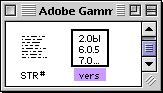 The package information is stored in a vers resource. The package information is stored in a vers resource.
To modify it, open a copy of the control panel with ResEdit and after finding the vers resource, open it with a double-click.
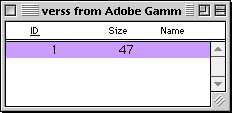 For a program without any package information, there will be only one ID. You need to create another one and give it a number of 2. For a program without any package information, there will be only one ID. You need to create another one and give it a number of 2.
Here's how.
Select ID#1 and duplicate it (command-D). The new ID will be named 128. From the Resource menu, select Get Resource Info and change the ID to 2. Close the Info window and open your new ID 2 with a double-click.
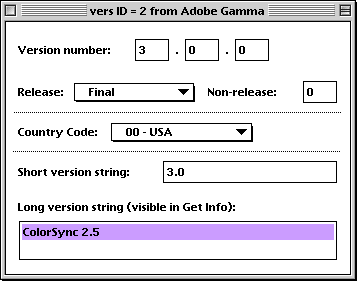
The text in the
Long version string determines the package for the program.
In this example, I've changed the text to ColorSync 2.5
You can leave the rest of the information the same and close the ID window.
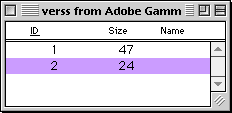 When finished, you will have a new ID #2 (or perhaps you only had to modify an existing one). When finished, you will have a new ID #2 (or perhaps you only had to modify an existing one).
You can now save your work and quit ResEdit. Replace the old control panel or extension and restart your computer.
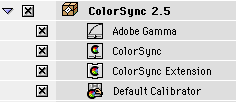 Adobe Gamma now shows up as part of the ColorSync 2.5 package! Adobe Gamma now shows up as part of the ColorSync 2.5 package!
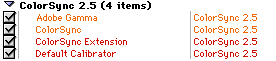 And the information also works for Conflict Catcher. And the information also works for Conflict Catcher.
To summarize, the package is determined by the long version string in vers ID#2. You can either modify an existing string, changing a package, or create a new ID to assign a package. |
|


