


|
|
|
|
|
|
|
|
|
|
|
|
 |
|
|
 |
|
|
|
|
|

Visit the Mac Experts!
|
|
|
|
|
|
|
|
|
|
|
|
Maintained by the Staff of ResExcellence.
This entire site ©1997-2003 ResExcellence
Privacy Statement? Sure we gotta Privacy Statement.
[an error occurred while processing this directive]
|
 |


 Find a favorite desktop pattern and copy it to the Clipboard.
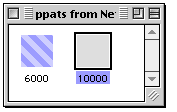 Open ID#10000 with a double-click
 While viewng the color icon, Select All (command-A) and paste in your new pattern from the clipboard.
 Save your work and quit ResEdit. Launch Netscape to view your work.