Replace the mini-icon used in Finder list views

If you think the 3D folder looks too jagged when the Finder is displaying folders in list view, then here's how to replace it with one I've created.
Mini-icons cannot be graphically edited in ResEdit, so this replacement was made with Resorcerer, a commercial editor.
Download the new icon and open it and a copy of the Appearance Extension in ResEdit.
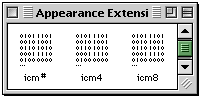
In the Appearance Extension, scoll down to the three icm resources.
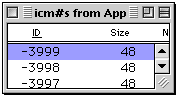 For each of the three icon types (#, 4, 8) copy For each of the three icon types (#, 4, 8) copy
ID# -3999 from the new icon, and paste it into the same resource in the Appearance Extension.
Make sure you are only copying ID-3999, and not the whole icm resource.
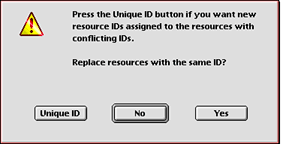 Each time you paste the new ID, you will get the dialog box pictured on the left. Each time you paste the new ID, you will get the dialog box pictured on the left.
You want to replace the same ID number, so select Yes.
Save your work and quit ResEdit.
Replace the old Appearance Extension, Restart, and you're all set.
|


