






 |
 |
 |
|
 |
 |
 |
Have Two Clocks in the Menubar A clever reader known only as Kevin has deduced a way to place two Clocks in the Menubar - one set to analog the other to digital. In MacOS 9, Find the menu clock in the folder listed below.
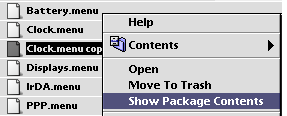
Make a copy of Clock.menu and Control-Click the copy to bring up the contextual menu allowing you to view the package contents.
In the /Contents/MacOS folder is the Clock binary application. Make sure you have Forker installed, then open "Clock" in ResEdit.
There is only the datafork <DF>, open it with a double-click. As shown in the image below, open ID # 128. Then type Command-G to bring up the ASCII search dialog box.
Search for the first occurrence of 'MenuBarClock' and change it to 'MenuBarCloc2'. In other words, change the last letter K to 2. (It doesn't really make a difference what you change it to, just make sure you do not add any additional characters to the length of the name).
If the two clocks are of the same style, click and hold one clock to drop the Preference menu, change the setting, and enjoy your two clocks. Now you can be twice as late!
|
 |
|
 |
 |
 |
|
 |


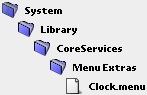


 Save your work, quit ResEdit and boot into MacOS X. Open the folder containing the modified Clock.menu copy (/System/Library/CoreServices/Menu Extras), and drag the copy to the menubar. It will appear as a second clock.
 |
 |
 |
||||||||||||||||||||||||||||||
 |
|
 |
||||||||||||||||||||||||||||||
 |
 |
 |
Maintained by the Staff of ResExcellence. This entire site ©1997-2006 ResExcellence
Privacy Statement? Sure we gotta Privacy Statement.
[an error occurred while processing this directive]