Don't forget to look under AppleScripts on the Previous Edits page.
In no particular order:
Dave sent this cool Applescript that gives several excellent examples of how to build a list and take actions on the list.
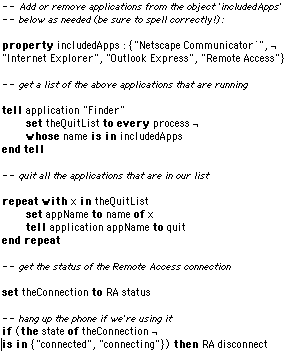
Here is an Applescript that I wrote for quitting a list of internet applications and hanging up the phone if it's in use. Just modify the 'includedApps' list for the programs you use. Thanks to Michael Askew for his script, which gave me the idea to look for a list of programs that may be running (I had been using a script that quit each specific program).
José Benitez from Italy sent this nifty Applescript to toggle the visibility of the Application Switcher.
-- hide & show Application Picker on fly
on run
tell application "Application Picker"
if visible of palette is false then
set visible of palette to true
else if visible of palette is true then
set visible of palette to false
end if
end tell
end run
You can use it with OSA Menu (place it in Universal Scripts folder) or as an Application (in Apple Menu)
Here are a couple of simple Applescripts to Hide All/Show All from Victor Yee. One way to trigger them is by assigning them to Function Keys in the Keyboard Control Panel, another is with OSA Menu.
APPL is the creator code for the Finder. You can easily modify the scripts to show/hide and application by changing the code.
Applescripts and mailto:
Doh! Kevin Hessel updated his script from Monday based on the following:
So beginning about 30 seconds after I sent you the "Mail To..." script, it suddenly and happily stopped working on my computer when configuring it with real names. Dead after a Restart, so who knows if something funky was up with my computer and it originally worked when it shouldn't have. It has now been confirmed by another ResExcellence devotee that indeed, the real names portion of the script doesn't work. Of course, the script can easily be reconfigured with a new format. Instead of having "Any Name" and leaving it at that, you must change it to "Any Name <anyname@isp.com>" Hence, this new script.
Eric Albert reworked Kevin's script to make it recognize the email client you have selected in the Internet Control Panel. This script also stores the address that has been typed, making that the default the next time you run the script.
Kevin Hessel created this Applescript for you to download:
Remember back when Apple included the "Connect To..." script on your desktop? Well, this a "Mail To..." script that works basically the same way. I found that I e-mail two people more than anyone: My brother and my girlfriend. So instead of starting up Outlook Express, clicking the "New" button, typing a bit of their name and having Express fill it in for me, I created this script that defaults to my girlfriend's name, gives me an option for my brother's name, and also allows me manually type in any other name! Blammo -- directly to OE5.

Now, the best part about this, I discovered, is that you don't have to use the person's e-mail address ... you can use their REAL NAME! If OE5 stores the person's name in your address book as "Any Name <anyname@isp.com>" then OE5 will automatically recognize it if you simply type "Any Name" and then press "E-Mail."
Of course, you can also alter this slightly to make a new "Connect To..." script that will, perhaps, default to your home page, or give you the option to go to a search page!
Another sample Applescript to tidy up windows was written by ßob. After downloading the file, open it in the Script Editor and adjust the settings to suit your needs:
Larry wrote two Applescripts for ResEx readers. The first will delete your Finder preferences & reboot your computer.
The second script will open the Finder preferences & set them to what is showing below; if you prefer something else change the "true" to "false" . If you would prefer NOT to have the preference window open, then delete the line "open Finder preferences" & "close window of Finder preferences" .

This simple Applescript submitted by Bill Ferriot will close all but the active Finder windows:
 Long time contributor Donald Tipton sent this surprisingly simple Applescript for you to download, that does something way-cool. It adds a Trash icon to the Application Switcher. Drag an icon on to the icon, and it is moved to the trash. Long time contributor Donald Tipton sent this surprisingly simple Applescript for you to download, that does something way-cool. It adds a Trash icon to the Application Switcher. Drag an icon on to the icon, and it is moved to the trash.
This behavor emulates a NeXT/Linux dock function.
-- remove the "--" from the beginning of the following lines to make the
-- Application Switcher appear similar to the row of minimized icons in OpenStep
--tell application "Application Switcher"
-- run
-- set visible of palette to true
-- set frame visible of palette to false
-- set button ordering of palette to alphabetical
-- set names visible of palette to false
-- set icon size of palette to large
-- set orientation of palette to horizontal
-- set anchor point of palette to upper left
-- set position of palette to lower left
--end tell
on open (thefiles)
tell application "Finder"
delete thefiles
end tell
end open
More Sloppy Applescripts...

Pocket 48GBs and 30 Bucks with LaCie's PocketDrive - visit Smalldog.com
|