(Example: +interarchy +wands) Advanced Search & Tips
GUI Goodies
Clocks iTunes Skins
Desktop Pictures Makeovers & Skins
GUI Software Explorer Skins
Icons Propaganda Tiles
Interarchy Interfaces Themes
Throbbers
Home Page
Splash Screens
ATM Replacements
Application Splashes
Explorer Splashes
MacOS Startups (MOSS)
Netscape Splashes
MacOS X
MacOS X Mods
Login Panels
Boot Panels
Dock Poofs
Darwin
ResEdit
Classic ResEdit Mods
Getting Started
Download ResEdit
Resource/Template Archive
Helpful Sections
User Forum
About Us!
Icon Help
Site Map
Submission Policy
Suggestions/Email us
In Addition...
REALbasic
Snapshots
Advertising
Linux Icebox
Applescript/Scripting
Links Page
Download Stats
Call the Mac Experts!


Change the Alias Font Style

Using a ResEdit template created by Jeremiah Morris, you can easily set the text style of the font used in an alias' name. After performing this edit, you may want to view the previous edit to remove the word alias from the alias' name.

Intructions to install the template:

After downloading the template, open the ResEdit preferences file in ResEdit (you can find it in the System Folder-->Preferences). Open the new template file in ResEdit and select all the resources with Command-A.

Paste these resources into the ResEdit Preferences file with Command-C. You may get a dialog asking how to handle duplicate ID numbers - select the Unique button.

Save the preferences and quit ResEdit. The next time you launch the program, the template will be ready to use!


Removing the italic from the alias name:
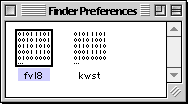

You can find the Finder Preferences in the
System Folder-->Preferences folder.

Open a copy of them with ResEdit , then open the fvl8 resource with a double-click.
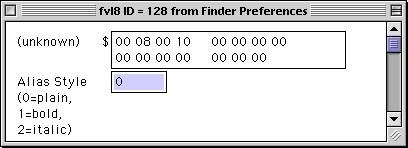

Thanks to the template, you can simply enter the number for the new style of text in the highlighted box.

Font Style Codes:
0 - plain text
1 - bold
2 - italic
4 - underline
8 - outline
16 - shadow
32 - condensed
64 - extended

Save your work and quuit ResEdit. Replace the old preference file with the new one and Restart your computer. Your alias will now have the new font style!


Pocket 48GBs and 30 Bucks with LaCie's PocketDrive - visit Smalldog.com

GUI Goodies
Clocks iTunes Skins
Desktop Pictures Makeovers & Skins
GUI Software Explorer Skins
Icons Propaganda Tiles
Interarchy Interfaces Themes
Throbbers
Home Page
Splash Screens
ATM Replacements
Application Splashes
Explorer Splashes
MacOS Startups (MOSS)
Netscape Splashes
MacOS X
MacOS X Mods
Login Panels
Boot Panels
Dock Poofs
Darwin
ResEdit
Classic ResEdit Mods
Getting Started
Download ResEdit
Resource/Template Archive
Helpful Sections
User Forum
About Us!
Icon Help
Site Map
Submission Policy
Suggestions/Email us
In Addition...
REALbasic
Snapshots
Advertising
Linux Icebox
Applescript/Scripting
Links Page
Download Stats

Maintained by the Staff of ResExcellence. This entire site ©1997-2001 ResExcellence L.L.C.
Privacy Statement? Sure we gotta Privacy Statement.
5973
