






 |
 |
 |
|
 |
||||||||||||||||||
 |
 |

Change The Default Palette In Apple's Color Picker
by Michael Coyle, August 10th, 1998
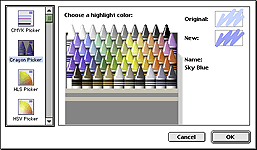
Everytime the I need to select a color in an application, Apple's Color Picker opens and the HSV palette is available. While the rainbow patterns are pretty, it's not quite my idea of a user friendly way to pick blue!
The Color Picker is an Extension in the System Folder.
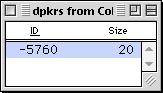
There is only one ID, number -5760.
Under Subtype, enter the name of the palette you want to be your new default.
Save your work and quit ResEdit. Replace the old Color Picker extension with the new one and restart your computer.
|
 |
|||||||||||||||||||
 |
 |
 |
|
 |




 |
 |
 |
||||||||||||||||||||||||||||||
 |
|
 |
||||||||||||||||||||||||||||||
 |
 |
 |
Maintained by the Staff of ResExcellence. This entire site ©1997-2006 ResExcellence
Privacy Statement? Sure we gotta Privacy Statement.
[an error occurred while processing this directive]