|
Today's News by Cletus™ I finally got a router!  Contest is now over. Results will be posted Monday. Contest is now over. Results will be posted Monday.
As we move into yet another weekend, I want to remind you there is still time to enter the "I Love New York" Contest we are running at ResExcellence. There is a picture of the prize here. Take some time, do some research and maybe win!
If you check out the screenshots as they appear in our archive, you will notice quite a few readers use TaskMenuBar. Version 2.4.2 is now available and will allow you to use empty menu bar space to list, switch and launch apps.
- Properly handles packaged applications, such as iView MediaPro.
- Sorts menu items on non-Apple volumes, such as DOS floppies and network volumes.
- Compatible with Control Strip Modules that change the font and the fore color.
Screen Catcher 2.3.5 is the newest release of this scriptable screen capture utility by St. Clair Software. It is great! Lot of changes in this version: - Corrected problems reading large TIFF images
- Fixed a bug that resulted in the "Include Cursor" option not working with some combinations of settings
- Holding down the shift key while selecting an area now constrains the selection to be square
- Fixed a conflict that caused DigiDesign ProTools to crash
- Filename extensions are now always lower case
- Double-clicking on an open Screen Catcher file no longer opens it a second time
- Image windows now "zoom" to fit the size of the image. They no longer leave the image surrounded with a gray border
iPod Free File Access (iPFFA) allows you to access the music folder created by iTunes 2 on the iPod disk. I do not own an iPod, however from the description what you need to do is this: "drag the iPod disk onto iPFFA, the music folder will be visible and opens automatically for quick & easy access. After dragging the iPod disk onto iPFFA it knows the disk name and from now you can make the folder visible just by launching iPFFA (handy in the Apple menu)."
iTunes Remote 1.0.1 by Lithe Integration allows you to control iTunes from any application. With iTunes Remote's floating window you can switch tracks, play, stop, pause, turn the volume up or down, mute the volume, eject a CD, and jump to iTunes itself when you need full access to your play lists. Only iTunes Remote gives you full control over which buttons you want displayed, and over the windows orientation (horizontal or vertical). Works in both Classic and Mac OS X. Plus!! iTunes Remote supports skins! What a perfect submission for Mr. Coyle!!
SNAX 1.1.5 is a Finder replacement for Mac OS X. A few of the features include: Navigate your volumes quickly and easily. Find files almost instantaneously. Move, copy, and compress files. Preview pictures, movies, text files, pdfs, html quickly. View a files contents in hex. Change permissions, group, owner and other file attributes. Swap or delete data and resource forks. A few changes in the release are:
- Noticable speed improvements
- German, and French localizations!
- SNAX Desktop. SNAX has it's own desktop, clicking on it brings SNAX forward, not the Finder
- Volume names written in Kanji were not showing up
- Open in TextEdit did not work on all computers
Five new schemes and 2 updated, grace the pages of the Kaleidoscope Scheme Archive. It must be moving into the Christmas season as the first seasonal scheme has arrived.
MacFixIt ran a bit of an editorial/opinion on the recent iTunes installer situation. I think it is a good read if for no other reason that it gives you something to consider, especially when dealing with installers. Whether it is a "well" known company or an unknown third party, one has to be careful. The article was posted Thursday under the title Looking back and then Looking ahead. Does anyone bother to read the counter at the bottom of the page? Our Webmaster™ always has something smart to say!
Have a Press Release? Software or General News? Submit it here: Suggestions!
Tools of the Trade. by Michael Coyle
After today's update, our man, Dan Flax gets married this weekend (despite my best advice)! While he is away on his honeymoon, please feel free to send me any icon/desktop news you wish to have posted.
One thing you can be sure to expect as a WebMaster™ are tons of email attachments. Combine those with the assorted virus attachments and sooner or later your email program will get stuck with a pesky corrupt file. A recent attachment had my emailer so confused, it refused to download or delete the offending message!
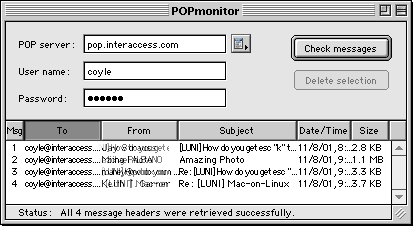
After lamenting to Cletus™, he recommended POPmonitor 1.1.1. It's available in both Classic and X versions. With POPmonitor you can take a peek inside your mailbox and delete unwanted email without the need to download those messages first. Just login, select the unwanted messages and click 'Delete'. If you have the same problem, I recommend this free utility.
iPod Easter Egg: Dan Jensen was the first to write in about this one. "I had my first chance to play with an iPod today, and I stumbled across a useless but fun Easter egg! Go to the "About" screen in the iPod and hold down the "Enter" button for about 5 seconds Up pops brick out! You have your paddle and the ball is already in motion! Cool!"
X Themination has posted a couple of new Mac OS X 10.1 themes called Titanium and Sosumi. This are the first posted themes from X Themination departure from an Aqua style.
Interested in remote control of iTunes over a network? Dan Semaya let me know of this thread in the MacNN forums.
Click Preview
 |
If you have spent anytime customizing the look of KDE, then you may have heard of Mosfet. He just released a KDE Theme titled "Liquid". It's actually much more than just a theme. It's a new theme engine that allows you to have transparent menus, fading menus, and a gaggle of other features. <-- Note: first use of Gaggle in a ResEx update.
Under Yellow Dog Linux, KDE2 uses the /usr/share directory for the storage of theme files. Liquid expects KDE2 to be installed into /usr/local/kde. This will prevent your KDE from finding the new theme, so before you build Liquid, change the configure file as follows:
In ~/mosfet-liquid0.7/configure, near the top of the file change the following:
ac_default_prefix=/usr/local
# Any additions from configure.in:
ac_default_prefix=${KDEDIR:-/usr/local/kde}
to these new directory paths:
ac_default_prefix=/usr
# Any additions from configure.in:
ac_default_prefix=${KDEDIR:-/usr}
Then build Liquid like most other KDE packages:
./configure
make
make install
Then open the KDE Control Center and play with your new options!
User Contributed Splash Screens. by Michael Coyle
Win a PowerMax gift certificate worth $50 by having the most popular contribution in the selected category! (How?)
- For iTunes 2, George Krueger sent a new skin titled Clean Aqua.
- For all the gorillas who read ResEx, Sporslown created a Planet of the Apes MOSS and ATM combo. Swing into the archive and download them.
- Continuing his 'colored' series, Scott Meinzer sends Purple, a skin for iTunes 2.
- Conrad sent a three-pack of Classic MOSS screens.

Click here to learn more about Toast 6 Titanium
Snapshots by Jeremy Hoesly Friday’s snapshot rollout is ready for showtime: - This snapshot from Brad Dusen sports a custom “Eye of God” desktop picture. Icons from Xicons and icons.cx abound.
- Fred submits this screenshot touting a custom “Homeland Security” desktop picture. Very patriotic.
- Mobiusco’s “MobiusFlower” desktop picture and the Aluminum Theme debut in this OS X contribution from Takahiro Fujisawa. Audion, retooled with the X Metal face, is dishing out tunes in the lower right. The Pictograph icon collections are also featured.
- This submission from Matthew Johnston features a Mac Axonz desktop picture. The Carlito Drives icons are nestled in the upper right. Check out the memory stats listed in the center!
Feel the joy of submitting! Give us a gander of your desktop.
Icon & Desktop News: by Dan  Back by popular demand, our Postcard Section will open once again for the Holiday season. We are now accepting submissions which will be available for sending to your friends and loved ones starting November 21. Click here to read the guidelines for postcard making, and get busy Back by popular demand, our Postcard Section will open once again for the Holiday season. We are now accepting submissions which will be available for sending to your friends and loved ones starting November 21. Click here to read the guidelines for postcard making, and get busy
*After 40 odd years of confirmed bachelorhood, your Icon and Desktop editor ties the knot with one of the most lovely women found this side of the Missisippi. Yes Virginia, Miracles do occur! Consequently, this section won't be updated from November 10th until November 21st, when we return from our Honeymoon. In order not to pack my Mail Box with large Icon and Desktop submissions and have them bounced back to you while I'm away, please upload all submissions to our ftp drop box , or email them to Michael Coyle till then. See you soon!
Icons - Desktops: We've got (8) New Desktops, (2) new Icon Sets, and of course, updated "News From Around the Web". All on display for today's update!
- LivePencil.com is well know for it's whimsical desktop artwork, icons and animations. Displaying that same fun style, Ramon G. Teja previews his "Crazy Smilies Icons", a set of 30 different hand drawn expressions.
- Rene of Happicon generates some smiles of his own with a new set of icons for OSX titled "Crazy Ones" This is a small set of ulta cheerful faces that are bound to put a smile on your own face.
- "Ice Palace" and "Dreamland" by Gary Principato are two more nicely done Bryce Renderings available in 1024x resolution. Look for several more fine selections from Gary in the coming weeks.
- If you prefer subtle and beautiful backdrops that don't overpower your screen, then "Sherbert" by Bradford Wiles, of Macmonkies is for you. I think this is one of Brad's more inspiring desktops, and it comes in 800x and 1024x resolution.
- "Tsun" by Guruphic is an elegant desktop which blends together that sought after hi-tech look with a Far East flavor. Only available in 1024x resolution.
- Ted Pearson takes some precious time out from his busy college schedule to express a little patriotic spirit with his "Flag" desktop. This red white and blue beauty comes in 1024x resolution.
- Here's a handsome desktop by Sporslown that truly matches the elegance and class of a "Vintage Porche". While few will ever get the chance to get behind the wheel of one, we can offer you the desktop in 1024x resolution.
- "iPod Desktops" by SoulRocka Nasty Nene feature 5 of his weird and wacky hand drawn characters jamming to the music. All are available in 1024 resolution.
- Michael Addison, Co-Web Author & Co-Graphic Artist of Macalodeon 2000, debuts the first of what he calls an OSX friendly desktop titled "Good Morning". With the stylish graphics splashed across the middle of the screen, the OSX dock at the bottom won't obscure that part of the desktop. Good thinking! Comes in 1024x resolution.
News From Around the Web: Flaxcreations updates with 4 beautiful desktops. Macuserx.com has been updated with 8 new desktops and 3 new icon sets!!!
Mandolux has release six newdesktops - 'Runner (Baton), Kitchen Flames, and Porsche.' Hes Nikke opens a new icon and desktop site. MacMonkies updates with four fine new desktops, news, and a whole lot of fun! While you're there, check and see if you're the winner of MacMonkies Madness Giveaway: A Brand New Scanner! Happicon now has a new url, and has released a brand new set of icons for OSX called "Crazy Smiles". IconTree has released 2 new set of icons and a set of cursors. Why the Mac is so great.com has updated with a desktop image called "Intersection 9/X". Check our LivePencils new updates: WALLPAPERS: 3 new wallpapers. Out in space you'll travel in our spaceship. See those pigeons fly free. IT IS YOU: Watch this beautiful girl, Watch her teeth surpass all her expectations!!! Blueskyheart releases a new freebie desktop titled "Batwing". Tray's Trove updates with eight new desktop designs 11-4-01 "Franks Second Corner" was updated with the "October 2001"-Edition of 12 new Desktops. Mando Gomez wants to inform you that there are 6 new desktops at http://www.mandolux.com - AmE9lie (part of the Blurra Series).
So what's up WWW? Icons? Desktop pictures? News? Inform us! We'll post it!
REALbasic Audio Barber Pole by Erick Tejkowski This week we'll go on a mind-bending trip into the realm of audio illusions. Using a few simple commands and an interface that you can build in minutes, we'll look at, er listen to, an unusual audio phenomenon, made famous by Roger Shepard. (Continued...)

Visit the Mac Experts!
Today's News by Cletus™  Did you enter the: "I Love New York" Apple Pin contest yet? If not, you can still get entered to win this hot item! DV Graphics is offering 4 of these pins to the lucky winners who can answer the question asked on the contest page. Another unique contest and never a dull moment at ResExcellence! Did you enter the: "I Love New York" Apple Pin contest yet? If not, you can still get entered to win this hot item! DV Graphics is offering 4 of these pins to the lucky winners who can answer the question asked on the contest page. Another unique contest and never a dull moment at ResExcellence!
Glidel 5.1.3 allows files to be dragged and dropped on items in the File or Apple Menus. This has always been a very popular piece of software at ResExcellence. Now it has been updated for the following:
- When an application is launched by Glidel, the menu bar displays its name, as does the Finder,
- When displaying the About Glidel... dialog, Glidel handles odoc and pdoc Apple events. In this case, Glidel quits gracefully instead of hanging. This is more likely to be of interest just for developers,
- Glidel can also launch appe applications or, more generally, any file containing a SIZE resource. Once again, the latter one should be of interest just for developers.
SmartLaunch 1.2 "is a MacOS utility for launching applications. It works somewhat like Internet Explorer 5. If you type part of the name of the application a list will show all applications on your local hard drives with names containing the text you've written." New in this version:
- Added the ability to quit or hide SmartLaunch as well as empty the text entry field after an application has been launched.
- It is now configurable for which disks to scan for applications.
Another favorite of readers is Eyeballs. Now at version 2.0.1 for Mac OS X, Eyeballs simple place a pair of eyes on the desktop or menu bar. They will then watch the cursor as it moves. Not really useful, but fun never the less. Plus it adds a little more personality to your Mac!
piDock 1.4.1 is a file navigation and launching utility. Navigation is made easy with hierarchical menus. This version removed the Mac OS X only options from the preference dialog when not running Mac OS X. It also fixed the "About" window to reflect current version.
ShadowKiller 1.1 is a haxie. When enabled, this haxie will remove window and menu shadows in Mac OS X. According to reports this would be ideal for slow machines, who really struggle drawing the additional shadows in Mac OS X. Helps you gain a little speed.
Folder Icon X, version 1.0.1 is the newest version of this application providing a simple way to create a customized folder. It does this by placing another icon on a standard plain icon. Cool! "It fully supports "drag 'n drop", live icon resize, and can load any icons from any files or folders. All generated icons are 32-bit Mac OS X-compatible icons which can be viewed on both Classic Mac OS and Mac OS X."
HexEditor 1.3 is a Hexadecimal file viewer/editor. This version is for Mac OS X and adds the following with this update: - Added Find capabitlities for ASCII and Hex strings
- Added "Open Special" menu item to open any files
- Hex is now default mode for viewing integer types
 I spent last night reformatting my workhorse G3 266 to handle Mac OSX and 9.2.1. I have previously set up my iBook this way. It is not easy to take a machine down like that when it is running without so much of a hiccup. But I did just that. I even decided to write todays update while running Adobe GoLive in Classic. Unfortunately the grass outside is basically dormant this time of year. Waiting for GoLive to load under Mac OS X is like watching grass grow and I did not even have that to do. In fact after saving this document, the application quit. I then switched to Mac OS 9.2.1 to finish. You can see a full screenshot here. I spent last night reformatting my workhorse G3 266 to handle Mac OSX and 9.2.1. I have previously set up my iBook this way. It is not easy to take a machine down like that when it is running without so much of a hiccup. But I did just that. I even decided to write todays update while running Adobe GoLive in Classic. Unfortunately the grass outside is basically dormant this time of year. Waiting for GoLive to load under Mac OS X is like watching grass grow and I did not even have that to do. In fact after saving this document, the application quit. I then switched to Mac OS 9.2.1 to finish. You can see a full screenshot here.
Have a Press Release? Software or General News? Submit it here: Suggestions!
Tools of the Trade. by Michael Coyle
On Monday, I asked what process Apple used to determine if a feature was to be added to the OS. I hate to post anonymous comments, but for obvious reasons, the identity of this person "in the know" must be kept unknown:
Historically, Apple has made a distinction between the objective results of usability testing and the subjective responses from users, and I've never seen them willingly give up something that's provably a win from an objective standpoint. The auto magnification of the dock falls into that category. It looks like an amusing technology demo, but increasing the target size has a proven benefit in graphical UIs. So if they can prove something's a win, they'll leave it in and give the user the option of disabling rather than dropping the feature altogether.
Patrick Kelleher tipped me off about a nifty hack-app from Ambrosia Software (makers of the outstanding Maelstrom!). They have released an unsupported utility that patches the MacOS X window server to activate a feature to speedup Classic windows, and make them render better with MacOSX. The patch does no permanent modifications. Logging out deactivates it. A before and after example is shown below.
Click for a larger image.
(Does anyone remember Tootie?)
 |
Scott Meinzer has been busy making iTunes skins. He would love to offer readers his modification to the Playlist colors, but they are in the Data Fork. I recommended the use of ResCompare to create a patcher/skin installer that will modify both the data and resource forks. He's having a little trouble so I've started a thread for others to lend a hand. I'd love to see this work so all iTunes skins are patches that change the playlist colors!
DV Graphics has updated their GlassEye Tunes makeover to work with iTunes 2. People can grab it at DVGs website.
Verbose MacOS X Startup!
Nate Friedman was the first of many helpful ResEx readers to let me know how to get the "verbose" text based startup. He also provides an extra tip...
The verbose booting has moved from 'V' to Command-V. If you hold Command-V at boot, you’ll get the same verbose booting as in the Public Beta.
A couple of other boot tweaks with Mac OS X are, Command-S for single user mode, (command line interface as root, no password by default! That's bad!) And lastly Command-X to force a UMA Macintoshes to boot into Mac OS X (it doesn't matter what OS is selected!)
A copy of all the login text is always available in the text file: /var/log/system.log
User Contributed Splash Screens. by Michael Coyle
Win a PowerMax gift certificate worth $50 by having the most popular contribution in the selected category! (How?)
- Yowzer! SuperBeef sent a great looking MOSS of the great looking Jessica Alba.
- Scott Meinzer sends a new iTunes 2 skin. This one is titled Yellow.
- Zooooom... If you're like me and your other car is a Porsche, then download this MOSS and ATM combo from Sporslown.
- fimwat created a very pretty MOSS from a photo of a sunset. The title is "Red Wine".

Complete Cable Management For The Home & Office.
Snapshots by Jeremy Hoesly Get your midweek snapshot fix: - Scott Dingle returns with this submission bearing the “Timegate” desktop picture. GraphicConverter, the lean and mean catch-all utility of all things fashioned with pixels, is running in the lower right.
- This contribution from Jonathan Gurule touts a custom “Enterprise NX-01” desktop picture. Icons from Icon Factory and Mac Axonz are nestled in the dock.
- Jon Martin submits this OS X screenshot sporting a color gradient desktop picture. iTunes is sitting in as digital DJ in the lower left.
- This OS X snapshot from Willy Wang features UniDoc’s PanALEX program for Chinese text. iTunes is spinning off music along the right edge.
Feel the joy of submitting! Give us a gander of your desktop.
Icon & Desktop News: by Dan Back by popular demand, our Postcard Section will open once again for the Holiday season. We are now accepting submissions which will be available for sending to your friends and loved ones starting November 21. Click here to read the guidelines for postcard making, and get busy
*After 40 odd years of confirmed bachelorhood, your Icon and Desktop editor ties the knot with one of the most lovely women found this side of the Missisippi. Yes Virginia, Miracles do occur! Consequently, this section won't be updated from November 10th until November 21st, when we return from our Honeymoon. In order not to pack my Mail Box with large Icon and Desktop submissions and have them bounced back to you while I'm away, please upload all submissions to our ftp drop box , or email them to Michael Coyle till then. See you soon!
Icons - Desktops: We've got (7) New Desktops, (2) new Icon Sets, and of course, updated "News From Around the Web". All on display for today's update!
- Max Rudberg has been working on his "Ultimate Game Icons Collection" for quite a while. It now contains a whopping 75 game icons, all optimized for OSX. This set actually contains some icons from two previous sets, but all have received an overhaul and look quite nice
- "Mac Tabs" Icons for OSX were conceived while I was playing around with some gradient patterns in Photoshop. This small set of 13 colorful concave icons appear to lift off the page, and look great as general folders. If you're looking for even more stylish icons and desktops, surf on over to Flaxcreations for a visual feast.
- "Another Lunar View" and "Pale Moon" by Gary Principato are two nicely done Bryce Renderings available in 1024x resolution. Look for several more fine selections from Gary in the coming weeks.
- If you end up owning several pussy cats, invariably there's always one ham in the crowd. Such is the case with Tiger, the photogenic tabby owned by Bradford Wiles, of the Macmonkies website. This is a desktop you gotta love, and comes in 800x and 1024x resolution.
- "Doti" by Guruphic is another of his handsome Hi -Techish looking desktops in 1024x resolution.
- Guys, be careful you don't break your neck while looking at Chris L. George's "Jolene desktop". Featuring the lovely Jolene Blalock, this one is available in 1024x resolution.
- There's no more vibrant or cheerful flower to look at that those born on the interesting Iceplant. Tim Fehr, webmaster for the American Hemerocallis Society, snapped these pictures while touring a botanical garden. Native to the African continent, this ground hugging succulent plant does very well in summer containers and frost free climates. The desktops are available in 1024x and 800x resolution.
- Andy submits a set of 6 desktops featuring Jon Hooper's Hexley mascot for Darwin. The little guy is downright charming, and when Andy went looking for desktop pics of him, he was surprised to find none at all. The Hexley license is included as an .rtf file, as well as a sitting hexley icon Andy was puzzled as to why so few OSX users even know about the cuddly mascot for Darwin ala Linux's Tux, so hopefully this will create some awareness for Jon's excellent work. Hexley comes in 1024x resolution and in 6 different colors.
News From Around the Web: MacMonkies updates with four fine new desktops, news, and a whole lot of fun! While you're there, check and see if you're the winner of MacMonkies Madness Giveaway: A Brand New Scanner! Happicon now has a new url, and has released a brand new set of icons for OSX called "Crazy Smiles". IconTree has released 2 new set of icons and a set of cursors. Why the Mac is so great.com has updated with a desktop image called "Intersection 9/X". Check our LivePencils new updates: WALLPAPERS: 3 new wallpapers. Out in space you'll travel in our spaceship. See those pigeons fly free. IT IS YOU: Watch this beautiful girl, Watch her teeth surpass all her expectations!!! Blueskyheart releases a new freebie desktop titled "Batwing". Tray's Trove updates with eight new desktop designs 11-4-01 "Franks Second Corner" was updated with the "October 2001"-Edition of 12 new Desktops. Mando Gomez wants to inform you that there are 6 new desktops at http://www.mandolux.com - AmE9lie (part of the Blurra Series).
White Fire web site will be updated Monday with three new stunning Desktop Pictures by Andy Moraitis. This is his best work yet, so be sure to come download your copy! In addition, Andy's weekly column, "The View From Here" will be updated Wednesday, so don't forget to come back for your mid-week dose of Inspiration! Marcsbitzoo updates with some new icons, a new desktop, and a new "iconimal"! Flaxcreations updates with 5 elegant new desktops. So what's up WWW? Icons? Desktop pictures? News? Inform us! We'll post it!
REALbasic News by Erick Tejkowski - New REALbasic 4 Alpha
- REALbasic Newbie?
- da' Bevel Button
- Think Smart
- RBScript Unleashed
- Have Mouse, will Wheel..
Find this and more in today's REALbasic News. (Continued...)

Need more workspace? Get Virtual Desktop!
Today's News by Cletus™ The Default Folder contest is over and what a contest it was. Very good turn out for the show! St. Clair and ResExcellence wish to thank you for participating. They have also awarded the winning registrations. Congratulations to the winners. - Ray Johnson
- Jonathan Sweet
And now...  DV Graphics and ResExcellence are teaming up to offer you a great opportunity to obtain an often sought after piece of Apple memorabilia. The "I Love New York" pin where the word love is replaced not with a heart symbol, but rather an Apple. This is a rather unique contest and calls on you to dig deep into the history of Apple computer to come up with the answer. Full details on this contest can be found here. DV Graphics and ResExcellence are teaming up to offer you a great opportunity to obtain an often sought after piece of Apple memorabilia. The "I Love New York" pin where the word love is replaced not with a heart symbol, but rather an Apple. This is a rather unique contest and calls on you to dig deep into the history of Apple computer to come up with the answer. Full details on this contest can be found here.
If you suffered any data loss because of the iTunes snafu this past weekend, MacFixIt has received a reply from Apple on what they recommend to reclaim the data. I am sure there will be more information on this topic at MacFixIt today also. Good luck if you had problems. Apple also posted an updated 2.0.1 version for Mac OSX. The classic 2.0 version had no problems associated with it.
iTunes Tool 1.2 (direct download) provides a small tool bar which floats over other windows with buttons for controlling iTunes 2 playback. This version has the following fixes:
- Fixed the problem introduced by iTunes 2.0.1 with resuming a paused song.
- Added help text to the preferences to explain the purpose of the status update.
- Added option to turn off timed update.
- Added option to update when the mouse moves over the tool bar.
- Added option for a vertical orientation of the tool bar.
LoadInDock 0.72 is a dockling to monitor the CPU load in the dock. This update shortens the delay interval for drawing animated Dock icon when LoadInDock is registered as one of the login items.
Element K Journals has posted another article you may find of interest. It is called: "Integrating Photoshop Files Into Fireworks 4" by G. H. Cloutier. "It's pretty hard to avoid Photoshop in any type of design work, so Macromedia has given up attempting to do so and instead, embraced the application." Continued...
Themes.org is alive and well and redone. Stop by and check out the new design. They have tons of new themes posted and great screen shot to show them all off.
Have a Press Release? Software or General News? Submit it here: Suggestions!
 Polling Place. by Michael Coyle Polling Place. by Michael Coyle
Among MacOS X users, just over 58% use Dock Magnification. That doesn't sound like a ringing endorsement to me. Fortunately, Apple gave us an option to disabling it. When Apple does usability tests on OS features, is there a threshhold a feature must cross before an itm is including in the next release? For example, it only 49.9% of testers liked Dock Magnification would it have been deleted from the final version?
As music companies try to limit our ability to play CDs in our computer, I began to wonder where most of us play our CDs. If only a few of us regularly listen on computers, then the out cry will be small and the RIAA will succeed in crippling the computer's CD drive. This week's Polling Place asks, "Where do you primarily play your music CDs?"
Tools of the Trade. by Michael Coyle
A couple comments on iTunes 2. A thanks goes to Cletus for sending an email (in just a nick of time) to stop me from installing the original iTunes 2 version for MacOS X. Since my drive has multiple partitions AND spaces in drive names, I would have been doomed.
Many contributors are sending updated iTunes skins. This is great, but be a little patient as I prepare previews and handle the backlog.
Doug Adams wrote to say:
I just wanted to let ResExcellence know that I have converted my "AppleScripts for SoundJam" site to accommodate AppleScripts for iTunes! All scripts are free to download.
There are aren't a lot of scripts posted yet, but, we hope to "port" some of our SoundJam scripts and accept new scripts from users. And of course we will be providing AppleScripting information so people can start writing their own AppleScripts for iTunes.
Cody has created a patch for the MacOS X version of AOL's Instant Messenger that will remove the banners. Download it here.
In the MacOS X beta, if you held the "V" key during boot, you were treated to a text based startup process rather than the usual Bootpanel and progress bar. That features seems to have disappeared. Anyone know how to bring it back? Let me know.
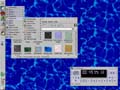
 Did anyone rush outside Saturday night to see Saturn and the Moon side by side? I almost missed it until I launched KStars under Linux and saw them. Click on the preview to see my Linux desktop with KStars in a new window. Did anyone rush outside Saturday night to see Saturn and the Moon side by side? I almost missed it until I launched KStars under Linux and saw them. Click on the preview to see my Linux desktop with KStars in a new window.
Do you have love letters you need to protect from prying eyes? Then maybe this MacInstuct tutorial is for you. Maximum File Security: Part 2 by Robert Baird will show you how to use PGP to encrypt email messages.
Command-Tab-Quit!
Last update, we learned that wearing wet socks leads to athletes foot. No wait, that wasn't it. We learned that while cycling through applications in MacOS X with Command-Tab, you could quit a program by typing Q.
Frederik Lundgren was the first to tell me that typing Command-Tab, and then "H" will Hide the selected application. To summarize:
Command-Tab to the application, so that it is highlighted in the dock. Then, without removing your finger from the Command key, hit Q. The application will quit without coming to the front! Hit H to hide the application.
User Contributed Splash Screens. by Michael Coyle
Win a PowerMax gift certificate worth $50 by having the most popular contribution in the selected category! (How?)
- Fresh for the release of iTunes 2, there are two skins for your pleasure. The first is an updated "Red" from Scott Meinzer...
- ...and the second is titled Armor from Harry Harrison.
- Bill Freeman created another Apple/Pixar montage with a MOSS titled Monsters 2.
- If you are using Multiple Users in Classic MacOS, take a look at the Login makeover from Conrad.

Support ResExcellence By Visiting Our Sponsors!
Snapshots by Jeremy Hoesly Monday’s snapshots are ready: - This submission from Cody sports a Mac Factory desktop picture. iTunes is cranking out music in the lower left, while icons from Xicons reside in the dock.
- Etreehi submits this OS X contribution featuring a “Gnome” desktop picture from Hebus. XDarwin accomodates the Gnome desktop environment and Ice window manager along with the GIMP drawing program.
- Sean Melnick contributed this OS X snapshot. iTunes is striking up the band in the lower left, and icons from Xicons abound.
- Apple’s latest version of its audio player software is the focus of this screenshot from Jose Miranda. Cool.
Feel the joy of submitting! Give us a gander of your desktop.
Icon & Desktop News: by Dan Back by popular demand, our Postcard Section will open once again for the Holiday season. We are now accepting submissions which will be available for sending to your friends and loved ones starting November 21. Click here to read the guidelines for postcard making, and get busy!
Icons - Desktops: We've got (6) New Desktops, (2) new Icon Sets, and of course, updated "News From Around the Web". All on display for today's update!
- "Paper Ladies", an original OSX icon set by Matthew Bice of I Heart New York, are based on the lovely pinup ladies found in the magazines of the 40s and the 50s. This grouping includes a dozen nostalgic beauties.
- "Gun Icons" is a little set of 6 different tiny gun icons available in either Folder or ResEdit format.
- Jeng created a desktop picture titled "Skank Different" for people who love Ska. Ska is a form of music in case you were not aware of this. The caption on the picture tells you to "SkankDifferent", which is a reference to Skank (a dance form used while listening to Ska or reggae). Comes in multiple resolutions.
- Mario Garza continues to hone his already impressive Photoshop skills with another desktop titled "Glass Applet". This handsome Apple-centric backdrop comes in 1024x and 800x resolution.
- In sincere appreciation ResX's help in promoting WhiteFire and Ethereal Creations, Andy Moraitis wanted to give us something special for the archives. "Be different Resx" is an adapted re-release of Andy's "Individuality" desktop, and comes in 1024x resolution.
- "Solaria" by Stareintome was created on a slipstream (iBook/500/384/10GB) with Photoshop 6.0 and the creative mind and eyes of a disproportioned malcontent. Comes in 1024x resolution.
- "Applelicous" by SoulRocka Nasty Nene is another signature desktop from the NY prince of street funk. This one comes in 1024x resolution.
- From Ethereal Creations and Andy Moraitis comes another new desktop submission titled "Pilgrimage" This one combines glowing 3D textures and colors along with an inspirational quote by Lellaludin Rumi. Available in1024x768 resolution.
News From Around the Web: Check our LivePencils new updates: WALLPAPERS: 3 new wallpapers. Out in space you'll travel in our spaceship. See those pigeons fly free. IT IS YOU: Watch this beautiful girl, Watch her teeth surpass all her expectations!!! Due to the overwhelming response, MacMonkies is giving everyone an extra day to sign up for a Free Scanner! Registrations will be accepted through Midnight on Monday night. The winner will be announced Wednesday along with their news update and the posting of their new desktops. Check it out! Blueskyheart releases a new freebie desktop titled "Batwing". Why the Mac is so great.com has released the icon set "Aquafication II". Tray's Trove updates with eight new desktop designs 11-4-01 "Franks Second Corner" was updated with the "October 2001"-Edition of 12 new Desktops. Mando Gomez wants to inform you that there are 6 new desktops at http://www.mandolux.com - AmE9lie (part of the Blurra Series).
White Fire web site will be updated Monday with three new stunning Desktop Pictures by Andy Moraitis. This is his best work yet, so be sure to come download your copy! In addition, Andy's weekly column, "The View From Here" will be updated Wednesday, so don't forget to come back for your mid-week dose of Inspiration! Marcsbitzoo updates with some new icons, a new desktop, and a new "iconimal"! Flaxcreations updates with 5 elegant new desktops. MacuserX has been updated with 13 new desktops and 3 new icon sets, just in time for Halloween. Check them out! Jeldred invites you to visit his iDisk for some cool desktop pictures he made. So what's up WWW? Icons? Desktop pictures? News? Inform us! We'll post it!

Visit the Mac Experts!
Today's News by Cletus™ Have you entered the contest? Two free registrations are being given away for Default Folder. A terrific dialog box enhancement tool that everyone should have running. Simply visit the contest page for full details on how to enter. Contest will come to a close Saturday evening. Do you feel lucky?
TransparentDock1.5 is a script that allows customization of the Mac OS X dock. The dock can be made fully transparent, fully opaque, or something in between. Custom pdf background images can be applied to the current dock, or used in conjunction with the selected transparency or opacity settings. A built-in reset option allows returning the dock to its original state. New in Version 1.5: AppleScript scripting additions are no longer required for automatic mode in Mac OS X 10.1
 Super Get Info 1.0.4 is a replacement for the Show Info command in Mac OS X by Bare Bones. "With the release of version 1.0.4, Super Get Info can now be invoked from within the Mac OS X Finder by means of a keyboard shortcut (Command-Shift-I). The most recent releases of BBEdit and DragThing feature integrated support for Super Get Info." Super Get Info allows you to do the following: Super Get Info 1.0.4 is a replacement for the Show Info command in Mac OS X by Bare Bones. "With the release of version 1.0.4, Super Get Info can now be invoked from within the Mac OS X Finder by means of a keyboard shortcut (Command-Shift-I). The most recent releases of BBEdit and DragThing feature integrated support for Super Get Info." Super Get Info allows you to do the following:
- Open more than one info window at a time
- View and edit the Macintosh type and creator codes associated with a file
- View and edit the Unix owner, group, and permission settings associated with a file or folder
- Change a file or folders creation and modification dates
- Copy (or drag and drop) a file or folders path info
piDog has posted version 1.4 of their fast and simple hierarchical file navigation and launcher piDock. The list of changes in this version is: - Added Control-Option-click on desktop to access menu (Mac OS X only)
- Added Control-Option-click on folder to access folder's contents (Mac OS X only)
- Added cut-copy-paste functions in register dialog
- Fixed more Mac OS X 10.1 compatibility issues
- Fixed a bug related to right side menu-only mode activation
- Double Clicking piDock app while piDock is running now opens preference window
iTunes Tool 1.0 provides you with a floating window for the playback options of iTunes 2. The direct download link is here.
 Joe Howard wrote to tell me about a new program— SwitchPic, he is working on for Mac OS X. SwitchPic is an application that handles changing the desktop picture in Mac OS X 10.1. SwitchPic can also be used to randomly rotate the desktop picture at specified intervals. As an added bonus you can even use SwitchPic to set the desktop picture to one of the amazing images from the Mac OS X screensavers. Joe Howard wrote to tell me about a new program— SwitchPic, he is working on for Mac OS X. SwitchPic is an application that handles changing the desktop picture in Mac OS X 10.1. SwitchPic can also be used to randomly rotate the desktop picture at specified intervals. As an added bonus you can even use SwitchPic to set the desktop picture to one of the amazing images from the Mac OS X screensavers.
- Randomly rotates the desktop at specified intervals
- Set your desktop picture to one of the pictures from the Mac OS X Screensavers
- Standalone and System Preference versions of SwitchPic
- Drag and drop support for setting the desktop picture from the Finder and inside of SwitchPic
- Personal contact with the developer to get the features you want into SwitchPic
Virex Definitions for November are now available. The virus definition DAT file is for versions 5.9.x & 6.x. Symantec has also posted their NAV virus definitions for Nov. The definitions are for Norton AntiVirus
Be sure to visit the ResExcellence Forums. There a lot of good threads dealing with Mac OS X currently. It probably pays to get in on the ground floor and all learn together.
Have a Press Release? Software or General News? Submit it here: Suggestions!
Tools of the Trade. by Michael Coyle
Before I owned my Powerbooks, I had a Tandy 100 which was stolen from the back seat of my car. I can sympathize when Ray tells the story...
Recently, I had my G3 Powerbook Wallstreet Edition stolen from me. I ran into my girlfriends house for about 2 minutes (knock it off, this is serious!). While I was inside, someone lifted my book bag out of my car. Sadly, my Mac was in my bag. On top of that the jerk also got around $2,000 dollars worth of CD's. At least someone else became a Mac owner day that day.
Well, since it was stolen from my car, I figured my car insurance would cover it, right? Wrong! It wasn't bolted to the car! Then I was notified that my home owners insurance would cover it. That's great, but I don't own a home, and my girlfriend doesn't have renters insurance. Needless to say, I'm now eating a $4,000 Powerbook, because it was only half paid off.
So here's the question. If you were to have your Mac stolen, are you positive you have the proper insurance to cover the value of your Mac?
After my Tandy was stolen, I had a rider added to my home insurance policy for about $40 a year to cover my Powerbooks. Fortunately, I have never had to make a claim. If you're not a homeowner, there are several companies that specialize in Computer insurance. If you have something to add or a company to recommend, post in this forum thread.
Roberto Dohnert contributed a set of MacOS X Clock faces, and it was enough to enter him in the PowerMax drawing for a $50 Gift Certificate. And guess what, he won! Congratulatins to Roberto J Dohnert. Send a contribution to be entered in this month's drawing.
Command-Tab-Quit!
Most readers know that in MacOS X you can cycle through applications by hitting the Command-Tab keys. George Kruegar discovered you can take this one step further.
Did you know you can quit an application in the background in OSX? First, Command-Tab to the application, so that it is highlighted in the dock. Then, without removing your finger from the Command key, hit Q. The application will quit without coming to the front!
User Contributed Splash Screens. by Michael Coyle
Win a PowerMax gift certificate worth $50 by having the most popular contribution in the selected category! (How?)
- Sporslown sends a matching MOSS and ATM of your friendly neighborhood Spiderman.
- Huxley is the mascot of the Darwin Project, but since every MacOS X user is also using Darwin (it's under the hood silly!), Andy thought it would be nice to have a Huxley Boot Panel!
- 13 year-old Scott Meinzer has created another iTunes skin. While not as festive as his recent Halloween, the new Graphite skin will look great on the clean-styled desktop.

Snapshots by Jeremy Hoesly Close out the week with a pack of snapshots: - Charles Dinning contributes this dual-monitor snapshot featuring Blue Sky Heart’s “Laserhead” and Digital Blasphemy’s “Conjunction” desktop pictures. iTunes is shuffling soundtracks in the upper left of the left screen, while icons from Icon Factory inhabit the right edge of the right screen.
- This Linux Mandrake submission from Art Rumrill sports Digital Blasphemy’s “Fluorescence” desktop picture. XMMS is juggling music in the upper right, and Basilisk, a Mac emulator, is running System 7.5.3r2 in the center.
- Luna may be a natural satellite, but it’s the star of this submission from Andrew Smith. Audion, overhauled with the Bubble Life face, is tickling the eardrums along the top.
- Willy Wang submits this OS X screenshot. iTunes is striking up the band in the lower right.
Feel the joy of submitting! Give us a gander of your desktop.
Icon & Desktop News: by Dan Back by popular demand, our Postcard Section will open once again for the Holiday season. We are now accepting submissions which will be available for sending to your friends and loved ones starting November 21. Click here to read the guidelines for postcard making, and get busy!
Icons - Desktops: We've got (6) New Desktops, (2) new Icon Sets, and of course, updated "News From Around the Web". All on display for today's update!
- After a day's fruitless quest to find new icons for his iBook running OSX, Charles Mangin sat down and made "DBZ Icons for OSX" (Dragonball Z ROMs). This set includes 20-128x128 and 52- 48X48 sized icons to satisfy every DBZ collector.
- "Star Trek Icons Collection" for OSX is the biggest set yet ever made by Hein Mevissen. This galactic sized grouping features 70 different Trek Icons. Some of these have been featured in Hein's other sets, but many new ones have been added.
- Rendered in Bryce5 for OSX with variable light shading and glowing metallic textures, this latest submission from Andy Moraitis of Ethereal Creations titled "Union" illustrates the intertwined nature of our lives. Available in 1024x resolution.
- Attention South Park fans! A fellow suspiciously named Kenny submits a "South Park Makeover Kit" for some off center fun. The kit includes 2 Southpark desktops in 1024x resolution, 9 sicko sounds, 6 Classic sized icons, and even a small Cartman animated gif. Enjoy!
- An obvious X-Men fan, Tom Hacket submits a new desktop featuring a scanned image from the "XMen275" comics on a black background. Comes in 1024x resolution.
- "Fruity Apple" by Dutch Wolf is the first background picture he's ever made. Finding himself getting sick about "borrowing" creations from others, Dutch experimented a bit and this is the result. We hope u like his work, which comes in 800x and 1024x resolutions.
- "StoneRose" by SoulRocka Nasty Nene is definitely strange, and well, just downright weird. Another signature desktop from the prince of Funk, this one comes in 1024x resolution.
- "Sela Ward Desktop" is another stylish entry to John Rose's popular Celebrity Series. Comes in 1280x resolution.
News From Around the Web: Marcsbitzoo updates with some new icons, a new desktop, and a new "iconimal"! White Fire Ministries web site will be updated Friday with three hot new desktops by Andy Moraitis. And if you haven't already, stop by to check out Andy's new weekly column "The View From Here". Mando Gomez announces that there are 15 new desktops at http://www.mandolux.com - the completion of the Lincoln Series. Flaxcreations updates with 5 elegant new desktops. MacuserX has been updated with 13 new desktops and 3 new icon sets, just in time for Halloween. Check them out! MacMonkies has really flipped their lid this time. Up for grabs in the Monkie Madness Giveaway is a brand new Scanner! Hurry over and grab your chance to win TODAY! Jeldred invites you to visit his iDisk for some cool desktop pictures he made. Why the Mac is so great.com continues the aquatic fever with a new icon set release called "Aquafication". Ethereal Creations updates its image gallery with a new inspirational abstract desktop entitled "One". Live Pencil updates with 43 new icons in 4 sets, 18 new wallpapers. Awful, disgusting, repulsive...All appropriate for this season, 4 new animations and much more. Dean's Designs has updated with 2 new desktops. Iconfactory announces the release of World of Aqua/After Dark Halloween Icons.  So what's up WWW? Icons? Desktop pictures? News? Inform us! We'll post it!
REALbasic Speedy Mouse by Erick Tejkowski As we slowly bid farewell to the classic Mac OS, we'll take one last poke at the venerable Extension. This week we'll show you how to whip up a handy Extension with REALbasic. (Continued...)

Calendar & Appointment Scheduler for Mac OS X
|