|
Today's News by Cletus™ Remember to enter the Default Folder contest. What a great chance to win a terrific dialog box enhancement tool from St. Clair Software. Here is a little teaser: "What does the left-most button look like? " Check out the contest page for full details.
Teng Chou Ming and Peter Hardman have updated Extension Overload to version 5.9.3. Extension Overload is a dictionary of sorts for your system. If you want to find out about and extension, CMM, Control Panel or CSM, you want to use this program. - Now with definitions for 5367 extensions, control panels, CSM and CMM, up from the 5200 previous definitions.
- More URLs and emails have been updated.
- Better support for the non English Mac OS's.
- Added an "Updates" button which sends your web browser to the "updates page."
 Xochi Media has released iScreensaver Designer 2.0 which will turn QuickTime-compatible movie files (including Macromedia Flash, MPEG, AVI, MOV, etc.) into a full-featured screensaver for both Macintosh and Windows computers. To use the software, you will need either a PC running Windows (version 95 thru XP) or a Macintosh running MacOS (version 8.6 thru 9.2). Xochi Media has released iScreensaver Designer 2.0 which will turn QuickTime-compatible movie files (including Macromedia Flash, MPEG, AVI, MOV, etc.) into a full-featured screensaver for both Macintosh and Windows computers. To use the software, you will need either a PC running Windows (version 95 thru XP) or a Macintosh running MacOS (version 8.6 thru 9.2).
SnapperHead 4.2 allows others to see a snapshot of your screen in their browser. I wasn't able to get to the web site, but a direct download link is here. Here is a much more detailed explanation: SnapperHead is a handy little app that sends screenshots to people who enter your IP address into a web browser. Simply launch SnapperHead™, then send a friend your IP address (it is shown on the SnapperHead™ window under "Snaps Served"). When they type that Internet address into the location field of a web browser (you know, where you usually type in "http://www.stimpsoft.com"), they will be sent, as an image in their browser, a picture of your screen. That's all there is to it!
 Unsupported UtilityX 2.0 will help you install OS X on some unsupported Macs. Primarily (the 7300 - 9600 series, and equivalent clones). Installation requires only 3 more clicks than a supported install. It now works with Mac OS X 10.1. This version has improved error logging. Unsupported UtilityX 2.0 will help you install OS X on some unsupported Macs. Primarily (the 7300 - 9600 series, and equivalent clones). Installation requires only 3 more clicks than a supported install. It now works with Mac OS X 10.1. This version has improved error logging.
Bosco wrote in to tell me about "Bosco’s Foto Trimmer." He describes it this way: "You download 20 photos of your favorite dog from your camera, and you need to scale and trim them quickly. Maybe you look a little heavy in your picture and want to thin it to 96% of the actual width. You need them compressed as JPEGs so that you can send them to your buddies who do not have cable modems. If you use typical photo editing tools with those capabilities, you will be there all day. Not with Foto Trimmer." Foto Trimmer runs on Mac OS X and Mac OS 9.
Guy Casavant wrote me the other day requesting: "A simple ResEdit hack to map the Open/Close function of the new Apple Keyboard on an old keyboard that doesn't have this key." I use Eject Disk. However he really wanted to avoid an extension. He replied that he actually found what he was looking for already on his machine. The Apple Extras folder included with the new Quicksilver G4s that shipped with 9.2x. includes a folder called Eject Extras. The Apple read me states:  "If you use a third-party keyboard that doesn't have a Media Eject key, you can use one of the following methods to open and close your computer's optical drive." "If you use a third-party keyboard that doesn't have a Media Eject key, you can use one of the following methods to open and close your computer's optical drive."
Assign a function key to open and close the optical drive tray
- Assign the Eject application to a function key (numbered F-keys, for example F5 or F12).
Use the Eject application
- Double-click the Eject application whenever you want to open or close the optical drive.
Use the Eject portion of the Control Strip
- Drag the Eject module from the Eject Extras folder onto the Control Strip.
Have a Press Release? Software or General News? Submit it here: Suggestions!
Tools of the Trade. by Michael Coyle
Frank N. Stein sent me a note after he got his dead little fingers on a copy of iTunes2. The good news is that iTunes2 can be skinned just like version one. The bad news is that some of the buttons have moved a few pixels, so current skins don't look quite right.
Nate Friedman let me know of a thread in the MacNN forum that tells you how to change the icons associated the little menubar utilities. Reading this Previous Edit can aid in finding the correct files.
Joshua Taylor has assembled what he called a Graphite MacOS X Patch. It patches the MacOS X, the Mail app, IE, installer, CPU monitor, DVD player, iTunes 2 and more.
Click for larger image
 |
Change the Picture in the Default MacOS X Screensaver.
Adam Urban was bored with the graphite Apple image that is provided with the default screensaver in MacOS X. He created 9 replacement colors and tells you how to install them. (Continued...)
User Contributed Splash Screens. by Michael Coyle
Win a PowerMax gift certificate worth $50 by having the most popular contribution in the selected category! (How?)
- Scott Meinzer is a pain-in-the-butt procrastinator! But he makes a good looking iTunes skin. Be sure to check out his last minute contribution for Halloween! I believe we can expect Scott's X-mas skin by New Year's Day! :)
- B O O ! ! Just in a time for Halloween, Delereum sent this cool pumpkin MOSS!
- A chrome/metal iTunes skin was created by Dan Leeder.
- For Pismo/Wallstreet Powerbook owners, Ashley created a nice MacOS X Boot Panel.

Support ResExcellence By Visiting Our Sponsors!
Snapshots by Jeremy Hoesly Feast your eyes on Wednesday’s choice snapshots: - Chris Mahn sends this snazzy OS X screenshot sporting a Looroll desktop picture. iTunes is cranking out songs along the right edge, and icons from Xicons roam about.
- This OS X contribution from Keith Mason touts a custom desktop picture. iTunes is spinning off selections in the lower left. Fire, a chat client for OS X, sports a custom Aqua makeover.
- The “Wall” desktop picture from Tim’s Desktops and the DSG Theme debut in this submission from Jon Owsley. iTunes, decked out with the Orange skin and Origami visualizer, is juggling music along the top. Icons from the Anatomy set lurk around the desktop.
- William Stetler submits this snapshot sporting the Enlightenment window manager for X-Windows configured with an Aqua theme. Various X-utilities are also visible.
Feel the joy of submitting! Give us a gander of your desktop.
Icon & Desktop News: by Dan This week marks my one year anniversary as Icon and Desktop editor for ResExcellence. I'm just wanting to say a simple thanks to all who have sent in their artwork, it's truly been a pleasure to get to see so much creativity. Looking forward to the next year!
 Icons - Desktops: We've got (6) New Desktops, (2) new Icon Sets and of course, updated "News From Around the Web". All on display for today's update! Icons - Desktops: We've got (6) New Desktops, (2) new Icon Sets and of course, updated "News From Around the Web". All on display for today's update!
- Still haven't found that perfect Halloween icon and it's the 11th hour? Look no further, Ramon Gonzalez Teja of LivePencil comes to the rescue with his "Altrin-ween" icons. This hand drawn set of goulish goodies includes 14 different halloween creatures.
- wOOgie from MacAxonz continues to hone his already formidable icon making skills with the release of "Polished Stone" icons. This set includes 13 different shiny stone-like Hard Drive icons for use with OSX or Classic.
- Not only is Melissa Coyle pretty, talented, creative (and our webmaster's daughter), but her skill in desktop making is par-excellance. "Melissa's Desktop" was made by placing items in an artful composition on a flatbed scanner, an assignment for her Graphics Art Class. Comes in 1024x resolution.
- "Urasima" by Guruphic is an elegant desktop which blends together that sought after hi-tech look with a Far East flavor. Echoing an old Japanese tale, this one comes in 1024x resolution.
- Originally made as an "OSX Login Screen", Dan at NonsuchWorks decided his creation looked so good that it would make a fine desktop as well. We agree! Available in 1024x resolution.
- Gateway, eat your heart out! This "Mac 'n White" desktop by FlaxCreations gives Apple that country-cow look, without all the bull. Comes in 800x and 1024x resolution.
- Dean Fusaro of Dean's Designs created a new desktop entitled "iPod", in celebration of Apples newest MP3 player and the new and improved iTunes software. Visit Dean's site for the download, and while you're there, scope out the other great desktops on display.
- Serve yourself some Apple flavored eyecandy with Dan Leeder's "Apple Grill" desktop in 1024x resolution.
News From Around the Web: Flaxcreations updates with 5 elegant new desktops. MacuserX has been updated with 13 new desktops and 3 new icon sets, just in time for Halloween. Check them out!! MacMonkies has really flipped their lid this time. Up for grabs in the Monkie Madness Giveaway is a brand new Scanner! Hurry over and grab your chance to win TODAY! Jeldred invites you to visit his iDisk for some cool desktop pictures he made. Why the Mac is so great.com continues the aquatic fever with a new icon set release called "Aquafication". Ethereal Creations updates its image gallery with a new inspirational abstract desktop entitled "One". Live Pencil updates with 43 new icons in 4 sets, 18 new wallpapers. Awful, disgusting, repulsive...All appropriate for this season, 4 new animations and much more. Mandolux is back on line, and serving his own pages! (How's that for ingenuity?) Dean's Designs has updated with 2 new desktops. Iconfactory announces the release of World of Aqua/After Dark Halloween Icons. The White Fire Ministries site has been updated with an elegant new look, and a new piece of artwork "Finger of God" is now available for download. In addition, inspirational artwork by Andy Moraitis will soon be featured on the White Fire site as well! Pixelcentric Design has been updated with a new, revised site design. The new look is better optimized for larger screens and has a more rounded and finished feel to it than the previous layout. Additionally, Pixelcentric has released two new desktop pictures, Speed and Subtle Insanity.  So what's up WWW? Icons? Desktop pictures? News? Inform us! We'll post it!

Visit the Mac Experts!
REALbasic News by Erick Tejkowski - OS X Utilities Plugin
- Professional Advertising at Amateur Prices
- ProSQL 1
- Customer Tracking
- What a Pain in the Back!
- Even Dogs Love REALbasic
Find this and more in today's REALbasic News. (Continued...)
Today's News by Cletus™ A brand new contest begins this week. Yeah! ResExcellence and St. Clair Software are teaming up once again for another great contest. This time it is for two (2) registrations for their award winning dialog enhancement tool Default Folder. Default Folder makes managing your files almost automatic. Simply install Default Folder, set your preferences, and start saving time and aggravation! Check here for the full scoop about the contest.  Lemke Software has updated Graphic Converter to version 4.1. This version provides a plethora of changes and bug fixes. The entire list can be found here. A partial listing of this superb graphic program can be found below: Lemke Software has updated Graphic Converter to version 4.1. This version provides a plethora of changes and bug fixes. The entire list can be found here. A partial listing of this superb graphic program can be found below:
- JPEG2000 import added (PPC and Carbon only)
- Diskus YUV import and export added
- PNG export bug with tEXt chunk fixed
- Import of Nokia .pict files added (export with option .logo possible)
- Unsharp mask added
- TIFF import improved
TinkerTool has undergone yet another update to version 2.0.2. TinkerTool adds functionality and options to many OS X features. This version add the following feature set: - Added Norwegian language package
- The font and font anti-aliasing tabs are now closer together.
- Minor changes in the wording of some language packages
- Implemented a work around for a bug in Mac OS X 10.1 which can cause TinkerTool to read invalid font settings for Cocoa applications in very rare cases
Mac Uptime 1.203 is a simple utility by Heiko Kretschmer to display your computers uptime. It will run in both Classic and Mac OS X.
 Desktopper has mentioned an item on the resources available for the Aquacid Graphite Resources and that they are available for download. It is for use with the Kaleidoscope Scheme. As to what exactly can be done with them I leave to the scheme makers. I mention it here for your benefit. The page is Japanese and thee is an English version of the page available as well. I have included a clipping of the image found on the page here as well. Desktopper has mentioned an item on the resources available for the Aquacid Graphite Resources and that they are available for download. It is for use with the Kaleidoscope Scheme. As to what exactly can be done with them I leave to the scheme makers. I mention it here for your benefit. The page is Japanese and thee is an English version of the page available as well. I have included a clipping of the image found on the page here as well.
Have a Press Release? Software or General News? Submit it here: Suggestions!
 Polling Place. by Michael Coyle Polling Place. by Michael Coyle
It seems Apple's Desktop Printing has a larger following than I would have imagined. I wish more vendors supported it. For example, it's a shame there are no Epson 700 series printer descriptions. It's also unfortunate that Desktop Printers can't be accessed on another computer via "PrintShare". (Please correct me if I'm wrong.)
Several people I've talked to can't stand it. I personally don't prefer it, but what about you? This week's Polling Place asks, "Do you use OS X dock magnification?"
Tools of the Trade. by Michael Coyle
Now things may get interesting. If you've heard the whispers in the theming community, a group was getting together to create a new theme editor for MacOS X. Now the X Themination web site is up. They have a theme for you to download (a slightly modified Aqua) and make the bold statement:
This site will not only include MacOS X themes, but also our software that is currently in development, ThemeShop. ThemeShop will be a stable, more powerful editor than Theminator, the previous theme editor for MacOS X themes. Themeshop will also be able to edit the new, modified OS X 10.1 theme file, which Theminator can no longer edit.
They are looking for Cocoa developers and themers to join the project. Stop by if you can help out.
Are you itching to modify the keyboard maps under MacOS X? John Steed told me of an article at Macintouch that can get you started. The article lists a different location for the Localized resource file than where I found mine, but maybe the author is running 10.0.4. Once you have converted the Localized.rsrc file with QuickConvert, you can read this previous ResEx edit to start modifying your keyboard layout.
Fontosaurus Text has been busy! They just released five new fonts and an icon set!
- Microbial, a free font
- Garamorbital, a free font inspired by Chank's Orbital font
- Fallen Thyme, a remix of Chank's Thymesans font
- Candycorn Overdose, the October Font of the Month
- Inception, the first FOTM, is now available for purchase by anyone
- and for you Mac OS X users, Fighters X, a set of 13 jet fighter icons is now available
User Contributed Splash Screens. by Michael Coyle
Win a PowerMax gift certificate worth $50 by having the most popular contribution in the selected category! (How?)
- brenda vonahsen has done an excellent job on her new iTunes skin, Stoned. It replaces everything with a subtle rough marble finish.
- As a bonus contribution, brenda also sent a nice Ruby animated cursor!
- Mixing a little Pixar and Apple, Brian Freeman created a cute Monster MOSS.
- If you would like to have a kinder gentler arrow in your Control Strip modules, check out this contribution from Peter McHugh.

Snapshots by Jeremy Hoesly Monday’s shipment of snapshots has just arrived: - Timm Hoff contributes this submission featuring a custom desktop picture. Audion, overhauled with the deJected face, is dishing out songs in the upper left. Icons from Icon Factory’s World of Aqua collection are scattered throughout.
- This OS X snapshot from John touts Andy Moraitis’ “Diversity” desktop picture. Audion, outfitted with Brendon Porter’s ThinkX face, is shuffling some tunes in the upper left. Mac Axonz’ Tri-Tanium icon collection is also featured.
- This OS X contribution from Aaron Scott sports an unidentified desktop picture and a custom banking program. iTunes is churning out selections in the upper left, and icons from Icon Factory and Xicons share the spotlight.
- This two-part screenshot from Manuel Velazquez touts the custom “AetherDragon” desktop picture and Michael Rabe’s Glass Theme. Audion, tweaked with the Widget face, is taking music requests in the upper left of the first shot.
Feel the joy of submitting! Give us a gander of your desktop.
Icon & Desktop News: by Dan  Icons - Desktops: We've got (6) New Desktops, (1) OSX Icon Set, a "Creepy Links" section where you can find some goulish Halloween decorations, and of course updated "News From Around the Web". All on display for today's update! Icons - Desktops: We've got (6) New Desktops, (1) OSX Icon Set, a "Creepy Links" section where you can find some goulish Halloween decorations, and of course updated "News From Around the Web". All on display for today's update!
- As near as I can tell, Hein Mevissen takes the prize for creating the most OSX icon sets on Earth, for that matter, in any universe. "Alien Icons" is another of his recent creations, and includes 14 unusual system level icons.
- Something Viscous, Icky and "Gooey" this way comes for Halloween from Ramon Gonzalez Teja of LivePencil.com. One of many weird, wacky and wonderful works of art you will find at LivePencil, this one comes in 1024x and 800x resolutions.
- Dean Fusaro sent me a preview of the newest desktop featured on Dean's Designs titled "Dolphins". Dean collaborated on this pretty piece of artwork with his girlfriend Denyse who lives in Montreal and is a devoted Mac user as well. Visit Dean's Designs for the download, and check out all the other great desktops to be found there.
- 'Manuel B. Velazquez incorporates personal spiritual philosophy into colorful and unique digital artwork with yet another new entry to his powerful Metaphysical series. The beautiful "Aetherdragon" desktop comes in 1024x resolution.
- "Bush Speech" by Bart Blubaugh, is a desktop picture created from an excerpt of the speech “God Bless America”, given by the George Bush on the evening of September 11th. All the text is hand lettered calligraphy and the flag art was created in Photoshop 5.0. Comes in 1280x resolution.
- Stevie M. has been reading our pages for several years now and says he absolutely loves it. But, this is the first time he's ever taken a chance and submitted some of his own artwork. "Stevie's Desktops" includes 3 desktops in several resolutions. The first is a picture he snapped from Kylie Minogues latest video "I Just Can't Get You Out Of My Head". The second is a pic captured from "Andromeda", including a transparent version of the same. Lastly, just Stevie's normal desktop, which is actually the logo of his recording studio located in Scotland.
- Here's something wicked and funky to add to your desktop collection. "Boogie World" by SoulRocka Nasty Nene is another of his cool "off center" backdrops available in 1024x resolution.
Looking For Halloween Stuff? Check out the links below. Know of any? Send them on in! Iconstree.com has released a new set of Pumpkin Icons. Dont miss this set... they are terrific If you don't find OSX Icons very scary, maybe a few Aqua Monsters will change your mind. Visit Ilicon to find this set of 7 creepy creatures. Visit Rampant Mac's Fall and Halloween gallery for some ominous desktops and other treats. Check out Digital Blasphemy's Annual Halloween gallery. Need some cool Halloween fonts? Visit the Font Diner for 12 free creepy fonts. Live Pencil updates with some new Halloween goodies. * Note that Livepencil has become a subscription site. The house of pure imagination has a pile of Halloween Icons and Fall desktops. Stimpsoft offers a Halloween Dock App. Put a pumpkin in your dock. News From Around the Web: Ethereal Creations updates its image gallery with a new inspirational abstract desktop entitled "One". Live Pencil updates with 43 new icons in 4 sets, 18 new wallpapers. Awful, disgusting, repulsive...All appropriate for this season, 4 new animations and much more. Mandolux is back on line, and serving his own pages! (How's that for ingenuity?) MacMonkies has really gone coconuts this week! Available are new desktops and news, as well as a just to win a $75 gift certificate to Outpost.com. Surf on over and check out the festivities! Dean's Designs has updated with 2 new desktops. Iconfactory announces the release of World of Aqua/After Dark Halloween Icons. As a result of it's explosive growth, Ethereal Creations (NEW link below) is proud to announce that it is now part of the WhiteFire Ministries family of websites. The new site features an incredible new page layout by web designer Donnie Fischer and 4 new desktop images. The White Fire Ministries site has been updated with an elegant new look, and a new piece of artwork "Finger of God" is now available for download. In addition, inspirational artwork by Andy Moraitis will soon be featured on the White Fire site as well! Macuserx.com has been redesigned and has 9 new desktops for you plus 3 icon sets and 1 Mac OS 10.1 user picts set. Eight6 was updated with 2 desktop pictures: « GT » and « Pearl » Rampant Mac has three new desktops for Sunday October 21st. Featuring Art Desk no.7, Indigo Flame and
Mac Desk no.2. Pixelcentric Design has been updated with a new, revised site design. The new look is better optimized for larger screens and has a more rounded and finished feel to it than the previous layout. Additionally, Pixelcentric has released two new desktop pictures, Speed and Subtle Insanity. So what's up WWW? Icons? Desktop pictures? News? Inform us! We'll post it!

Visit the Mac Experts!
Today's News by Cletus™ Some really big Mac OS X third party software has been updated. These are quickly becoming some of my favorite software items to use in Mac OS X. James Thomson has released version 4.2 of his premier launcher DragThing. It is fully compatible with Mac OS X. If you want to bring some of the classic environment back to Mac OS X such as Trash can on the desktop or the application switcher, then you want to try this version out. DragThing uses the native Quartz graphics of Mac OS 10.1 for an improved Aqua appearance, including an option for translucent docks, and anti-aliased icons. Life is good— life is great with DragThing running! TinkerTool 2.0.1 is now the latest version of the Mac OS X enhancer. A couple of bugs were squashed from version 2.0. Specifically: - corrected typos in several language packages
- the reset button did not immediately update the Dock position. It also reset the scroll bar arrows to the "at both ends" style instead of "together at end position". These problems have been corrected
- the FAQ document has been extended
- added Korean language package
WindowShade X 1.1 adds WindowShade features to Mac OS X. This application is gaining in popularity at an incredible rate. It may very well send a signal to Apple. It at least gives you some options to work with. WindowShade X has 3 alternative minimize styles: WindowShade, Make Window Transparent, and Hide Application. You can also minimize the window in the Dock like before, if you hold Control button on your keyboard while minimizing.
Humongous Elephants and Tigers, INC. has released Alarm Clock S.E. 1.1 gives you not only the ability to keeps appointments with its alarm feature, it will also launch scripts and music. Designed specifically for Mac OS X, this version corrects several bugs and adds some new features. - Fixed snooze slider in preferences not remembering snooze settings
- Added support for volume control and speed control of music songs
- Applescript was broken, now works
- Registration wouldn't give appropriate error message on some incorrect keys, now fixed
- Added support for midi music files
- Added support for "Docking" the clock window to save space
- Made set date/time/interval windows simpler
- Several other changes
LaunchBar 3.1.1 is the newest version of this launcher which offers an amazingly intuitive way to control your computer. "Just type a few letters of what you intend to do and LaunchBar will do it for you. And the best - it's lightning fast! Even before you can finish your thought of what to do next - it will be done." Those who know me, know that I am a big Queen fan. In fact I have a rather large collection of CD's and (gasp) albums and (gasp again) 45's! A friend of mine found this article about some work being done on "A Night at the Opera" which contains their classic hit: Bohemian Rhapsody. I only mention it here, because they are using Mac's for some of the conversion work to digital. November 20th is the scheduled release date for the all region DVD from DTS Entertainment and Valley Entertainment. At the very least the process is interesting to read.
Have a Press Release? Software or General News? Submit it here: Suggestions!
Tools of the Trade. by Michael Coyle
Updated: 11:30am. Hang on for a little editorializing. Many readers are emailing regarding Microsoft's blocking of competing browsers and if there are work-arounds. One reader noticed Entourage can no longer access Hotmail accounts which is particularly odd since it's a MS product. My opinion on this is unfortunate for readers searching for an answer. It's obvious to me that the solution is to not use Microsoft products until they either choose to stop such behavior or are forced to by the courts.
 Has anybody thought of skinning the MacOSX DVD player? It's possible and very similar to creating iTunes skins. Inside the DVD Player.app, under the /Contents/Resources/English.lproj directory is a file titled Localized.rsrc. Flip the data and resource forks using QuickConvert and you can modify the resources in ResEdit. Has anybody thought of skinning the MacOSX DVD player? It's possible and very similar to creating iTunes skins. Inside the DVD Player.app, under the /Contents/Resources/English.lproj directory is a file titled Localized.rsrc. Flip the data and resource forks using QuickConvert and you can modify the resources in ResEdit.
Patrick O'Kelly has some advice if you are having trouble with Firewire drives under MacOS X.
I have two Firewire drives and after upgrading to MacOS 10.1 one of the drives failed to mount. After several shutdown/restarts and checking drivers, I still had one drive that would not mount.
I contacted the distributor of the drive (it has a 46 GB 7200 rpm IBM Deskstar inside) and was informed they where aware of the problem and I would have to wait for a fix/update from Apple. Nooo...please, not more waiting.
Well, to shorten this already long story, I tried an old work around from the early days of Firewire drives. Shut down the computer, shut down the drive, unplug the Firewire to computer connector, startup in MacOS X, replug connector to drive, turn on drive.
After about five or ten seconds the drive light does a little disco lighting effect (insert Bee Gees sound bite) and the drive volumes/partitions appear.
Apple acknowledges the problem and verifies this as a valid work around.
At long last the Geocities banners will no longr harrass you while visiting DV Graphics. They're all 'growed-up' and have their own domain.
 Have Two Clocks in the Menubar Have Two Clocks in the Menubar
A clever reader known only as Kevin has deduced a way to place two Clocks in the Menubar - one set to analog the other to digital. (Continued...)
User Contributed Splash Screens. by Michael Coyle
Win a PowerMax gift certificate worth $50 by having the most popular contribution in the selected category! (How?)
- An interesting Dock Background for MacOS X was sen by Matthew Nupen. It's a checkered and reminds me of Photshops transparencey pattern.
- Scott Meinzer send a new iTunes skin. This one is titled Yellow. Guess what color it is?

Calendar & Appointment Scheduler for Mac OS X
Snapshots by Jeremy Hoesly Check out Friday’s selection of snapshots: - Jeff Abraham contributes this OS X snapshot featuring a MacSurfshop desktop picture. Audion, equipped with the Link skin, is striking up the band in the lower left. Icons from Xicons roam the desktop.
- This OS X screenshot from Chad sports a modified version of Desktop Model’s “Jenny McCarthy” desktop picture. Icons from Xicons and our Icon Archive also make their debut.
- Mike Guzman sends this OS X snapshot touting a Game Wallpapers desktop picture. iTunes is churning out songs in the lower right.
- This OS X submission from Jon Martin sports the Whitecap visualizer running within iTunes. Very cool.
Feel the joy of submitting! Give us a gander of your desktop.
Icon & Desktop News: by Dan Icons - Desktops: We've got (6) Creepy New Desktops, (2) Halloween Icon Sets, (1) set of Scary System Sounds, a "Monstrous Links" section where you can find even more goulish decorations and of course, updated "News From Around the Web". All on display for today's update!
- Iconfactory resident pixel zombie, Dave Brasgalla, has concocted a special treat for all you kiddies out there - "World of Aqua: After Dark". This freeware icon collection follows in the glowing footprints of WOA:1 and WOA:2, but with a decidedly dark slant. The set is available for download now in their Showroom and works best with Mac OS X. Check it out!
- Timothy Zulewski of CricketBow Design catches the many moods of the Jack-O-Lantern with his set of 10 "XPumpkin Icons" designed for, you guessed it, OSX!
- What would Halloween be without some "Scary Sounds"? Just drop any of these delightfully demonic sounds on to your closed System Folder and your computer will put them in the appropriate place. Select any of them in your Sounds Control Panel as System Alerts, or drop a copy into your Startup Items or Shutdown Items folders for some added fun.
- No one makes desktops with as much finesse as Layne Karkruff of Blueskyheart. His latest Halloween masterpiece "Spook Ball" is no exception. Visit Layne's site for the download, where you find this luminous backdrop available in multiple resolutions.
- Timothy Zulewski of CricketBow Design created two original "Halloween Desktops" using Corel Painter 7 on a PowerMac G4/450 running Mac OS X. Wishing you a happy holiday, both backgrounds come in 1152x resolution.
- A close friend of mine who makes her living as a Horticultural Consultant sent me this prize winning picture of a humongously "Giant Pumpkin". Sprinkled with her patented magic fairy dust, (also know as fu-fu juice) this incredible orb grew to over 922 pounds, and took the Puyallup Fair (Washington State) record. While this is not a proper desktop picture per se, it's fun to look at.
- Complete your Halloween makeover with and erie "Full Moon" backdrop sent in by L. Chaney. Comes in 1024x and 800x resolutions.
- It's been said that spirits of the ancients and long since dead wander the earth this time of year, and take up residence in all sorts of odd and familiar places. "Scary Egypt Heads #2" by Northwind, are the author's second set of very strange backdrops that illustrate one such possession, and come in four different resolutions.
Looking For More Scary Stuff? Check out the links below. Know of any? Send them on in! Visit Rampant Mac's Fall and Halloween gallery for some ominous desktops and other treats. Check out Digital Blasphemy's Annual Halloween gallery. Need some cool Halloween fonts? Visit the Font Diner for 12 free creepy fonts. Live Pencil updates with some new Halloween goodies. * Note that Livepencil has become a subscription site. The house of pure imagination has a pile of Halloween Icons and Fall desktops. Stimpsoft offers a Halloween Dock App. Put a pumpkin in your dock. News From Around the Web: MacMonkies has really gone coconuts this week! Available are new desktops and news, as well as a just to win a $75 gift certificate to Outpost.com. Surf on over and check out the festivities! Dean's Designs has updated with 2 new desktops. Iconfactory announces the release of World of Aqua/After Dark Halloween Icons. As a result of it's explosive growth, Ethereal Creations (NEW link below) is proud to announce that it is now part of the WhiteFire Ministries family of websites. The new site features an incredible new page layout by web designer Donnie Fischer and 4 new desktop images. The White Fire Ministries site has been updated with an elegant new look, and a new piece of artwork "Finger of God" is now available for download. In addition, inspirational artwork by Andy Moraitis will soon be featured on the White Fire site as well! Macuserx.com has been redesigned and has 9 new desktops for you plus 3 icon sets and 1 Mac OS 10.1 user picts set. Eight6 was updated with 2 desktop pictures: « GT » and « Pearl » Rampant Mac has three new desktops for Sunday October 21st. Featuring Art Desk no.7, Indigo Flame and
Mac Desk no.2. Pixelcentric Design has been updated with a new, revised site design. The new look is better optimized for larger screens and has a more rounded and finished feel to it than the previous layout. Additionally, Pixelcentric has released two new desktop pictures, Speed and Subtle Insanity. Juan Manzano from Topicons announces the opening of the new Icontree website. JasonMaki.com updates with a new desktop picture titled "2 the centre". So what's up WWW? Icons? Desktop pictures? News? Inform us! We'll post it!

Visit the Mac Experts!
REALbasic Phone Home by Erick Tejkowski This week we'll create a fun REALbasic project that spits out audio files. These audio files will play a tone like your telelphone produces when you press the number keys. (Continued...)
Today's News by Cletus™  TinkerTool is a module for the System Preferences application. It can be installed by a simple drag-and-drop operation. Full installation instructions are included in the package. Without using the command-line, you can activate the following preference options: TinkerTool is a module for the System Preferences application. It can be installed by a simple drag-and-drop operation. Full installation instructions are included in the package. Without using the command-line, you can activate the following preference options:
- Enable or disable the Mac OS Desktop
- Disable the animation effect when opening files
- Show hidden and system files in the Finder
- Control the scaling options for the Desktop background image
- Set the Dock position and pinning
- Select the Dock animation effect
- Use transparent Dock icons to mark hidden applications
- Select different styles for display of the scroll bar arrows
and many other features.
Startup Doubler 2.6.1 by Marc Moini can significantly accelerate startup process time. Startup Doubler is most useful for pre-G4 Macs, where startup can be made 10% to 50% faster. Fast disks in new high-end Macs can't be accelerated much,
Poof.FX provides manipulation over the cloud (poof) that appears when you drag an item out of the Dock in Mac OS X. Twelve unique effects are included in the download and instructions are given on installation of the application. Haxial WorldClock 1.000 tells you what the local time (and date) is in the cities you choose. It takes into account Daylight Savings, so the time should be exactly correct. It also includes a Calendar, and a Time Converter. This product is shareware. Changes to this version includes the addition of several cities and state abbreviations. Added a location of "UTC/GMT" and a new PDF read me. More changes can be found here.
 ion Special Edition is a great new Kaleidoscope Scheme by Toren Valimir. He states it was made to appease those Mac purists who liked ion, but encouraged me to "put the widgets in the right place." You can always count on really cool schemes coming out of the I / O camp such as the I/OS X scheme, which is still one of my favorites.. A preview of the scheme is included here and a full page preview can be found viewed by clicking here. ion Special Edition is a great new Kaleidoscope Scheme by Toren Valimir. He states it was made to appease those Mac purists who liked ion, but encouraged me to "put the widgets in the right place." You can always count on really cool schemes coming out of the I / O camp such as the I/OS X scheme, which is still one of my favorites.. A preview of the scheme is included here and a full page preview can be found viewed by clicking here.
Have a Press Release? Software or General News? Submit it here: Suggestions!
Tools of the Trade. by Michael Coyle
Ryan Meek updated his instructions for running two Finder applications in MacOS X, with one of the Finders running as 'root' to aid in file manipulation.
Click for larger image
 |
Alex sent a tip about a program called PFKeyAvailer X. It's a free cocoa app that allows the use of the Function Keys in MacOS X similar to the Keyboard Control Panel in Classic Mac.
It works great, but there's one caveat: all the text is in Japanese! If someone could translate, we can all be sure we're getting the most from this cool utility.
Andy Moraitis has updated his iDisk with more information on modifying MacOS X. (and don't forget to look at his incredible desktops)
- Making Swap Invisible
- OSX 10.1 Swap Benchmarks
- OSX Memory Tools
- OSX VM Swap Guide
Several readers have written to say that the previous edit to have multiple icon sizes on the desktop no longer works with MacOS X 10.1. Currently, there is no known work around, but if someone finds one, I'll post it ASAP.
Nathan Aschbacher filed this investigative report from the field:
I just wanted to drop you a note to tell you that I've figured out how to change the image that gets displayed in the background at the MacOS X Login Screen.
The OS just looks for the file called "Aqua Blue.jpg" in /Library/Desktop Pictures/ you can place any image you want in that place and rename it to "Aqua Blue.jpg" and it will get displayed instead of the Apple default background.
If there is no image named "Aqua Blue.jpg" the screen gets filled with the Horizontal white/gray bar scheme that is prevalent in the Aqua interface.
User Contributed Splash Screens. by Michael Coyle
Win a PowerMax gift certificate worth $50 by having the most popular contribution in the selected category! (How?)
- Scott Meinzer updated his recent Red iTunes skin with colored scroll bars. If you downloaded the old one, be sure to upgrade.
- Three replacement digital clock faces for the MacOS X Clock.app were created by Roberto J. Dohnert.
- A pair of 9/11 Commemorative MOSS were sent by Mandy Gordon.

Click here to learn more about Toast 6 Titanium
Snapshots by Jeremy Hoesly Here’s Wednesday’s snapshot lineup: - MacDesktops’ “Titanium Apple” desktop picture and Maury McCown’s AquaX III Graphite K-Scheme debut in this contribution from Adrian Anhorn. Icons from Xicons and icons.cx are situated along the bottom edge.
- This Halloween submission from John features Cognitive Distortion’s “Jack” desktop picture. Audion, outfitted with the Ghost face, is dishing out tunes along the left edge. Omid Tavallai’s Industrial icons, Jamie Hamel-Smith’s Biohazard collection, and various selections by Carlos Reyes are dispersed alongside the Graphite Audio Apps.
- Kara Kelly contributes this OS X snapshot sporting a custom desktop picture. Audion, equipped with Akio’s SlickCorner face, is juggling music in the lower left. Icons from Xicons and icons.cx abound.
- A desktop picture from Ok47 coupled with Kei Kinoshita’s Diez K-Scheme is showcased in this submission from Netkoh. Very cool.
Feel the joy of submitting! Give us a gander of your desktop.
Icon & Desktop News: by Dan Icons - Desktops: We've got (6) Brand New Desktops, updated "News From Around the Web" and (1) giant new OSX Icon Set to outfit your Mac. All on display for today's update!
* Stop back on Friday for some spooky Halloween goodies. - "Nice in the Dock Icons" by Hein Mevissen, is a rework one of his earlier OSX icons sets. None the less, this awesome collection of 105 system level icons features just about any application icon you could think of, and then some. Note that the download is a hefty one, but well worth the time.
- The Master of 3-D desktop magic, Scott Chitwood of Rampant Mac, sends in another bound-to-be famous desktop titled "Mac Desktop #2". This fine backdrop is available here in 1280x resolution only. Other sizes are available on Scott's site.
- "Titanatom" is another cool nuclear powered desktop created by Derek Gordon. This one was designed for use with the new Titanium Powerbooks, and comes in 1024x resolution.
- EyeCandy comes in many flavors, and John Rose's sexy "Latetia Casta" desktops are certainly tasty. Another entry to John's "Think Beautiful" series, this one includes 2 new desktops, both in 1280x resolution.
- Since Frank Robertson was "knee high to a grasshopper" he's loved the heavy metal rockers Kiss. Frank's "KISS desktop" pays homage to the band, and comes in 800x and 1024x resolution.
- "Golden Apples" by Mario Garza is an elegant Apple-Centric desktop which proudly displays the logo will all know and adore. Comes in 1024x and 800x resolution.
- For those who like that understated greyscale look, Asher's "Desktop 7" is for you. Featuring a right handed dock, this one comes in 1024x resolution.
News From Around the Web: MacMonkies announces Phase III of the Monkie Madness Giveaway. Stop by this week and register for a $75 gift certificate from Outpost.com. Whatcha waitin' for?!! Rampant Mac has three new desktops for Sunday October 21st. Featuring Art Desk no.7, Indigo Flame and
Mac Desk no.2. Pixelcentric Design has been updated with a new, revised site design. The new look is better optimized for larger screens and has a more rounded and finished feel to it than the previous layout. Additionally, Pixelcentric has released two new desktop pictures, Speed and Subtle Insanity. Juan Manzano from Topicons announces the opening of the new Icontree website. JasonMaki.com updates with a new desktop picture titled "2 the centre". New desktop pictures at BlueSkyHeart for Halloween. 12 new desktops at http://www.bish73.com Tray's Trove updates 10-21-01 with eight new desktop designs. Ethereal Creations updates with two new desktop pictures in the Abstract and Inspirational sections entitled Reflective Prison and Wrappers. Also, the site has been revised with more tightly compressed jpeg images for faster page loading. Why the Mac is so great.com, has released a new icon set - "Looks Weird". Please checkout http://www.enslavedelectrons.com Nice desktops, 'so so' icons and crappy little animations! Flax Creations updates with a pile of new and exciting desktops. Check out the series of 16 beautiful Fractals. So what's up WWW? Icons? Desktop pictures? News? Inform us! We'll post it!

Need more workspace? Get Virtual Desktop!
REALbasic News by Erick Tejkowski - Frog slapping fun
- Search Plugin
- Create Control Strips with REALbasic
- iScreenSaver
- Get your game on...
Find this and more in today's REALbasic News. (Continued...)
Today's News by Cletus™
| | | Teaser image from Dragthing 4.2 | James Thomson has once again posted a little teaser about DragThing v4.2 on his site. He writes: "I expect it will be ready for release in about a week, depending on whether there are any last minute changes needed. It's looking good. All the localized versions are finished too, so it should be a simultaneous release in English, Japanese, German, French and Italian. Also, DragThing 4.2 will be a free upgrade for registered users of DragThing 4, just like DragThing 4.1 was."
SpeedApp 2.2b7 by Stefano Ghielmi is described as the fastest way to run an application on Power Macintosh computers! Using a shortcut, you can call SpeedApp from the Finder by typing part of the applications name. - Added a new Keyboard shortcut configuration option in the preferences window, (available only for Mac OS 9.x plus), which allows the user to choose its favorite FKey shortcut by the Finder instead of using the old SpeedApp INIT method.
- It is now possible to set SpeedApp to be hidden (instead of quitting) when launching an application.
- Applications of the type "APPD" (such as Key Caps) are now treated as every other application of the type "APPL" and they are now listed in the main list.
- Desk accessories "dfil" are now listed too, and can be excluded by a new preferences window option.
Clipboard Edit 2.0b1 "is a simple application which allows you to edit the contents of the clipboard (both text and graphic clipboards). You can save it as a clipping file or as a SimpleText file. Moreover, you can use several filters to clean up and convert text clipboard. Works with PPC Mac OS 8 or higher with CarbonLib and Mac OS X 10.0 or higher
Iconizer Pro 1.6.3 builds group of icons from a picture to make folder backgrounds. This version handles a serious error when the imported picture is too large. Additionally, to use Iconizer Pro with Photoshop, download Iconizer Pro Plug-in here.
 Mscape Software has updated Iconographer to version 2.2. Iconographer is a fully-featured icon editor. Wonderful little application. "It allows you to both change the icons of items and to edit the icon resources used by various programs. Iconographer has been created from the ground up to deal with many icon formats, including: classic Mac OS (8-bit icons only), Mac OS 8.5+ (32-bit icons with 8-bit icons), Mac OS X (128 x 128 icons in .icns files), Windows and Windows XP (.ico files), and Mac OS X Server (48 x 48 icons in .tiff files)". Changes to this version includes: Mscape Software has updated Iconographer to version 2.2. Iconographer is a fully-featured icon editor. Wonderful little application. "It allows you to both change the icons of items and to edit the icon resources used by various programs. Iconographer has been created from the ground up to deal with many icon formats, including: classic Mac OS (8-bit icons only), Mac OS 8.5+ (32-bit icons with 8-bit icons), Mac OS X (128 x 128 icons in .icns files), Windows and Windows XP (.ico files), and Mac OS X Server (48 x 48 icons in .tiff files)". Changes to this version includes:
- Support for loading and editing of Windows XP icons
- Support for editing of icons contained in .rsrc files
- Generate Mask and Complete Icon commands
- Expand/Contract Selection command
- Speed optimizations and cosmetic improvements under Mac OS X
- Other bug fixes and tweaks
Xload 1.4.2 is a utility that displays the load of the processor on Mac OS X. If you use a Multiprocessor machine, Xload will display the load of each CPU. - Bug fix: The wire frame mode is now correctly rendered.
- Fix: the size of the font to display the load is now bigger.
- You can now switch from Dock to Window (and vice-versa) from the Dock Application menu.
- Spanish localization included (the documentation is not translated yet).
 Time- X by YourHead Software provides numerous features for Mac OS X 10.1. "Time-X is a digital clock for Mac OS X. Time-X is fully skinnable with alpha channels so your clock can be just as lickable as the rest of Mac OS X. Now Time-X 1.6 has 10.1 dock-menus and dock-notification so you wont miss your alarms even when Time-X is in the background." Plus: Time- X by YourHead Software provides numerous features for Mac OS X 10.1. "Time-X is a digital clock for Mac OS X. Time-X is fully skinnable with alpha channels so your clock can be just as lickable as the rest of Mac OS X. Now Time-X 1.6 has 10.1 dock-menus and dock-notification so you wont miss your alarms even when Time-X is in the background." Plus:
- a chronograph stopwatch
- a count-down timer
- an alarm function
Have a Press Release? Software or General News? Submit it here: Suggestions!
Polling Place. by Michael Coyle
 More than three-quarter of ResEx readers feel rumor sites are harmless. They certainly have been less reliable since Steve Jobs returned to the helm. More than three-quarter of ResEx readers feel rumor sites are harmless. They certainly have been less reliable since Steve Jobs returned to the helm.
In 1997, right after I purchased my new Powerbook 3400, I was invited by Apple to a marketing survey for their next generation of Powerbooks. I was shown plastic mockups of the Wallstreet Powerbook and asked to comment on them. As I left the building that night, I wondered how long wait would be before pictures of those mockups appeared on the internet.
It didn't take long. The next morning, O'Grady's Powerpage had images posted with comments from several of the people who were at the presentation with me.
Those days of loose lips and leaked images are gone. Next week Apple is announcing a new device and not a soul has a clue what it is. Rumor sites may hypothosise, but they really don't know. For that very reason rumor sites are harmless to Apple. No one regards them as news sites anymore. It's pure entertainment like a tabloid newspaper.
Last week I purchased two USB HP 1200 printers for work. It's a black ink laser printer that handles small card stock very well. It doesn't provide a Chooser extension, instead using Apple's Desktop Printing architecture. I must admit I have never used Desktop Printing before, but it is much cooler than the old Chooser. Not every printer is supported, but this week's Polling Place still asks, "Have you used Desktop Printing?"
Tools of the Trade. by Michael Coyle
In Linux, just about every window manager allows you to open a file browser as Root for the copying of protected files. Ryan Meek has found a way to do this in MacOS X. In MacOS X, the Finder is the file browser and Ryan has devised a way to launch two Finders, one with root access!
I had an idea that it may be a possible way to run two Finders because the Finder is just an application. I stumbled upon a program called Skeleton Key that allows you to run any program or file as root. I made a copy of the Finder.app and dragged it onto Skeleton Key's icon, typed in root as the user and the root password. Much to my amazement it worked.
I had two separate Finders running. One being my regular user's Finder and the other being the root's Finder. Once I clicked on the Finder icon in the dock I couldn't return to the root Finder until I repeated the steps again. I found it to be quite useful when I needed to do anything as root, such as delete a protected file, and the best part is you don't need to logout and back in to do so. I haven't had much time to test this so proceed at your own risk.
Very cool. Apple needs to add this feature to the OS. Management of a server is much more difficult when you are constantly having to log in and out to gain a root file manager. Thanks Ryan for the tip on Skeleton Key. I had not heard of it before.
The pickle has a new hack for users of Netscape. Netscape will automatically search the WWW if you enter some text in its Location box. Unfortunately, the search engine used - Netscape's own - is less than stellar. The edit shows you how to make Google take over the searching. (There is also a link to a version for IE).
Lanny Chambers says, "Run, don't walk, to download Coela. The archive also contains a Mac OS 9 version, but the X app is what you need. The site's in Japanese, but the app is all English. The docs are Japanese, too, but you won't need them. Each tab in the prefs will make your jaw drop farther." (Coela is a file browser replacement with a lot of cool features!)
 Butt O'Sigh from Desktopper.net emailed to say an updated version of his "xenogenesis" theme for MacOS X has been posted. Dave Chapmon was the first to send a translation of the READ ME: Butt O'Sigh from Desktopper.net emailed to say an updated version of his "xenogenesis" theme for MacOS X has been posted. Dave Chapmon was the first to send a translation of the READ ME:
Xenogenesis is an OS X appearance theme. It cannot be used with OS 9 or earlier. It is a grey scale design based on the Aqua GUI.
Installation
1. Login as root.
2. Press command+F to launch Sherlock, then search for Extras.rsrc.
3. Extras.rsrc is located at: /System/Library/Frameworks/Carbon.framework/
Versions/A/Frameworks/HIToolbox.framework/Versions/A/Resource This Extras.rsrc file needs to be replaced with the one in the Xenogenesis folder. The original should be moved elsewhere, like to your desktop. CAUTION: BE SURE TO KEEP A BACKUP OF THE Extras.rsrc FILE!
4. Login again.
Standard disclaimer (i.e., if it breaks your computer, don't come looking for me), however, if you do want to send a bug report, send a detailed description of the problem to webmaster@desktopper.net (complete with snapshots). With your info, I may even put out an upgraded version.
Known issues
1. Sheet goes transparent. Haven't figured out how to fix this yet.
2. Edit Text/List Box Frame is green (by default). pxm# 2324-2326. This is the part that appears in places like the command+I get info window, and I managed somehow to maintain it at the default color. It would be easy to put it in grey scale as well, so I may do that in the future. But then again maybe not.
Desktopper also has news on an X Theme called, "pomegranate". It's basically a red version of Aqua.
User Contributed Splash Screens. by Michael Coyle
Win a PowerMax gift certificate worth $50 by having the most popular contribution in the selected category! (How?)
- A new iTunes skin titled simply "Red" was created by Scott Meinzer.
- With a name like Wonko the Sane, it should be no surprise that Chris Shewchuk sent this silly MacOS X Boot panel.
- Uncle Sam wants YOU in this MOSS by David Messick.

Complete Cable Management For The Home & Office.
Snapshots by Jeremy Hoesly Start the week off right with a fresh set of snapshots: - Tim Chong contributes this OS X snapshot featuring the new 10.1 release hacked to display Far Eastern language scripts. Custom icons abound.
- Tom Hastings was thinking out of the box quite literally in this unique contribution. An “Aki” desktop picture is displayed on the 17” Studio Display. It’s interesting to see how people have their physical desktops arranged.
- This screenshot from Mastabri sports Shinter’s “Space Travelling” desktop picture. SoundJam, equipped with the After Shock skin, is juggling selections in the lower left. Icons from Icon Factory and Xicons roam the desktop.
- RAILhead Design’s “Blue Glass” desktop picture and the Blackness AfterStep theme debut in this OS X submission from Tamiara. XDarwin accomodates the AfterStep window manager and various other X-Windows utilities such as Dillo, an X-based graphical browser, and ImageMagick, an X-based graphics program.
Feel the joy of submitting! Give us a gander of your desktop.
Icon & Desktop News: by Dan  Icons - Desktops: We've got (6) Brand New Desktops, updated "News From Around the Web" and (1) new OSX Icon Set to beautify your Mac. All on display for today's update! Icons - Desktops: We've got (6) Brand New Desktops, updated "News From Around the Web" and (1) new OSX Icon Set to beautify your Mac. All on display for today's update!
- Ryan Meek adds to our growing collection of popular DBZ icons with "Meeker's DBZ Icons 2.1". This grouping of OSX icons features 9 different characters from the DBZ lineup.
- Manuel B. Velazquez incorporates personal spiritual philosophy into colorful and unique digital artwork with another new entry to his Metaphysical series. The beautiful "Origins" desktop comes in 1024x resolution.
- "Caffeine Crush" is another cool 3-D composition created by Bradford J. Wiles, Webmaster of the popular Macmonkies website. One of many fine desktops from the author, this one comes in 1024x and 800x resolutions.
- "Hot Stuff", by Mario Garza adds a little splash and spice to one of Apple's default OSX desktops. Available in 1024x and 800x resolution.
- "I think very Deeply", by SoulRocka Nasty Nene should add a little flavor to your Power Mac. This Titanium theme desktop done in Nene's funky signature style comes in 1024x resolution.
- Fazo53 sends in a "Survivor Africa" splash screen from the latest incarnation of the popular TV show where eating rats, lizards and bugs are in fashion. Comes in 1152x resolution.
- Caution! You may have strange dreams, visions or nightmares after using Northwind's "Scary Egyptian Heads Vol. 1". This set of historically ghoulish desktops come in 4 different resolutions.
News From Around the Web: Phase II to MacMonkies' Monkie Madness Giveaway has come to a close. The winners, along with new desktop pics, will be posted this Wednesday. New desktop pictures at BlueSkyHeart for Halloween. 12 new desktops at http://www.bish73.com Tray's Trove updates 10-21-01 with eight new desktop designs. Ethereal Creations updates with two new desktop pictures in the Abstract and Inspirational sections entitled Reflective Prison and Wrappers. Also, the site has been revised with more tightly compressed jpeg images for faster page loading. Why the Mac is so great.com, has released a new icon set - "Looks Weird". Please checkout http://www.enslavedelectrons.com Nice desktops, 'so so' icons and crappy little animations! Flax Creations updates with a pile of new and exciting desktops. Check out the series of 16 beautiful Fractals. Why the Mac is so great.com has released three new desktop images. Colheres updates with a new icon set: Gertrude Elliott (by Lu=EDsa). Macuserx.com has been updated with 4 new icon sets and 10 new desktops. Some for Halloween. Gridface has just posted six new desktop pictures, called Railyard Desktops 2. So what's up WWW? Icons? Desktop pictures? News? Inform us! We'll post it!

Visit the Mac Experts!
Today's News by Cletus™ I am back! A very relaxing little break. I needed that. When I got back, my package from Apple containing Mac OS X was waiting for me. It is loaded on my iBook and playing has begun. I use this little extension and I love it! Disk First Aid Doubler 1.1. It allows you to shorten or eliminate the delay you face after Disk First Aid is run. Left unattended, you face at least a minute, maybe more before the machine begins start up after DFA runs. With this extension the "OK" button is automatically clicked so startup can continue. If DFA finds a problem, you can control the length of the delay.  MacPowerUser.com announces the release of MenuStrip 2.0 for Mac OS X! MenuStrip is a multi-purpose utility for Mac OS X that allows quick access to frequently used settings, such as the computer volume, monitor resolution, and color depth - right from the OS X menu bar, or in a floating window similar to the OS 9 control strip. New in version 2 is: MacPowerUser.com announces the release of MenuStrip 2.0 for Mac OS X! MenuStrip is a multi-purpose utility for Mac OS X that allows quick access to frequently used settings, such as the computer volume, monitor resolution, and color depth - right from the OS X menu bar, or in a floating window similar to the OS 9 control strip. New in version 2 is:
- MenuStrip can exist either in the menu bar or in its own floating window anywhere on the screen.
- Pressing cmd-ctrl-s will hide/show MenuStrip.
- AppSwitcher menu item which can switch between applications (similar to the OS 9 application menu).
- Now all plugins can be arranged in any position (including the clock).
- When running in Single App mode, certain user designated applications will not cause others to hide.
- Volume control updates with the keyboard volume keys.
Quit Anything by Colin Foster has been updated to version 1.6.0. There is also a version for Mac OS X, for which the script is slightly different. It is freeware and full AppleScript source is included. A version of the script for OS X is available, but there are quite a few problems (see documentation) with quite events in OS X so it strongly advised that your read the included documentation if you would like to run this script.
WindowShade X 1.0 adds this familiar feature to Mac OS X. WindowShade X will give you the choice of 3 different window minimize styles: WindowShade, Make Transparent Window, and Hide Application.
We haven't heard from Marc Moini in a while concerning Smart Scroll. That has now changed with the release of version 3.7.2. It is a maintenance release to add support for Mac OS 9.2.1.
The Kaleidoscope Scheme Archive has updated with 4 new and one updated scheme. New schemes included: IZAPIX, Patriot 2 (which is really nice) Metallic Shark, and Matrix. Check them out at NAUS.
Have a Press Release? Software or General News? Submit it here: Suggestions!
Tools of the Trade. by Michael Coyle
A great Japanese GUI site, Desktopper.net has posted a new Theme for MacOS X titled "xenogenesis". It has also been added to the ResEx theme archive. If anyone can translate Desktopper and provide more info in the author, please email me.
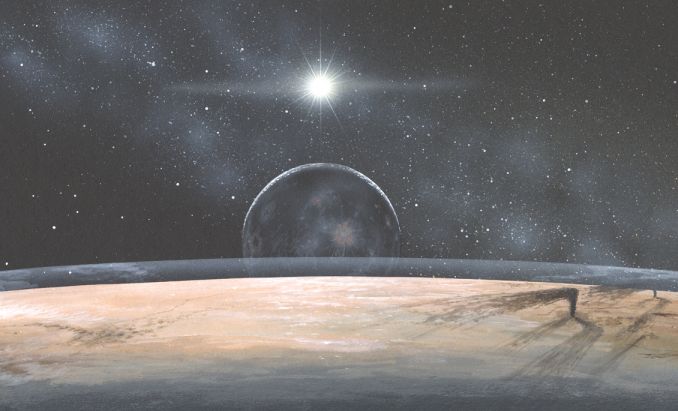
Today's Astronomy Picture of the Day is a beautiful rendition of what it would look like from the surface of Pluto.
Adium is a new AIM Clone for MacOS X. What's interesting is the single paned layout of chat windows. This will greatly reduce desktop clutter for my daughter, who often has a dozen windows open at once!
For users of KDE 2, Vadim Plessky has created more themes. Called Mini-Themes, these simpler versions of his previous releases do not use pixmaps, so they're fast!
It's conceivable the next music CD you purchase will not play in your computer. It's all part of the new copy protection scheme from the RIAA. There is a list of CD's encoded with this protection. Before your next purchase, you may want to give it a look.
User Contributed Splash Screens. by Michael Coyle
Win a PowerMax gift certificate worth $50 by having the most popular contribution in the selected category! (How?)
- Usually the side-kick on Space Ghost, Brak finally takes the front stage in this MOSS by Jeff Drake.
- A very cool Interarchy Interface called Purple Gel was sent by Shane Leaman.
- While they're small, these little replacement arrows by Chris McGhee will look great in your control strip modules.
- An anonymous artist sent a new memorial MOSS of a weeping Uncle Sam.

Support ResExcellence By Visiting Our Sponsors!
Snapshots by Jeremy Hoesly Friday’s snapshot selections have been chosen: - Jade Barton submits this OS X screenshot sporting the “Blue Vortex” desktop picture. iTunes is churning out songs in the center, and icons from Xicons and our Icon Archive are scattered throughout.
- This OS X snapshot from Chris sports a modified “Fallout 2” desktop picture. iTunes is shuffling music in the lower right, and a variety of icons available from Xicons roam the desktop.
- A custom desktop picture and DragonTongue’s Steel-Sharpwords K-Scheme debut in this tribute to New York from Chris George. Nicely done.
- This OS X contribution from Edward O’Rourke features the Classic, OS X, and X-Windows environments. Audion is sitting in as digital DJ in the lower left. The windowshade effect is accomplished using the script shown in the Script Editor window.
Feel the joy of submitting! Give us a gander of your desktop.
Icon & Desktop News: by Dan  Icons - Desktops: We've got (6) Brand New Desktops, updated "News From Around the Web" and (1) fun new OSX Icon Set to decorate your desktop. All on display for today's update! Icons - Desktops: We've got (6) Brand New Desktops, updated "News From Around the Web" and (1) fun new OSX Icon Set to decorate your desktop. All on display for today's update!
- "New PiXels" is the second cute as a bugs ear set of pixel creature Icons for OSX created by Hein Mevissen. This grouping of 17 new critters is bound to put a smile on any desktop. In case you didn't adopt the first set of PiXels, click Here to find them.
- When I first looked at this OSX desktop titled "Evil Desktop", for the life of me I couldn't figure out what was so evil about it? Perhaps, if I turned it upside down and played some old Beatles music backwards I would discover it's dark secret. In desperation, I finally opened the read me file (smart eh?) and discovered that it's not the desktop at all, but the author who calls himself EvilDan, and this-is-one-of-his -creations. Kinda silly, but I think you'll like the desktop anyway, which comes in 1600x resolution.
- "Water" by Aquaman, gives you that illusion of floating on an aqua sea across your desktop. This nicely done Macintosh desktop comes in 1024x and 800x resolutions.
- Dean Fusaro sent me a preview of the newest desktop featured on Dean's Designs titled "Penguins". Dean collaborated on the artwork with his girlfriend Denyse who lives in Montreal and is a Mac user (thank God). Visit Dean's Designs for the download, and scope out all the other great desktops to be found there.
- Long time ResExcellence fan and obvious Van Halen freak, Midnyte (aka Dustin Driscoll) conjures up some heavy metal " Midnyte Magic" with a set of three rockin desktops. These come in 1024x resolution.
- John Rose sends in 3 original creations honoring the little known or talked about but exceptional pin-up artist Edward Runci. This set of saucy little numbers all come in 1280x resolution.
- The new OSX theme collides with Apple's Classic colors in "Old Meets New" desktop, submitted by Chris Clarke. While the preview doesn't do it justice, download the desktop in 1024x resolution and take a look for yourself.
Ethereal Creations has updated with five new Abstract, Inspirational and Plasma Series desktop pictures. Flax Creations updates with a pile of new and exciting desktops. Check out the series of 16 beautiful Fractals. MacMonkies.com announces Phase II of the Monkie Madness Giveaway. Up for grabs are 2 copies of "Star Wars Episode I: The Phantom Menace" on DVD! Why the Mac is so great.com has released three new desktop images. Colheres updates with a new icon set: Gertrude Elliott (by Lu=EDsa). Macuserx.com has been updated with 4 new icon sets and 10 new desktops. Some for Halloween. Gridface has just posted six new desktop pictures, called Railyard Desktops 2. Rampant Mac has updated with (4) new desktops The Headfactory has moved to a proper site. They open the doors on the 1st of
November with a flood of new stuff including software, desktops, music and plenty of other nifty stuff. Take a look at Glitschka.com for a great example of what you can do with Flash and have a ton of giggles at the same time. Icika opens a new website with desktop artwork. Check out Live Pencil's new updates: ICONS: More animals by Sergio and a series of Chrome Masks. IT IS YOU: a new section where he makes funny animations out of your personal pictures, and much much more. So what's up WWW? Icons? Desktop pictures? News? Inform us! We'll post it!
Complete Cable Management For The Home & Office.
REALbasic Buzzword Machine by Erick Tejkowski Ever feel like your bosses are making things up as they go along? Well, they probably are! Today's project is a simple one, but it evens the score. Now you can produce all sorts of buzzword-filled phrases and impress that boss with your knowledge. Only you will know that its complete nonsense! (Continued...)
 Cletus is taking today off to spend a little time with his lovely wife. Which reminds me, twenty years ago today I met my own lovely wife! So everyone help me celebrate by hugging my wife. No wait, I mean hug your own wife! - Michael Cletus is taking today off to spend a little time with his lovely wife. Which reminds me, twenty years ago today I met my own lovely wife! So everyone help me celebrate by hugging my wife. No wait, I mean hug your own wife! - Michael
Tools of the Trade. by Michael Coyle
He's baaaack! One of the happiest little pieces of email I have received came from Bowie Poag, the creator of all the excellent Propaganda Desktop Tiles. He has opened a new site (a great satirical read) and wants ResEx readers to know he will be releasing a new set of tiles within the next two weeks. (Woo-Hoo!)
Melissa has added three news sites to the ResExcellence Links page. Give them a gander and suggest your own additions using the form at the bottom of the page.
Mac OS X User Pictures by Forrest Walter
I've converted a lot of Gort's Icons Volume 4 and 5 to Mac OS X User Pictures (These are the pictures shown in the login panel next to the user names in Mac OS X). They're smaller than the ones that Apple provides (32x32 vs. 60x56), but they make up for it with...um...flavor. I've also included the Photoshop Action I made that makes it easy (mostly for icon-makers that use PhotoShop to create their 32-bit icons) to convert icons to user pictures. (Continued...)
User Contributed Splash Screens. by Michael Coyle
Win a PowerMax gift certificate worth $50 by having the most popular contribution in the selected category! (How?)
- A Patriotic/Religiuos MOSS in memory of the September 11th Terrorist Attacks was created by Ken Messick.
- A while back, Ed Dyer sent a '50s retro MacOS X Boot Panel. Today he updates with two Giant versions.
- Here are Forrest Walter's Login Picts that are mentioned in the news item above. The set of 58 Gort's icons have been converted to TIFs.
- Three more lovely ladies are featured in this final Pin Up MOSS series from John Rose.
Snapshots by Jeremy Hoesly It’s time for another mid-week snapshot refueling: - Mac Axonz’s “Blue Cubes” desktop picture and Maury McCown’s AquaX III K-Scheme debut in this contribution from Dave. SoundJam is pumping out tunes in the lower left. Chilly Day’s Another Plate Vitro icons are situated along the right edge.
- Jon Martin returns with this OS X submission featuring the custom “NoDozXP” desktop picture. iTunes is cranking out songs in the lower left.
- Mix in a little OS X with a pinch of Windows 2000 combined with open-source Unix, and you’ve got this submission from Hes Nikke. XDarwin provides the X-Window environment for Gnome which is configured with the Sawfish window manager. Virtual PC is emulating Windows 2000 Professional.
- This OS X screenshot from Derek Parris touts a desktop picture of the New York City skyline prior to Sept. 11th’s attacks. A spinoff of the MasterCard commercials is featured in the lower right.
Feel the joy of submitting! Give us a gander of your desktop.
Icon & Desktop News: by Dan Icons - Desktops: We've got (6) Great New Desktops, updated "News From Around the Web" and (1) great new OSX Icon Set to beautify your Mac. All on display for today's update!
- When our Webmaster Michael Coyle submitted his "Blue Folder Icons" for OSX, he included a Photoshop template for anyone to expand on the concept. Well, I took him seriously and got totally carried away with "Coyle's X Folders Vol.4". This is the fourth and final set of 29 brightly colored and patterned OSX folders out of over 100. These differ from volumes one and two with the folders being oriented in the opposite direction, as you would find the default folders using OSX.
- Add a little fusion power to your desktop with Derek Gorden's "Mac Atom" desktop. This nicely done Apple powered desktop comes in 1024x resolution.
- Enter the weird and wonderful three dimesional "Land of Alice" created by Bradford J. Wiles, Webmaster of the popular Macmonkies website. One of many fine desktops from the author, this one comes in 1024x and 800x resolutions.
- Manuel B. Velazquez incorporates personal spiritual philosophy into colorful and unique digital artwork with two new entries to his Metaphysical series. "Tachbol" and "X-TachyonBolide" feature a bit of esoteric teaching from Sara Lyara Estes, and both come in 1024x resolution.
- "X Spectrum" is a new desktop on display from Christopher Clarke. Inspired by the release of OSX 10.1, this one comes in 1024x resolution.
- Several weeks ago Webmaster Mike suggested that many of Nasa's Satellite pictures of Earth and other celestial bodies (no, not THAT kind) might make cool desktops, and to send them on in. John Engler found an interesting one, and submitted an "Earth Map" for your educational enjoyment. Comes in 1024x and 800x resolutions.
- "Mac Hall GigaPet" desktops, submitted by Twist were made from the Mac Hall web comic strips and their web site interface. The artist is Ian McConville and writer is Matt Boyd. Twist was surprised to see that there were not very many desktops on their site so like a good fan boy he made some. Visit Twisted Technology's website for the complete set of four desktops, or download this one in 5 different resolutions here.
Flax Creations updates with a pile of new and exciting desktops. Check out the series of 16 beautiful Fractals. MacMonkies.com announces Phase II of the Monkie Madness Giveaway. Up for grabs are 2 copies of "Star Wars Episode I: The Phantom Menace" on DVD! Why the Mac is so great.com has released three new desktop images. Ethereal Creations updates with one new Bryce5 desktop picture in the Christian and Inspirational section entitled "Solitude". More updates are planned for the Abstract and Surreal Section later this week. Colheres updates with a new icon set: Gertrude Elliott (by Lu=EDsa). Macuserx.com has been updated with 4 new icon sets and 10 new desktops. Some for Halloween. Gridface has just posted six new desktop pictures, called Railyard Desktops 2. Rampant Mac has updated with (4) new desktops The Headfactory has moved to a proper site. They open the doors on the 1st of
November with a flood of new stuff including software, desktops, music and plenty of other nifty stuff. Take a look at Glitschka.com for a great example of what you can do with Flash and have a ton of giggles at the same time. Icika opens a new website with desktop artwork. Check out Live Pencil's new updates: ICONS: More animals by Sergio and a series of Chrome Masks. IT IS YOU: a new section where he makes funny animations out of your personal pictures, and much much more. So what's up WWW? Icons? Desktop pictures? News? Inform us! We'll post it!
REALbasic News by Erick Tejkowski - REALbasic 3.5.2b2
- MovieStuffExtensions
- New URL Button
- TBFinder Update
- SoundShip plugin
- 'plst' Editor
- iScreenSaver
Find this and more in today's REALbasic News. (Continued...)
Click here to learn more about Toast 6 Titanium
Today's News by Cletus™ The results of the first ResExcellence contest featuring a game, iTarget were excellent. Everyone concerned with the contest are very pleased. Drew Hamlin, President of Vizspring Software and ResExcellence wish to thank all that entered contest. Drew also mentioned this: "Wow, and the best I could get was around 5500. Those are some very fast-fingered ResEx readers!!! Congratulations to all of them." The five winners are listed below (with winning scores) and their free registration information will arrive this week sometime: - Eric Holtam: 9204 pts.
- Dustin MacDonald: 8199 pts.
- John Burr: 8190 pts.
- Matt Coley: 7915 pts.
- David Zuhoski: 7423 pts.
Clipboard Edit 2.0b1 is a simple application which allows to edit the content of the clipboard (both text and graphic clipboards). You can save it as a clipping file or as a SimpleText file. Moreover, you can use several filters to clean up and convert text clipboard.
Unsupported UtilityX 2.0b4 will help install Mac OS X, Darwin and Mac OS X Server on some unsupported systems (the 7300 - 9600 series, and equivalent clones). Installation requires only 3 more clicks than a supported install. It now works with Mac OS X 10.1. This update fixes problems that affected some users with SCSI cards and IDE cards, especially in 6-slot machines.
HexEditor 1.2.1 is a Mac OS X application that allows viewing/manipulating raw data inside files. It can show data using various encodings as integers (hex or decimal), floating points, binary, character strings. This update is for Mac OS X 10.1 compatibility.
I was notified of a broken link leading to Gerry's ICQ from our archive. Actually it went to an undesirable site. Was the site hacked? If anyone has information on what the new link is, please let me know.
I will be taking a few days off and will return Friday.
Have a Press Release? Software or General News? Submit it here: Suggestions!
Polling Place. by Michael Coyle
 Over 70% of readers can still tie a neck tie. The comments on this poll were particularly funny with one gent saying he didn't need to know how to tie a tie as long as his Mom did! I'm glad my job allows my to dress casual (jeans and a shirt with a collar). I pity my friends who have to wear suits everyday and all the hassles associated with that! Over 70% of readers can still tie a neck tie. The comments on this poll were particularly funny with one gent saying he didn't need to know how to tie a tie as long as his Mom did! I'm glad my job allows my to dress casual (jeans and a shirt with a collar). I pity my friends who have to wear suits everyday and all the hassles associated with that!
Rumor has it that new Powerbooks will be released next week. If true, I may finally move up to a Titanium. I plan many of my purchases on what rumor sites report, even though they are almost always wrong with their predictions. Macintosh email lists often ask the question, "Should I buy now or wait for the next rumored machine/OS/next big thing?". Apple has argued that rumor sites can affect sales by causing a large number of consumers to delay purchases hoping to get newer hardware that is just around the corner. (Anyone have an LCD iMac they'd like to sell?)
This week's Polling Place asks, "Are rumor sites hurting Apple?"
Tools of the Trade. by Michael Coyle
MacInstruct has posted a new tutorial, Interactive Unix by Bert Altenburg. It teaches readers how to use Unix and the terminal program in Mac OS X. Unlike previous tutorials by Bert, this tutorial is really interactive. You'll have to see it to believe it.
Absolutely everything you ever wanted to know about the Macintosh Color Classic can be found by perusing the Colo(u)r Classic Upgrade Mega-FAQ!
Changing iTunes Playlist Highlight Colors by Chris X
With the growing number of submissions of iTunes Skins, I'd like to offer this how-to for editing the iTunes highlight and background colors in the playlist/ browse lists.
These colors cannot be edited directly in ResEdit, because the color resources are "hidden" in the Data Fork, not the resource fork; so you'll need a hex editor. With the addition of the extension "Forker", ResEdit can read and edit data forks. (Continuied...)
User Contributed Splash Screens. by Michael Coyle
Win a PowerMax gift certificate worth $50 by having the most popular contribution in the selected category! (How?)
- A matching MOSS and ATM combo set was sent by TAPPI featuring a lovely young lady.
- Left in the ftp drop box without a READ ME, this MacOS X Boot Panel shows Uncle Sam wants to dish out a little justice.
- Colorful cursors titled Bumble Bee were crearted by brenda vonahsen.
- Jeff Kelly sends a Giant MOSS called Red Flag!
Complete Cable Management For The Home & Office.
Snapshots by Jeremy Hoesly Monday’s snapshots are here for your viewing pleasure: - This OS X snapshot from Entica sports Misery in Motion’s “The Wired” desktop picture. Audion, retooled with the X Metal face, is shuffling soundtracks in the center. Flax Creations’ AtmoSpheres icon collection is nestled along the bottom edge.
- Ben Klocek sends this screenshot touting the custom “Burning Man” desktop picture. iTunes is rounding up songs in the lower left. Nicolas Cardot’s Fablue #10 icons line the right edge.
- A desktop picture from The Apple Collection and Maury McCown’s AquaX III K-Scheme debut in this submission from Henrique Scaff. Intriguing.
- A custom “Phoenix” desktop picture from his “In Memoriam” series coupled with Michael Rabe’s Glass Theme is showcased in this OS X contribution from Manuel Velazquez. Audion, equipped with the ESSS01 face, is dishing out tunes in the lower left.
Feel the joy of submitting! Give us a gander of your desktop.
Icon & Desktop News: by Dan Icons - Desktops: We've got (6) Great New Desktops, updated "News From Around the Web" and (1) great new OSX Icon Set to beautify your Mac. All on display for today's update!
Flax Creations updates with 7 new exciting desktops. MacMonkies.com announces Phase II of the Monkie Madness Giveaway. Up for grabs are 2 copies of "Star Wars Episode I: The Phantom Menace" on DVD! Colheres updates with a new icon set: Gertrude Elliott (by Lu=EDsa). Macuserx.com has been updated with 4 new icon sets and 10 new desktops. Some for Halloween. Gridface has just posted six new desktop pictures, called Railyard Desktops 2. Rampant Mac has updated with (4) new desktops The Headfactory has moved to a proper site. They open the doors on the 1st of
November with a flood of new stuff including software, desktops, music and plenty of other nifty stuff. Take a look at Glitschka.com for a great example of what you can do with Flash and have a ton of giggles at the same time. Icika opens a new website with desktop artwork. A new desktop picture "Aquatic Traffic Lights" is available for download at http://www.whythemacissogreat.com ("Why the Mac is so great.com"). Check out Live Pencil's new updates: ICONS: More animals by Sergio and a series of Chrome Masks. IT IS YOU: a new section where he makes funny animations out of your personal pictures, and much much more.
Mac Axonz updates with a new desktop picture that celebrates ENTERPRISE, the newest installment in the world of star trek. Also a little teaser of the new iconz set: TriTanium Squared!!!! So what's up WWW? Icons? Desktop pictures? News? Inform us! We'll post it!

Visit the Mac Experts!
|